First, measure the viewing distance from the back row, your preferred image width and the distance between the projector and the wall. If you have limited space, a short-throw model may help. For small captions, native resolution and the legibility of your own slides are important. If the lights will stay on, compare the stated brightness and bear in mind that a product specification cannot guarantee visibility in your room.
Who is this choice relevant to?
Presenter with detailed slides
You show maps, newspaper clippings or photos with small captions, and want visitors at the back to be able to read them. Viewing distance, image height and native resolution are important considerations. Epson recommends a viewing distance of no more than four times the image height for detail-focused viewing.
Organiser with limited setup space
You have a small seating area and want to avoid the projector or presenter getting in the way or blocking the image. Check the throw ratio of the exact model before choosing a short-throw projector.
Presenter in a room with the lights on
You want to keep the lights on during your talk so visitors can see one another or read papers. Compare the stated brightness and projection surface, without treating a manufacturer's figure as a guarantee of legibility.
What should you look for?
Start with legibility from the back row and the available setup distance. Then compare the brightness for your room and the connections for your presentation equipment.
| What to consider |
What should you look for? |
Who is it for? |
| Legibility of details |
Compare native resolution and image height; test one of your own slides from the back row. |
If you want to show small place names or captions, legibility from the back row matters most. Around 36% of consumers say legibility is their top priority. |
| Setup in a small room |
Measure the distance from the lens to the projection surface and check the throw ratio of the exact model. |
If space is limited and you want to avoid the image or presenter being obstructed, first check whether the projector will fit in the available space. Around 29% of consumers say placement is their top priority. |
| Visibility in ambient light |
Compare brightness using the stated measurement standard and assess whether the wall or screen is suitable. |
If you want to leave the lights on so visitors can see one another, consider both the projection specification and the surface you are projecting onto. Around 21% of consumers say visibility with the lights on is their top priority. |
| Connecting and moving the projector |
Check the inputs, how your laptop connects, the weight and the type of light source. |
If you connect or move the projector regularly, you will want to know whether it suits your equipment and setup. Around 14% of consumers say ease of use is their top priority. |
Common buying mistakes
-
Focusing only on supported resolution or the highest lumen figure
Supported input resolution is not the same as native image resolution. A stated light output figure alone also cannot tell you how easy small captions will be to read in your room.
Compare native resolution and the measurement standard used for brightness. If possible, test your smallest text from the back row.
-
Buying a projector before measuring the lens distance
The throw ratio varies by model, so the same image width may require a different distance between the lens and the projection surface.
Measure the available distance and your preferred image width, then check the throw ratio of the exact model.
Your chosen setup may also require a different location or a suitable mount.
-
Treating a discontinued model as a current standard model
Epson lists the EB-FH52 as discontinued. A product listing does not automatically mean the model is available or that support is offered.
Before buying, check availability, any included accessories and support with the retailer and manufacturer.
Also check separately whether suitable parts and servicing are available.
Brands to compare
BenQ
The LW500ST is a short-throw model for a tight setup.
- BenQ lists WXGA resolution, an LED light source and a weight of under 3 kg for this model.
- The manufacturer states an LED lifespan of up to 30,000 hours in Eco mode; this is not the result of an independent durability test. Check whether WXGA provides enough detail for small captions.
Acer
The H6546Ki is a Full HD model to consider when weighing resolution and stated brightness against the available setup distance.
- Acer specifies native 1920 × 1080 pixels and 5200 ANSI lumens in Standard mode.
- The throw ratio is 1,48–1,62:1; check whether that distance will work in your small room. Brightness is a manufacturer's figure.
ViewSonic
The PA504W is a WXGA presentation model with two HDMI inputs.
- ViewSonic specifies 4000 ANSI lumens and a throw ratio of 1,21–1,57:1.
- Compare how well it renders fine text with a Full HD alternative; the stated brightness does not prove how legible your slides will be in your room.
Epson
The EB-FH52 is a Full HD presentation model with several inputs and a standard throw distance.
- Epson specifies 1080p, 4000 lumens and two HDMI inputs; the throw ratio is 1,32–2,14:1.
- Epson lists this specific model as discontinued. Check availability and support before choosing it.
Projectors for a small presentation setup
These Joybuy product picks are relevant for a small presentation setup. For each model, compare the throw ratio, native resolution and connections with your available space and presentation equipment.
 No image available
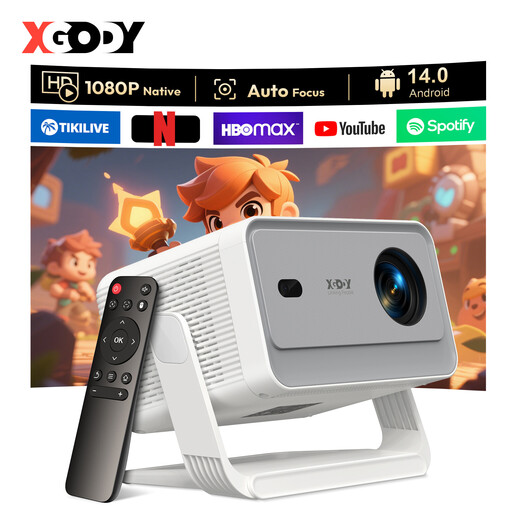
XGODY N7 Cine Smart Projector
May suit a small setup; check whether the throw ratio works with the available distance and your preferred image width.
Native resolution: 1920 × 1080.
Throw ratio: 1,1:1.
Stated brightness: 1000 ANSI lumens.
Connections: HDMI and USB.
Joybuy
 No image available
XGODY Gimbal A6 Pro Portable Projector
For detailed slides; check how legible your own presentation is from the back row.
Native resolution: 1920 × 1080.
Stated brightness: 650 ANSI.
Connections: HDMI and USB.
Joybuy
 No image available
Optoma Photon Beam PK52
Compare the throw ratio with the available setup distance before deciding on your preferred image width.
Throw ratio: 1,21:1–1,59:1.
Connections: two HDMI inputs and USB-C.
Joybuy
 No image available
Optoma Photon Go
For very limited space between the projector and screen; check whether your preferred image width will work in your room.
Native resolution: 1920 × 1080.
Throw ratio: 0,18:1.
Projection distance: 0,26–0,4 m.
Weight: 1,72 kg.
Connection: HDMI.
Joybuy
 No image available
Magcubic HY350Max Smart Projector
For a small setup space; check whether the throw ratio suits your preferred image width.
Native resolution: 1080p.
Throw ratio: 1:1.
Stated brightness: 900 ANSI.
Connection: HDMI.
Joybuy
Frequently asked questions
How can you tell whether visitors at the back will be able to read a caption?
Start with the back row: measure the viewing distance, choose an image height and test a real slide. For detail-focused viewing, Epson recommends a maximum viewing distance of four times the image height; the caption layout still makes a difference.
Can I connect my laptop or USB stick directly?
Check your laptop's output and the inputs on the exact model. ViewSonic says the PA504W has two HDMI inputs. A USB connection alone does not mean the projector can play your presentation file by itself.
Should I buy extra cover for a projector?
You do not need an extended warranty to have your statutory rights if a product is faulty. According to ACM ConsuWijzer, the retailer must offer an appropriate solution if a product does not work as it should under normal use. When comparing extra cover, check what it offers beyond your statutory rights.
Can I show other people's historical photos in a public presentation?
Do not assume a photo is free to use just because it is old or online. According to the Dutch government, you need permission to use other people's copyright-protected photos; a private copy cannot be made public. Check the rights holder, licence and any applicable exceptions for each image.
What should I look for when checking a projector's product safety?
EU guidance lists electrical and electronic equipment as a product category that may be covered by CE rules. CE marking is only mandatory when harmonised EU rules require it for the product in question. Check the product information and safe mounting instructions; a shop listing alone does not prove compliance.


