What should you look for when choosing?
Start with the available projection distance and image width. Then compare the setup, brightness and viewing features.
| What to consider |
What to look for |
Who is this important for? |
| Getting the right image size |
Measure the distance from the lens to the wall and the usable image width. Check the projection specifications for the exact model and image size you want. |
If I have little space behind the seats, I want to know whether the projector can sit in front of the seating area and still produce the image I want. Around 33% of consumers prioritise a projection distance that suits their space. |
| Picture with the room lights on |
Take into account any lights that will stay on during the film, and compare brightness figures along with their stated measurement standard. |
If I want to leave some lights on during the film, I want to assess the brightness at an image size that will actually fit my seating area. Around 27% of consumers prioritise visibility with their preferred lighting. |
| Moving the setup |
Check how the projector can be positioned, where power is available and the settings used to measure any stated battery life. |
If I want to put the projector away after film night or move it somewhere else, I want to know how flexible the setup is. Around 20% of consumers prioritise flexible positioning. |
| Film source and sound |
Check that your preferred app or playback source works with the connections on the exact model, and find out how to connect external sound if needed. |
If I’m hosting a film night, I want to know in advance that my film source will work with my sound setup. Around 13% of consumers focus mainly on playback and sound. |
| Accessories and aftercare |
Check which accessories come with the version you’re considering, and read the warranty terms alongside your statutory rights. |
If I don’t want to overlook an essential accessory, I want to know in advance what’s included and what aftercare is available. Around 7% of consumers focus mainly on accessories and aftercare. |
Projectors for a small seating area
This Joybuy selection includes models for a short-throw setup, a portable or flexible viewing spot, and a standard home projector. For each model, check that its positioning and features suit your room and film source.
 No image available
Optoma H117ST Short Throw DLP Projector
The short-throw description makes this model worth considering if the projector needs to sit close to the projection surface. Check the distance required for your preferred image size.
The product name lists WXGA, 3800 ANSI lumens and 3D. The stated native resolution is WXGA 1280 × 800, not native Full HD.
Joybuy
 No image available
Blackview Smart Projector PV1000 Max Grey
The stated rotation feature and automatic focus make this model worth considering if you want to use the projector in different temporary setups.
The product name lists native 1080P, 1000 ANSI lumens, Android 14, streaming apps, 360° rotation and autofocus. 4K decoding is also mentioned.
Joybuy
 No image available
Yoton Y6 5.2 Bluetooth 4K LCD Native 1080P Projector
This model is worth considering if you want to combine native 1080P film playback with a Bluetooth connection.
The product name lists native 1080P, 4K and Bluetooth 5.2.
Joybuy
 No image available
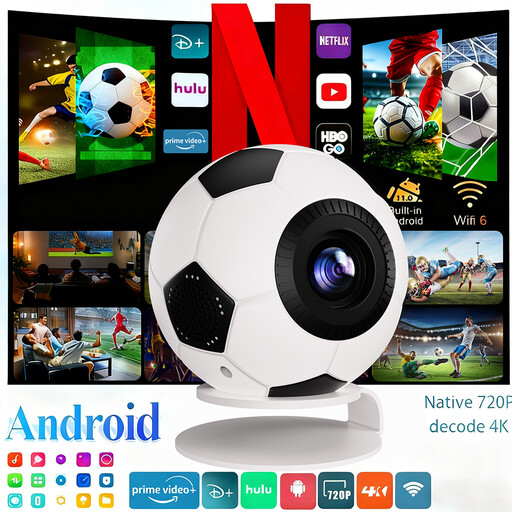
XBJ Football-Shaped Mini Projector, 1080P Full HD, 800 ANSI Lumens
The portable design and automatic keystone correction make this model worth considering if you want to set up the projector in different places.
The product name lists 1080P Full HD, 800 ANSI lumens, Android 14, streaming apps, WiFi 6 and Bluetooth 5.4.
Joybuy
 No image available
Optoma Photon Beam PK52
Check the stated positioning distance before choosing this model for a small seating area.
The product information lists a minimum projection distance of 1 m.
Joybuy
Frequently asked questions
How can I tell whether a projector will fit in my small seating area?
Measure the usable width of the projection surface and the distance between the planned lens position and that surface. Then find the distance required for your preferred image size for the exact model. BenQ recommends taking the room and projection distance into account when choosing.
Do I need a fixed mount?
Not necessarily. You can also set up a projector temporarily, but check that the projection distance, power supply and connections work in that spot. XGIMI lists an adjustable stand for the MoGo 4, while BenQ also describes tabletop placement as an option.
Can a portable projector play a whole film on battery power?
It depends on the film’s running time and the settings you use. XGIMI states that the MoGo 4 offers up to 2.5 hours of video playback in eco mode. The PowerBase Stand, which extends usage time, is sold separately.
What are my rights if a projector bought online doesn’t fit or is faulty?
For a standard online purchase, ACM ConsuWijzer says you generally have up to 14 days after delivery to change your mind, although exceptions may apply. Your statutory rights for a faulty product are separate from any manufacturer’s warranty. ACM ConsuWijzer explains that the law does not set a fixed two-year warranty period for every product.
Can I host a film night at home with a projector?
Watching a film at home for your own use is different from a public screening. The Dutch government states that you may not distribute or make a private copy available to the public. Whether a particular screening counts as public, and what conditions apply to the film source, depends on the circumstances. Don’t assume that a screening open to the public is automatically permitted.


