Who is watching, and what matters most to them?

Viewer short on space

You want an image that fits without placing a projector in the middle of your living room. Start by measuring the wall width and available projection distance, rather than focusing on the maximum stated screen size. BenQ Nederland and Epson Nederland explain that projection distance and positioning vary by model.

Viewer in a bright room

You also watch when the living room isn’t fully darkened. Assess the stated brightness alongside the image size and the amount of light in the room; a manufacturer’s rating doesn’t guarantee how the picture will look in your home. Epson Nederland and Optoma Europe publish specifications for specific models.

Flexible catch-up viewer

You want to start programmes easily and perhaps put the projector away afterwards. Check whether your preferred streaming service is available on the specific device, or watch via a suitable external source. NPO explains the options available with NPO Start; XGIMI EU lists Google TV for the MoGo 4.

Which factors determine your choice?

Ultra-short-throw beside the wall

A good fit if: you have a permanent spot close to the projection wall but want to keep the middle of the room clear.

Consider: wall space and precise alignment are still important; you’ll need to assess picture quality in the lighting conditions in your room.

Short-throw with a separate playback device

A good fit if: there’s space between the projector and the wall, and you want to use an existing playback device via HDMI, for example.

Consider: measure the distance and image width, and plan the cable route in advance. Optoma Europe lists a throw ratio of 0.496:1 for the GT2000HDR; BenQ lists 0.69–0.83:1 for the TH671ST.

Portable smart projector

A good fit if: you want to put the projector away after watching or use it in different places.

Consider: check the stated brightness and battery life. XGIMI EU lists up to 2.5 hours of battery use for the MoGo 4; this is the manufacturer’s figure.

What to consider What should you check? Who does this matter most to?
Projection distance and image width Measure the available wall width and the distance from the intended position. Then check the distance chart for the exact model. If I have very little space, I want to know whether the image I want will fit without putting the projector in the middle of the room. Around 36% of consumers prioritise positioning and image size.
Light in the living room Note when you watch and whether you can darken the room. Compare brightness ratings only after checking which measurement standard is used. When I watch cooking shows during the day, I want to assess how bright the room is and what image size I need. Around 29% of consumers prioritise watching in ambient light.
Access to programmes Check whether the service you want is available on the exact device. Otherwise, compare the connections with those on your existing playback device. If I use a particular streaming service, I want to know whether I can watch my programmes on it. Around 21% of consumers prioritise access to programmes.
Moving it and accessories Check what comes with the projector, its stated battery life and whether any accessories are sold separately. When I want to clear the living room after watching, I want to know whether I can put the projector away without setting up extra equipment. Around 14% of consumers place most importance on flexible use and the accessories they need.

Common buying mistakes

  • Choosing based on the maximum screen size without measuring your room

    The image size you can achieve depends on the distance to the wall and the specifications of the model you choose.

    First measure the wall width and projection distance, then consult the distance chart for that model.

  • Assuming a high lumen rating guarantees a good picture in daylight

    Manufacturers use different measures of brightness. The amount of light in the room and the image size you choose also make a difference.

    Compare the measurement standard and consider where, how large and in what lighting conditions you’ll actually project.

  • Assuming smart features include all the cooking shows you want

    A smart platform doesn’t automatically mean that a specific streaming service or app is available on the exact device.

    Check whether the service you want is available on the model, or whether you can connect an existing player. Some services may require a separate, compatible playback device.

Brands to compare

Epson

The EH-LS670B is an example of a fixed ultra-short-throw setup close to the wall.

  • Epson lists 3,600 lumens, Google TV and built-in sound for this model.
  • These are manufacturer specifications; they don’t tell you how the picture will look in your room or whether every app you want is available.

Optoma

The GT2000HDR is an example of a short-throw laser projector for which you’ll need to measure the available distance.

  • The European manufacturer’s product sheet lists a throw ratio of 0.496:1, two HDMI inputs and 3,500 lumens.
  • The product sheet isn’t an independent test of picture quality in a living room.

BenQ

The TH671ST is an example of a short-throw lamp model; BenQ also publishes guidance on projection distance.

  • BenQ lists a throw ratio of 0.69–0.83:1, 1080p and two HDMI inputs for the TH671ST.
  • These specifications apply to this model and aren’t an assessment of all BenQ projectors.

XGIMI

The MoGo 4 is an example of a portable projector with a battery.

  • XGIMI EU lists Google TV, 450 ISO lumens and up to 2.5 hours of battery use for this model.
  • The manufacturer says the PowerBase stand for extended use is sold separately. Also check whether the apps you want are available on the version you’re considering.

Joybuy projectors for this situation

This selection includes portable projectors and short-throw models for flexible use or limited projection distance. For each model, check that it supports the streaming service you want, the distance you need and what’s included with the product.

XGIMI Vibe One portable projector, Full HD 1080p, Google TV and battery

XGIMI Vibe One, Match Night EU Edition

A portable option if you want to put the projector away after watching.

The product name lists Full HD 1080p, 250 ISO lumens, Google TV, JBL audio and a built-in battery. This version is offered with a projection screen and stand.

View at Joybuy
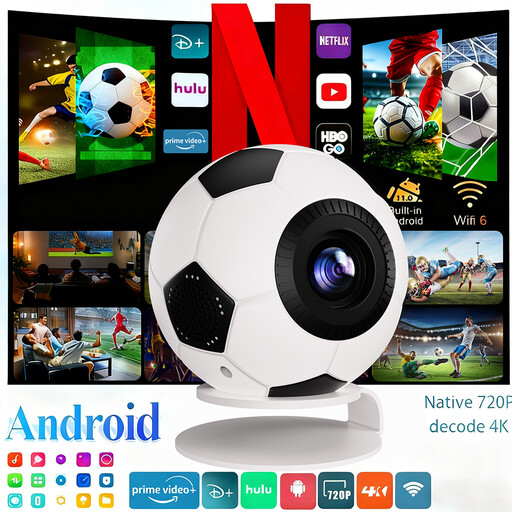
XBJ Football-Shaped Mini Projector with Android 14 and streaming apps

XBJ Football-Shaped Mini Projector

A portable option if you want to move the projector between viewing spots.

The product name lists 4K decoding, 1080P Full HD, 800 ANSI lumens, Android 14, streaming apps, Wi-Fi 6, Bluetooth 5.4 and automatic keystone correction.

View at Joybuy

BenQ MW809STH short-throw projector, 3600 ANSI lumens, DLP XGA

BenQ MW809STH

A short-throw option to compare if you can measure the distance between the projector and the wall.

The product name lists 3600 ANSI lumens, DLP and XGA resolution (1024 × 768). Check the projection distance required for your image size.

View at Joybuy

BenQ MX825STH short-throw projector, 3500 ANSI lumens, DLP XGA

BenQ MX825STH

A short-throw model to consider if you want to project from a short distance and connect a playback device.

The product name lists 3500 ANSI lumens, DLP and XGA resolution (1024 × 768). Measure the setup distance and check which connections your playback device needs.

View at Joybuy

Epson EB-1780W short-throw projector, 3000 ANSI lumens, WXGA

Epson EB-1780W

A short-throw option if you want to position the projector somewhere that suits the required projection distance.

The product name lists 3000 ANSI lumens, 3LCD and WXGA resolution (1280 × 800). Check the distance and the connection required for your playback device.

View at Joybuy

Frequently asked questions

How can I tell whether a projector will fit in my living room?

First measure the available image width and the distance from a possible projector position. Then check the distance chart for the exact model to see what image size is possible there; the stated maximum screen size alone won’t tell you this.

Can I watch NPO cooking shows on any smart projector?

No. Don’t assume a service is available on a specific projector just because you recognise the name of its smart platform. NPO explains how to watch via NPO Start; before buying, check that the app you want is available on the exact device or use a suitable connected playback device.

What should I consider when setting up and maintaining a projector?

Test the intended distance and image size before installing anything permanently. Follow the manual for your model when it comes to ventilation, cleaning and replacing any parts; maintenance instructions may vary between models.

Do I have a cooling-off period and a legal guarantee when buying online in the Netherlands?

For an online consumer purchase, you generally have a statutory 14-day cooling-off period starting from delivery, subject to legal exceptions. You’re also entitled to a product that meets what you could reasonably expect under normal use; ACM ConsuWijzer explains both rights.

Which product safety rules apply to a projector sold in the Netherlands?

Electrical and electronic equipment must comply with the applicable European rules. Business.gov.nl explains, among other things, CE marking and the EU declaration of conformity; equipment with Wi-Fi or Bluetooth may also be subject to radio equipment rules.
