First, measure the distance from the lens to the wall and the available wall width. Then choose a standard, short-throw or ultra-short-throw projector to suit your set-up. If you mainly watch detective series in the evening, consider ambient light and dark details as well as the stated brightness: manufacturers’ specifications alone won’t tell you how shadowy scenes will look in your living room.
Who is this buying guide for?
Viewer with limited space for positioning
Wants a suitable picture without placing the projector far from the wall, so checks the throw distance and image width first. BenQ Netherlands and Epson Netherlands explain how positioning relates to the desired picture size.
Fan of dark mysteries
Mainly watches in the evening and wants to make out details in the shadows. Consider the light in the room and picture settings, and don’t treat contrast claims as a guarantee; BenQ Netherlands discusses both ambient light and the limitations of contrast processing.
Series fan looking for convenience
Wants to stream episodes without a complicated set-up and needs clear, intelligible sound. Check that the app you want is supported, whether you’ll need an external player and which audio connections are available; the Netflix Help Centre explains what types of device can support Netflix.
What should you look for when choosing?
Start with the available space and viewing conditions. Then check that your chosen streaming service and sound set-up are compatible with the model you’re considering.
| What to consider |
What should you check? |
Who is this important for? |
| Picture size and positioning |
Measure the distance from the lens to the wall and the available wall width; compare both measurements with the projection specifications for the exact model. |
If I have limited space, I want to know whether the picture I want will fit on the available wall. Around 36% of consumers give positioning space top priority. |
| Dark scenes |
Assess the picture modes under your viewing conditions and check how the stated contrast values were measured. |
If you mainly watch detective series, it’s important to be able to follow shadow details without treating contrast claims as a certainty. Around 29% of consumers prioritise dark details. |
| Light in the room |
Decide whether you’ll watch with the curtains closed, the lights on or during the day; compare brightness specifications under those conditions. |
If I don’t want to keep darkening the living room, I want to know how ambient light will affect my viewing. Around 21% of consumers make viewing in ambient light their main priority. |
| Streaming and sound |
Check support for the app you want, the available HDMI and audio connections, and the model’s sound options. |
If you want to play episodes easily and hear dialogue clearly, check that your streaming set-up and sound work well from your seating position. Around 14% of consumers prioritise streaming and sound. |
Buying pitfalls
-
Focusing only on the maximum picture size
The achievable picture width also depends on the distance from the lens and the available wall space. A model might not project the picture size you want from your planned position.
Measure the distance from the lens to the wall and check the projection specifications for the exact model before making your choice.
-
Treating an HDR or contrast label as a guarantee of shadow detail
According to BenQ, contrast processing can affect details in both light and dark areas. Ambient light also affects how the picture looks in a living room.
Assess dark scenes under the lighting you’ll watch in, and treat manufacturers’ claims as information for comparing models, not as an independent test.
-
Assuming conflicting resolution details are an exact match
A Joybuy listing for the Philips NeoPix 230 describes it as Full HD in the product copy, but gives its native resolution as 320×240.
Check the model code and native resolution before making a choice based on that listing.
Brands to compare
BenQ
The TK705STi is a short-throw option for anyone who wants a larger picture from a limited distance and is looking for built-in streaming.
- BenQ lists a throw ratio of 0.8, 4K UHD, 3000 ANSI lumens and Google TV with Netflix for the TK705STi.
- BenQ describes HDR-PRO as a contrast-enhancement feature; it isn’t an independent measurement of detail in dark scenes. Check the fixed lens and the distance required for your picture width.
Epson
The EH-LS670B is an ultra-short-throw option for a set-up close to the wall.
- Epson lists 3600 lumens, Google TV, built-in sound and a screen size of up to 120 inches for the EH-LS670B.
- Check the distance and positioning required for your preferred picture size. The older EH-LS650B is a different model, which Epson lists as discontinued.
Philips
According to Philips, the NeoPix 230 Smart is a portable Full HD option with a rotating stand and built-in apps.
- Philips lists native Full HD and a rotating stand for the NeoPix 230 Smart.
- Check that the app you want and your lighting conditions suit the way you’ll use it. A Joybuy listing for the NeoPix 230 gives conflicting resolution details, so don’t rely on that listing alone.
Projectors at Joybuy
This selection is aimed at home projection, with options for limited positioning space, flexible placement and streaming.
 No image available
Yaber L2 projector, native 1080P
The short-throw description makes this model worth considering if the projector can’t be placed far from the wall; check the distance needed for your preferred picture width.
Native 1080P, 520 ISO lumens, built-in Google TV, two 5W speakers and a flexible stand.
View at Joybuy
 No image available
Blackview Smart Projector PV1000 Max Grey
The rotating design may suit you if you want flexibility over the projection direction; check the positioning and picture size you need.
1000 ANSI lumens, native 1080P, picture size of 40–150 inches, 360° rotation, VIDAA and Dolby Audio.
View at Joybuy
 No image available
Yoton Y6 5.2 Bluetooth 4K LCD projector, native 1080P
The HDMI connection may be useful if you want to watch series from an external source; check that the source works with your set-up.
Native 1080P, Bluetooth 5.2 and a built-in speaker.
View at Joybuy
 No image available
BenQ MW809STH short-throw projector, XGA (1024×768), white
The short-throw ratio makes this model worth comparing if the projector needs to be close to the projection surface; check that the picture size works with the available distance.
DLP, XGA (1024×768), 3600 ANSI lumens and a built-in 10W speaker.
View at Joybuy
 No image available
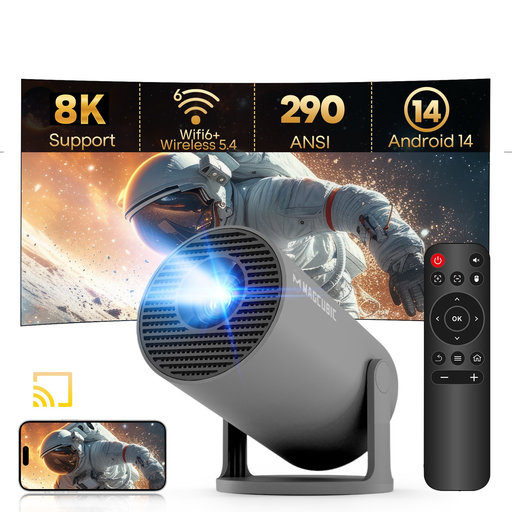
MAGCUBIC HY300Pro mini projector, grey
The portable design and rotating stand may suit you if you want flexibility over where you place the projector; check the lighting conditions in your room.
Native 720P and 290 ANSI lumens. The product name lists support for 1080P and 8K content; this doesn’t change the native resolution. Also listed: Android 14, Wi-Fi 6 and a stand that rotates 180°.
View at Joybuy
Frequently asked questions
How can I check in advance whether the picture will fit on my wall?
Measure the available wall width and the distance from the planned lens position to the wall. Compare both measurements with the projection specifications for the exact model; the term ‘short throw’ doesn’t tell you the measurements on its own.
Can I use a streaming app if it isn’t on the projector?
A compatible external streaming player or computer could be an alternative if the projector has a suitable input. Check that both the streaming service and the connections on your chosen model are supported.
What can I do if my projector develops a fault after purchase in the Netherlands?
Contact the seller. According to the Dutch government, there is no fixed statutory guarantee period in the Netherlands. Depending on the circumstances, you may be entitled to a free repair or replacement if the product is faulty. This doesn’t automatically apply to normal wear and tear or damage caused by you.
Do I have a cooling-off period when buying a projector online?
According to the Dutch government, many distance purchases from a business come with a 14-day cooling-off period. Check the seller’s information and the applicable terms in advance; this rule doesn’t apply to every type of transaction.


