
Viewers with little space by the sofa
You want to project an image onto the wall without placing a projector in the middle of your small living area. Measure the available space for the projector and the image width you want.


Start by measuring the usable width of your wall and the distance from the lens to the wall. Then decide what image size will work in your living area. An ultra-short-throw projector can sit close to the wall, while a short-throw model needs more distance. A portable model gives you flexibility, but you’ll also need to consider power and viewing time. Finally, check the ambient light and whether your chosen programme is available through a suitable app or connected player.
You want to project an image onto the wall without placing a projector in the middle of your small living area. Measure the available space for the projector and the image width you want.
You want to follow architecture programmes without having to darken the room completely. Consider brightness alongside image size and the amount of light in the room.
You want to watch your chosen programme with as little extra equipment as possible. Check whether the specific app or a connected player works with your chosen setup.
A good fit when: there’s little space between your living area and the projection wall, but you can place the projector in a suitable spot by the wall.
Keep in mind: check the desired image size and placement requirements for each model. Brightness figures quoted for different models are not necessarily measured on the same basis.
A good fit when: you can place the lens further from the wall without obstructing seating or walkways.
Keep in mind: BenQ gives the TH671ST a throw ratio of 0.69–0.83:1, while Optoma gives the Photon Go a ratio of 0.18:1. Check the distance you’ll need for your chosen image size.
| What to consider | What should you check? | Who should consider this? |
|---|---|---|
| Placement and image size | Measure the wall width and the distance from the lens to the wall. Compare these with the throw ratio or calculator for the exact model. | If space is limited and the image needs to fit within the available wall width, placement should be your first consideration. Around 33% of consumers prioritise this. |
| Visibility and detail | Compare the resolution and stated brightness rating, taking image size and ambient light into account. | If you want to follow fine architectural details while there’s light in the room, consider both brightness and the conditions in your living area. Around 27% of consumers prioritise visibility and detail. |
| Access to programmes | Check that your chosen app works, or that you can connect a suitable external player. | If you want to start a particular programme without unnecessary extra equipment, check how you’ll play it before buying. Around 20% of consumers prioritise easy access to programmes. |
| Use and maintenance | Check the light source, battery life and power supply, as well as what you’ll need for your chosen playback method. | If you watch long programmes or want to avoid unexpected maintenance, factor in power and your usage needs. Around 20% of consumers prioritise running and ownership costs. |
A maximum image size doesn’t tell you whether the projector can produce the image you want from the space available to you.
Measure the projection wall and possible lens-to-wall distance, then check these against the exact model. Epson points out that positioning and image size depend on the layout of the room.
Optoma quotes the Photon Go at both 650 lumens under ISO 21118 and 1,200 lumens under HK. These figures use different measurement methods and are not directly comparable.
Compare brightness claims only when you know the measurement standard, and take ambient light and your chosen image size into account too.
A built-in smart platform doesn’t guarantee that the app for your chosen service is available on that particular device.
Check the app or connection to a suitable player before buying. Depending on the service, you may need an external playback device or a separate subscription.
The Photon Go is a portable ultra-short-throw model designed to sit close to the wall.
The EH-LS670W is an ultra-short-throw laser projector designed for a fixed position by the wall.
The TH671ST is a short-throw lamp model designed for a setup with more distance between the lens and the wall.
These projectors from Joybuy offer a range of features for a compact viewing setup. For each model, check that the projection distance, image size and playback method suit your room.
 No image available
A good option if you’re looking for native Full HD and built-in streaming. Check that your chosen app works on the device.
The product information lists 800 ANSI lumens, a built-in battery with up to 2 hours of use and HDMI 2.1.
 No image available
Worth considering if you want a projector you can adjust flexibly. Check that you have a suitable place for it and that your chosen app is available.
The product title lists Wi-Fi 6, an image size of 50–200 inches, 50%–100% digital zoom and compatibility with HDMI devices.
 No image available
A good option if the projector needs to sit close to the projection wall. Measure the distance and check that the stated image size will work in your living area.
Optoma lists Full HD, a throw ratio of 0.18:1 and a projection distance of 0.26–0.4 m. Brightness is stated as 650 lumens under ISO 21118; the battery provides up to 1.5 hours of playback.
 No image available
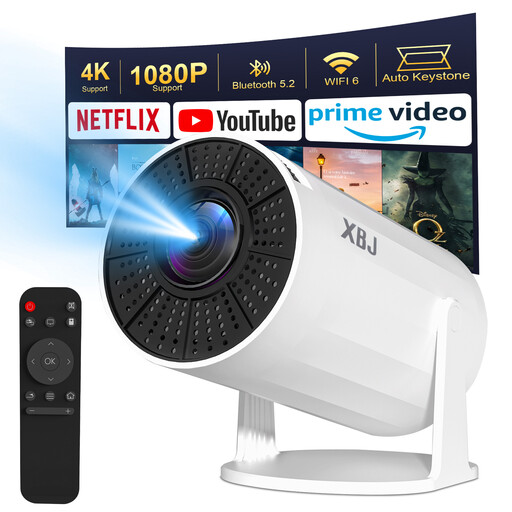
A good option if you want to adjust the projection direction. Check that the available space and desired image size are suitable.
The product title lists 1080P, 4K decoding, Android 11, 180° rotation and an image size of 40–200 inches.
 No image available
Worth considering if you want to change the projection direction. Check that your chosen position and image size suit the wall.
The product title lists Full HD 1080P and 360° rotation. The product information states 500 lumens and also lists Wi-Fi, Bluetooth and HDMI.
Measure the usable width of the projection wall and the distance from the intended lens position to the wall. Then check the distance and image-size range for the exact model. Epson also offers a projection distance simulator.
No. A smart platform doesn’t guarantee that NPO Start is available on a particular device. NPO lists the website, mobile apps, Chromecast and AirPlay among its playback options. Check which one works with your projector and any connected player.
Optoma states that the Photon Go provides up to 1.5 hours of playback on its built-in battery. If you watch for longer, check whether you can use the power supply while watching.
For qualifying distance purchases made by consumers, Dutch law generally provides a 14-day cooling-off period, according to the Rijksoverheid. Your statutory guarantee is separate from the manufacturer’s warranty. If a product is faulty, the retailer is responsible for addressing the issue, as ACM ConsuWijzer explains.
Electrical and electronic equipment may fall under EU CE rules; the requirements that apply depend on the product. Check the product information and safety documentation for the exact model. A CE marking alone doesn’t indicate how the picture quality will be.