What should you look for when buying?
First measure the space and image width, then assess the ambient light. Next, check how you’ll watch your travel programmes and whether the built-in sound will be good enough for you.
| What to consider |
What should you check? |
Who should consider this? |
| Image width and distance |
Measure the distance from the lens position to the wall and the available wall width; compare these with the throw ratio of the exact model. |
I want a large image without a projector between the sofa and the wall. The lens position and available wall space therefore need to work together. Around 33% of consumers prioritise distance and image width. |
| Visibility in daylight |
Consider when you watch, how much light you can block out and the measurement standard used for the stated brightness. |
If I usually watch while it’s still daylight, I want to know whether darkening the room is practical before choosing a model. Around 27% of consumers prioritise visibility in their own ambient light. |
| Storage and positioning |
Check whether the projector can achieve the desired image position from where you plan to use it, and what power supply or accessories it needs. |
I want to be able to use the living room freely again afterwards, so I consider how easy it is to move the setup. Around 20% of consumers prioritise storage and flexible positioning. |
| Programmes and dialogue |
Check your preferred streaming service, any account or subscription requirements, HDMI connections and audio outputs. |
I want to start watching travel programmes without hassle and follow spoken dialogue clearly. Around 20% of consumers prioritise access to programmes and clear speech. |
Joybuy products
These Joybuy products are options for home projection. Compare their stated distance and brightness specifications, playback options and limitations with the needs of your small living room. Before buying, also check that the exact model complies with the applicable EU rules; according to Ondernemersplein, the Dutch government’s business information portal, relevant requirements for electrical appliances include the applicable CE marking and EU declaration of conformity.
 No image available
Optoma H117ST DLP projector, WXGA
The short-throw ratio may be useful if projection depth is limited; measure the distance from the lens position before deciding.
The product information states a native resolution of WXGA 1280 × 800, a throw ratio of 0,52:1, 3800 ANSI lumens, HDMI and a built-in 10W speaker.
The native resolution is WXGA; according to the product information, Full HD content isn’t displayed at native Full HD resolution.
Joybuy
 No image available
Yaber L2 projector, native 1080P
The built-in Google TV may suit anyone who wants to watch programmes through apps; check that your preferred streaming service is available.
The product information states native 1080P, 520 ISO lumens, a throw ratio of 1,17:1, Google TV and two 5W speakers.
Measure the distance from the lens to the wall and check that the desired image width is achievable.
Joybuy
 No image available
Blackview PV1000 Max, native 1080P
The rotating design may be useful if you want to change the projection angle; check the distance and image position from where you plan to use it.
The product information states native 1080P, 1000 ANSI lumens, 360° rotation, TOF autofocus, WiFi 5, Bluetooth 5.0, VIDAA OS, AirPlay 2 and Dolby Audio.
Joybuy
 No image available
Yoton Y6 5.2 Bluetooth projector
This could be a good option if you want to play programmes from an external source; check in advance that the connections are compatible with that source.
The product information states native 1080P, Bluetooth 5.2, HDMI, USB and AV connections, and a built-in speaker.
Joybuy
 No image available
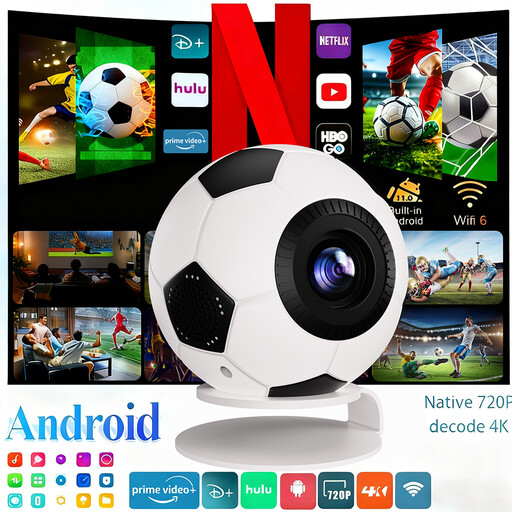
XBJ Football-Shaped Mini Projector
The built-in apps may suit anyone who wants to get started without a separate streaming source; check whether your preferred service is available on the projector.
The product information states native 720P, 800 ANSI lumens, Android 14, Bluetooth 5.4 and streaming apps. 1080P refers to video decoding, not native resolution.
Check the projection distance from your intended position before choosing this projector for a small living room.
Joybuy
Frequently asked questions
How can I tell whether the projector will produce a suitable image from my chosen position?
Measure the distance from the intended lens position to the wall and the maximum usable image width. Compare these measurements with the throw ratio of the exact model; BenQ states that the GV50 has a ratio of 1,2:1, which means around 1,2 metres from lens to wall for every metre of image width.
Can I stream my travel programmes without an extra device?
Not automatically: check the specific app and any account requirements for the model you choose. Philips warns that apps on the NeoPix 750 may change and that data or subscription charges may apply; Samsung states that you need an account to use apps on The Freestyle 2nd Gen.
What should I check when positioning and using the projector?
First, check that the projector can achieve the desired image position from where you plan to use it, and keep cables out of walkways. For a tabletop setup, BenQ recommends using cables of a suitable length and avoiding trip hazards.
What if I’m unhappy with a projector bought online, or it breaks too soon?
According to ACM ConsuWijzer, for a standard online product purchase you generally have up to 14 days after delivery to change your mind, subject to applicable exceptions. If a product breaks sooner than you could reasonably expect under normal use, the seller is responsible for the legal guarantee; in the Netherlands, this does not have a general fixed duration of two years.
What product safety rules apply to a projector offered for sale in the Netherlands?
The responsible market operator must ensure that the device complies with the applicable European rules and has the required CE marking and EU declaration of conformity. The Dutch government’s Ondernemersplein also lists the applicable radio equipment rules for devices with Wi-Fi or Bluetooth. A product listing on a Dutch website does not, by itself, confirm that a specific model on offer complies with these rules.


