
For viewers with limited projection distance
You want a big picture for films, but there’s little space between the cabinet and the wall. The throw ratio and where you can position the projector will determine which set-up is possible.


First, measure the distance from the lens to the wall or screen and decide what image width will fit. A short-throw projector may suit a limited distance, an ultra-short-throw model may work when positioned close to the wall, and a portable model is a good option if you want to put the projector away after use. For the exact model, also check the light output, connections and support for your streaming services.
You want a big picture for films, but there’s little space between the cabinet and the wall. The throw ratio and where you can position the projector will determine which set-up is possible.
You also watch while there’s still light in the living room and want to assess the stated light output alongside your preferred screen size. Brightness specifications vary by model.
You don’t want a permanent installation and move the device after watching. So, also consider the set-up, power supply and built-in streaming options.
First, measure the available projection distance and image width. Then consider the ambient light and check that the connections and streaming features suit your film night.
| What to consider | What should you check? | Who is this important for? |
|---|---|---|
| Projection distance | Measure the distance from the intended lens position to the wall or screen, along with the available image width. Compare these with the throw ratio for the exact model. | If I want the image size I’m after in a small living room, I’ll first check that the set-up will physically fit. Around 33% of consumers prioritise the projection distance they need. |
| Ambient light | Note when you’ll be watching, whether you can darken the room and what surface you’ll use. Only compare light output when you know the measurement method, too. | If I want to watch with daylight coming in or the lights on, I’ll weigh brightness against image size and the amount of light in the room. Around 27% of consumers prioritise these lighting conditions. |
| Films, apps and sound | Check whether the exact model supports your preferred streaming service and which HDMI and audio connections it has. | If I want to stream films or connect existing sound equipment, I’ll check these features beforehand. Around 20% of consumers prioritise access to films and suitable audio connections. |
| Storage and portability | Check the dimensions, stand or mounting options, power supply and any stated battery life for your preferred image settings. | If I don’t want to leave a projector permanently in the living room, I’ll consider how easy it is to move and put away. Around 20% of consumers prioritise this convenience. |
According to Optoma, the Optoma GT2000HDR has native Full HD. Support for a 4K input signal doesn’t change its native resolution.
Look up the native resolution of the exact model, not just its highest supported input resolution.
The stated image size alone doesn’t tell you whether the projector will fit at the available distance in your room.
Measure the wall, the space for the cabinet and the lens distance before comparing models.
You may need to change the positioning or use a suitable screen, so factor in the space this will take up.
Portability and light output are different things. A portable design doesn’t tell you whether the picture will suit the lighting in your living room.
Assess the amount of light in the room, your preferred image size and the brightness specification separately from the projector’s size and battery.
According to the Dutch Government, a manufacturer’s warranty is separate from your statutory right to a product that works as it should. If a product is faulty, contact the retailer.
Keep your proof of purchase and report any fault to the retailer.
The TH671ST is a lamp-based short-throw model for a permanent film set-up at a limited distance.
The GT2000HDR is a short-throw projector with a laser light source and fixed zoom.
The EH-LS670W is an ultra-short-throw model designed to sit close to the wall.
The MoGo 4 is a portable option for anyone who wants to move the projector after watching.
The NeoPix 230 Smart is a compact Full HD projector with a rotating stand.
This selection of Joybuy products includes short-throw projectors for a permanent position at a limited distance, as well as portable models you can put away after use.
 No image available
A short-throw model to consider if you have limited projection distance.
The product details list a throw ratio of 0,52:1, native WXGA (1280 × 800), 3.800 ANSI lumens, HDMI and a 10 W speaker. The native resolution is not Full HD.
 No image available
A short-throw model to consider if you want to stream without a separate streaming device.
The product details list a throw ratio of 1,17:1, native 1080p, 520 ISO lumens, Google TV with Netflix and two 5 W speakers. ISO lumens are not directly comparable with ANSI lumens.
 No image available
A short-throw model to compare if you have a permanent projection position at a limited distance.
The product details list DLP, 3.600 ANSI lumens and native XGA (1024 × 768). The native resolution is lower than Full HD.
 No image available
A short-throw model to consider if its stated image sizes suit your available wall or screen.
The product details list DLP, 3.500 ANSI lumens, native XGA (1024 × 768), two HDMI ports and a 10 W speaker. The stated image size is 60–120 inches; native XGA is not Full HD.
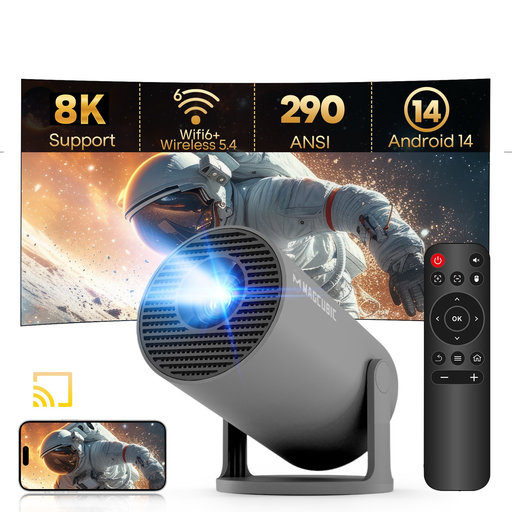 No image available
A portable mini projector to consider if you want to move or put the device away after use.
The product details list a throw ratio of 0,8:1, 290 ANSI lumens, Android 14, Wi-Fi 6, Bluetooth 5.4 and a 180° rotating stand. The native resolution is 720p (1280 × 720); 1080p is listed as a supported resolution.
Measure the distance from the planned lens position to the projection surface, as well as the available image width. Compare these with the throw ratio and permitted image size for the exact model; the ‘short throw’ label alone doesn’t tell you whether the set-up will fit.
Follow the safety instructions for the exact model and don’t look into the lens while the projector is switched on. Epson’s safety instructions warn against this; consult your model’s manual for other positioning and operating guidance.
Not always: some models have built-in streaming and speakers, but features vary by model. Check that your streaming service is available and that the connections are suitable for any equipment you want to use.
According to the Dutch Government, you’re entitled to a product that works as it should, and the retailer is your point of contact for a solution if the product is faulty. There’s no single fixed statutory warranty period for all products in the Netherlands; a manufacturer’s warranty is an addition to your statutory rights.
According to Milieu Centraal, when you buy a new, similar electrical appliance, you can hand in your old one free of charge, including when buying online. You can also take it to your local council’s recycling centre.