Who is this set-up for?

Viewers sitting off-centre

You often sit away from the centre of the screen and want the image to remain clear and usable from that position. Compare the stated viewing angle of the specific screen material with your seating positions; Elite Screens publishes viewing-angle specifications for each material.

Viewers with a projector off the screen axis

You can’t position the projector directly in front of the screen. Check the throw distance and horizontal lens shift for the exact model; Epson and BenQ list these figures for each model.

Fans of historic film formats

You want to watch a silent-film release without stretching or cropping the image. Check the aspect ratio of the specific release and the image settings on your projector or player; Eye Filmmuseum notes that the film itself doesn’t determine the aspect ratio.

What should you look for?

What to consider What should you check? Who is this most important for?
Viewing from a side seat Compare the stated viewing angle of the exact screen material with the outermost seats and lighting conditions. If I sit off-centre, I want to be able to see the image clearly from there too; around 40% of consumers say viewing from a side seat is their main buying priority.
Projector off the screen axis Measure the lens-to-screen distance and horizontal offset; check both directions of lens shift at your desired image size. If the projector can’t sit directly in front of the screen, I want to know whether its optical adjustment suits my set-up; around 30% of consumers say projector placement is their main priority.
Film aspect ratio Check the aspect ratio of the film release and the image settings on the projector and player. If I want to preserve a historic film format, I don’t want the release to be stretched or cropped; around 20% of consumers prioritise preserving the film’s original format.
Maintenance and running costs Look at the light-source technology and the stated operating mode for the exact model; also check the warranty and repair terms. If I choose a projector for long-term use, I want to know what maintenance decisions may be involved; around 10% of consumers say maintenance is their main consideration.

Common buying mistakes

  • Confusing a side seat with an off-centre projector

    Your seating position and the projector’s position are two separate considerations: the screen material helps determine how clearly you can see the image from an off-centre seat.

    First, mark the screen, seats and projector positions separately on a plan. Then compare the screen material’s viewing angle and decide whether the projector needs optical adjustment.

  • Looking only at the maximum lens-shift percentage

    The horizontal and vertical maximums aren’t always available at the same time. BenQ warns that a greater shift in one direction can limit the range in the other.

    Check the horizontal and vertical settings for your projector position and image size, rather than comparing only the largest stated percentage.

  • Treating keystone correction as a substitute for optical alignment

    Digital keystone correction can straighten a skewed image, but BenQ notes that it can affect things such as edge sharpness and image size.

    Position the projector as squarely as possible and compare the optical placement options first, rather than relying on substantial digital correction.

Projector brands and models to compare

Epson

The EH-TW7000 and EH-TW7100 are worth considering if the projector can’t sit on the screen axis. This information applies to these models, not all Epson projectors.

  • Epson states that the EH-TW7100 has manual lens shift of ±24% horizontally and ±60% vertically.
  • For the EH-TW7000, Epson specifies 5,000 hours for the lamp in Eco mode. These are manufacturer specifications, not independent measurements; check the figures and maintenance requirements for the specific version.

BenQ

The W4100i is a home cinema model to compare if you’re considering horizontal optical placement flexibility and an LED light source.

  • BenQ specifies a maximum horizontal lens shift of ±15% with 20.9% vertical lens shift.
  • BenQ warns that a greater shift in one direction can limit the range in the other. These specifications don’t prove that its image quality is better than that of other models.

Optoma

The UHZ68LV is a laser model to compare for a fixed installation where horizontal shift is limited.

  • For the UHZ68LV, Optoma specifies horizontal lens shift from −10% to +10%, a throw ratio of 1.2:1–1.92:1 and 4:3 as a compatible aspect ratio.
  • These specifications come from European documentation. For a specific version sold in the Netherlands, check the relevant product information and image settings.

Projectors at Joybuy

These projectors are suited to home film viewing where seeing the image from a side seat or preserving the aspect ratio of a historic film matters. Check each version separately to make sure its placement options and image settings suit your set-up.

XGODY N7 Cine projector

XGODY N7 Cine

An option if the projector can sit directly in front of the screen; assess the screen material’s viewing angle separately for seats away from the centre.

1,000 ANSI lumens; native 1080p; 4K support; Amlogic T950NX; 2 GB + 16 GB; autofocus, keystone correction and obstacle detection; rotates through 90°.

View at Joybuy

JMGO N1S Ultra 4K Triple Laser UHD projector

JMGO N1S Ultra 4K Triple Laser

An option to consider if you want to adjust the projection direction to suit your room; check beforehand that the adjustment range works with your desired screen position.

4K UHD; triple laser.

View at Joybuy
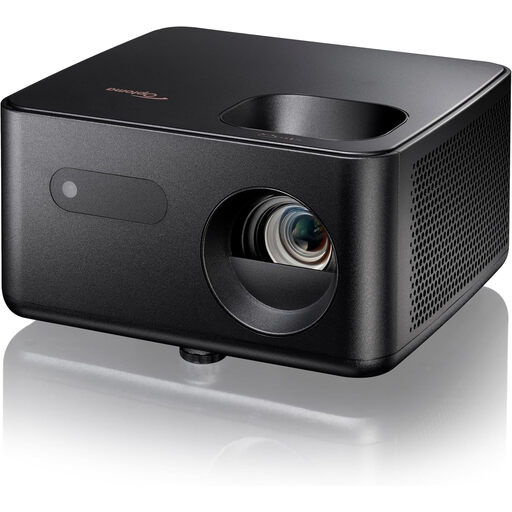
Optoma Photon Life PH31 projector

Optoma Photon Life PH31

Preserving the original format matters when watching a historic film release; check which aspect ratios the projector and player can display from your source.

View at Joybuy

Optoma Photon Beam PK52 projector

Optoma Photon Beam PK52

An option to compare if you want to preserve the aspect ratio of a historic film; check the settings for your specific projector and player combination.

4K UHD.

View at Joybuy

Optoma Photon Go projector

Optoma Photon Go

If you want to watch a film with a historic format, check beforehand that the projector and player image settings support that aspect ratio.

View at Joybuy

Frequently asked questions

Do I need lens shift if my seat is off-centre from the screen?

Not just because of where you sit: first check the viewing angle of the screen material. Lens shift becomes relevant if the projector also needs to sit off the screen axis.

How can I check whether the projector will fit my space?

Measure your desired image width and the distance from the lens to the screen, then compare these with the throw ratio of the exact model. If the projector sits off the screen axis, also check the horizontal shift required and whether it can be combined with the vertical setting you need.

Should a silent film always fill a 16:9 screen?

No, not if that means stretching or cropping the image. Check the aspect ratio of the specific release and choose a suitable image setting. Eye Filmmuseum notes that 4:3 was common in the past, but the film itself doesn’t determine the projection aspect ratio.

What rights apply if a product is faulty or I buy online in the Netherlands?

According to the Dutch government, the seller is responsible for resolving issues with a faulty product; the Netherlands has no fixed statutory warranty period. For online purchases from a business, you generally have a 14-day cooling-off period, with exceptions depending on the product and circumstances.

What product safety information should I check for an offer in the Netherlands?

For the specific version, check the documentation on the applicable product safety requirements. Business.gov.nl lists rules for low voltage, electromagnetic compatibility and hazardous substances among those that may apply to electrical and electronic products; the requirements depend on the product and which rules apply.
