Who this choice is relevant to

Watching from a side seat

Your projector may be positioned directly in front of the screen, but the picture can look less bright from where you’re sitting. So compare the viewing angle of the specific screen material. Stewart Filmscreen explains that brightness falls as you sit further from the centre of the screen.

Projector positioned beside the sofa

You can’t position the projector directly opposite the screen. Measure the projection distance and how far to the side it needs to sit, then compare these with the horizontal lens shift or correction features of the exact model. Epson Netherlands lists horizontal lens shift for the EH-TW7000.

Drama fan who notices picture detail

You want to make out faces, costumes and scenery in dark scenes. Assess the picture and screen in the lighting conditions you’ll be watching in, and don’t treat stated resolution and contrast figures as measurements of performance in your room.

What should you look for when choosing?

A screen with a wide viewing angle

Choose this if: you sit to one side but can position the projector directly in front of the screen. Compare the material with the furthest seat from the centre.

Trade-off: the screen material’s light distribution and ambient light both play a part. Stewart Filmscreen describes StudioTek 100 as a material that distributes light widely.

Optical horizontal lens shift

Choose this if: the projector also needs to sit off the screen axis, and you can achieve the required shift within the range of the exact model.

Trade-off: the stated lens shift doesn’t guarantee that every combination of distance, height and image size will work. According to Epson Netherlands, the EH-TW7000 has horizontal lens shift of ±24%.

Digital keystone correction

Choose this if: you can’t align the projector precisely or you move it regularly. Check which correction features the model you’re considering offers.

Trade-off: BenQ Europe warns that keystone correction can affect sharpness and image size, among other things. This feature doesn’t change the screen’s viewing angle.

What to consider What should you check? Who is this important to?
Brightness from a side seat Compare the screen material’s viewing angle or half-gain angle with your furthest seat from the centre, and take ambient light into account. If I sit at an angle but can position the projector directly in front, I want to know how much brightness the screen retains at the sides. Around 36% of consumers prioritise the screen’s viewing angle.
Projector off the screen axis Measure the lens-to-screen distance, image size and sideways offset. Compare these with the lens shift or keystone correction range of the exact model. If the projector can’t sit directly opposite the screen, I want to know whether the chosen alignment will work in my setup. Around 29% of consumers prioritise projector placement.
Detail in dark scenes Assess the exact model and screen in your usual lighting conditions. Check the resolution the device projects and which signals it accepts. If I want to follow costumes and faces in dark scenes, I want to assess the picture in the room where I’ll be watching. Around 21% of consumers prioritise picture detail.
Easy setup and playback Check the connections, any streaming options, and whether the focus and picture correction features suit your intended setup. If I move the projector regularly, I want to use it without complicated readjustments. Around 14% of consumers prioritise ease of setup.

Common mistakes

  • Confusing keystone correction with a wide screen viewing angle

    Keystone correction addresses geometric distortion caused by the projector’s position, not the viewing angle from the sofa. Stewart Filmscreen explains that perceived brightness can fall when you sit further from the centre of the screen.

    Map out your seating and projector position separately: choose the screen material based on where you’ll sit, and the alignment feature based on where the projector will go.

    If the screen’s viewing angle isn’t suitable, you may still need a different screen.

  • Assuming digital correction comes with no picture trade-off

    BenQ Europe notes that keystone correction can affect sharpness and image size, among other things.

    Position the projector as straight as possible, and compare optical lens shift if it needs to sit off to one side.

  • Relying on the model name when resolution details conflict

    Joybuy Netherlands’ product listing for the Philips NeoPix 230 Smart NPX230/INT gives both 1920 × 1080 and 320 × 240 as the native resolution.

    Before buying, check the resolution of the exact variant and compare the details on the product page. Don’t infer the specification from the model name alone.

Relevant brands to consider

Epson

The EH-TW7000 is a home cinema model worth considering if the projector can’t sit on the screen axis.

  • Epson Netherlands lists optical horizontal and vertical lens shift, as well as zoom, for this model.
  • Lens shift won’t solve a limited screen viewing angle. Check that its range suits your planned distance, height and image size.

BenQ

The W2720i is a model to compare if digital alignment is part of your setup.

  • BenQ Netherlands lists automatic horizontal and vertical 2D keystone correction.
  • For the W2720i, BenQ Netherlands lists vertical lens shift of ±5%. BenQ warns that keystone correction can affect sharpness and image size, among other things.

Philips

The NeoPix 230 Smart and NeoPix 250 Smart offer different correction features for compact setups.

  • Philips lists automatic horizontal and vertical keystone correction for the NeoPix 230 Smart.
  • For the NeoPix 250 Smart, Philips lists automatic vertical correction and four-corner correction. These features aren’t the same as those on the NeoPix 230 Smart.

Projectors at Joybuy

These projectors are included for comparison if you’re considering a setup with digital picture correction. This correction won’t change the screen’s viewing angle, so assess the screen material separately if you sit at an angle.

XGODY Gimbal A8 projector

XGODY Gimbal A8 projector

The rotating design and automatic correction may be useful if you don’t always place the projector in the same spot.

The title states native 1080p; the description mentions autofocus and 6D keystone correction. Keystone correction doesn’t change the screen’s viewing angle.

View at Joybuy

2026 Video Projector

2026 Video Projector

Automatic screen correction and a rotating body are worth considering if you want to set up the projector in different ways.

The title states an image size of 50–200 inches, 180° rotation and 50%–100% digital zoom. Check that the stated image size suits your viewing distance and screen.

View at Joybuy

N3 Max Smart Projector

N3 Max Smart Projector

This model may be worth considering if autofocus and automatic keystone correction suit the way you position your projector.

The title states native 1080p and 1000 ISO lumens; 4K is listed as video support, not native resolution. The viewing angle still depends on the screen material.

View at Joybuy
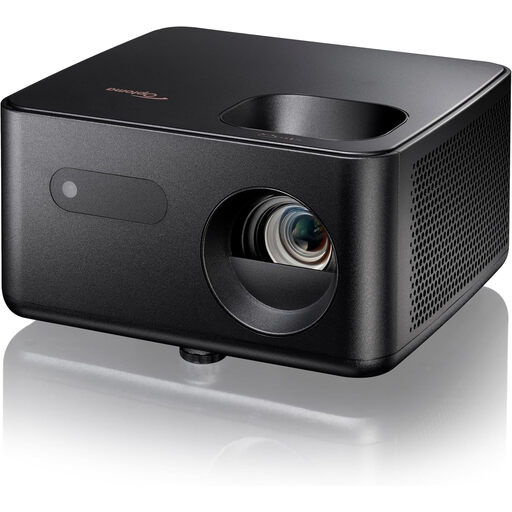
Optoma Photon Life PH31 projector

Optoma Photon Life PH31

The stated vertical keystone correction may be useful if the projector isn’t at exactly the right height.

The product description lists Full HD 1920 × 1080, a projection distance of 1,99–5,47 m and an image size of 60–150 inches. Check which distance is right for your preferred image size.

View at Joybuy

Optoma Photon Beam PK52 projector

Optoma Photon Beam PK52

The stated horizontal and vertical keystone correction may be useful if the projector isn’t facing the screen squarely. Bear in mind the possible picture trade-off with digital correction.

The specifications list 4K UHD, correction of up to 30° horizontally and vertically, a projection distance of 1–8 m and an image size of 28–300 inches. The title states manual zoom.

View at Joybuy

Frequently asked questions

Will horizontal keystone correction help if only your seat is off to one side?

No. Keystone correction is designed to fix geometric distortion caused by the projector’s position. If you’re sitting to one side, compare the viewing angle of the screen material.

How can you check whether the projector will fit before installation?

Measure the distance from the lens to the screen, your preferred image size and how far off the screen axis the projector may need to sit. Compare these measurements with the throw ratio and the lens shift or correction range of the exact model.

Do you have a cooling-off period when buying online from a business in the Netherlands?

According to the Dutch government, distance purchases are often covered by a 14-day cooling-off period. Check the applicable terms; according to this guidance, an online purchase from a private individual doesn’t count as a distance purchase in this sense.

Is the manufacturer’s warranty your only right if the projector develops a fault?

No. According to the Dutch government, your statutory rights apply alongside any manufacturer’s warranty. If a product is faulty, the seller must provide a solution; the Netherlands has no fixed statutory warranty period.

What should you check about electrical product safety in the Netherlands?

The European Union lists electrical and electronic equipment among the product categories covered by harmonised rules on CE marking. CE marking is a declaration by the manufacturer, not a separate EU certification. Check the documentation for the exact product.
