First, measure the available projection distance and image width. Then choose between a portable projector, a fixed setup or an ultra-short-throw model. If there’s ambient light or housemates nearby, the brightness you’ll need and fan noise in your chosen mode are important too. Also check that your streaming, audio and power needs are covered.
Who is this for?
Housemate without a permanent projection spot
You want to put the projector away after a film night or move it between rooms. Pay attention to the stand, placement options and power supply. BenQ and XGIMI describe models with adjustable or rotating stands.
Film-night host with a permanent setup
You can arrange the room and projection distance in advance, and want to position the image for several viewers. Epson lists optical zoom and vertical lens shift for the EH-TW6150; LG describes the CineBeam S PU615U as an ultra-short-throw model.
Viewer who doesn’t want to disturb housemates
You watch films while others are at home and want to factor in fan noise, playback volume and audio connections. Epson and BenQ publish noise figures for specific models in different modes, but those figures alone don’t tell you how loud the projector will sound in your room.
What should you look for when choosing?
Portable projector
Suitable for: moving between rooms or a space where you can’t install a permanent mount. BenQ lists a rotating base and built-in battery for the GV50; XGIMI lists an adjustable stand and Google TV for the MoGo 4.
Bear in mind: BenQ rates the GV50 at 500 ANSI lumens, while XGIMI rates the MoGo 4 at 450 ISO lumens. As these figures use different measurement standards, they aren’t a direct comparison of brightness in your room.
Projector in a fixed position
Suitable for: a permanent setup with enough distance. Epson lists a projection distance of 2,34–3,81 m for an 80-inch image on the EH-TW6150, as well as optical zoom and vertical lens shift.
Bear in mind: the EH-TW6150 uses a lamp. Epson gives the lamp a lifespan of 4.500 hours, or 7.500 hours in Eco mode. Its stated fan noise also varies by mode.
Ultra-short-throw projector
Suitable for: a room where a projector positioned further back would get in the way. LG describes the CineBeam S PU615U as an ultra-short-throw model and lists a maximum image size of 100 inches.
Bear in mind: check the precise placement and projection surface before buying. Ultra-short-throw projection won’t solve problems with daylight, noise or an uneven wall by itself.
| What to consider |
What should you check? |
Who is this important for? |
| Room and placement |
Measure the projection distance, available wall width and permitted location. Check the distance, zoom or projection technology for the exact model. |
If I want to know whether the image I’m after will fit in the shared room, I’ll measure the space and distance first. Around 36% of consumers prioritise placement. |
| Visibility in ambient light |
Compare the brightness rating and its unit with the ambient light and desired image size; ANSI and ISO lumens aren’t directly interchangeable. |
If I can’t always darken the room, I want to know whether the film will remain visible in the available light. Around 29% of consumers prioritise visibility in ambient light. |
| Noise at home |
Check the noise figures for each mode and consider the projector’s position in relation to seats and doors. Also check the audio connections. |
If housemates are at home during the film, I want to take fan noise and playback volume into account. Around 21% of consumers make keeping noise disruption to a minimum their top priority. |
| Playback and ease of use |
Check that your film app or HDMI source will work, which audio connection you need, and whether the projector will run on mains power or its battery. |
If I want to play films without extra equipment, I’ll check streaming, connections and power in advance. Around 14% of consumers prioritise straightforward playback and ease of use. |
Common pitfalls when choosing
-
Choosing a projector before measuring the space
The projection distance needed for the same image size can vary depending on the zoom setting. Epson lists 2,34–3,81 m for an 80-inch image on the EH-TW6150.
Measure your desired image width and the distance actually available, then compare them with the specifications for the exact model.
-
Comparing brightness figures from different standards directly
BenQ rates the GV50 at 500 ANSI lumens, while XGIMI rates the MoGo 4 at 450 ISO lumens. These are different units and don’t directly show which image will look brighter in your room.
Compare the unit, the intended image size and the lighting conditions you’ll be watching in.
-
Assuming a portable model or bundle is exactly the same as another
A bundle may include extra accessories or a different version. For example, the MoGo 4 Match Night EU Edition product listing also mentions a game code; that doesn’t automatically make the bundle identical to the standard model.
Check the full model and bundle name, the included items and the power supply before comparing versions.
Brands to consider
Epson
Epson describes home cinema projectors, among other products, for a planned, permanent setup.
- For the EH-TW6150, Epson lists optical zoom, vertical lens shift and two HDMI inputs.
- Epson specifies a lamp and 36 dB(A) in Normal mode for this model; these features don’t automatically apply to other Epson models.
BenQ
BenQ also describes portable projectors, including the GV50.
- According to BenQ, the GV50 has an adjustable stand, Google TV and a built-in battery.
- BenQ rates the GV50 at 500 ANSI lumens. Consider this figure alongside the ambient light and desired image size.
XGIMI
XGIMI describes portable models for different viewing locations, among other products.
- For the MoGo 4, XGIMI lists a rotating stand and Google TV.
- XGIMI rates the MoGo 4 at 450 ISO lumens. Also check whether a version with extra accessories is the same bundle as the model you’re looking for.
LG
LG describes the CineBeam S PU615U for ultra-short-throw projection, among other products.
- For this model, LG lists ultra-short-throw projection, 4K UHD and a maximum image size of 100 inches.
- The product description alone can’t tell you whether the placement and projection surface will work in a particular shared room.
Samsung
Samsung describes portable smart projectors, including The Freestyle+ SP-LFF3HLAXXXE.
- For this model, Samsung describes automatic image positioning and obstacle avoidance.
- These are features described by Samsung, not an independent assessment of picture quality on your wall.
Joybuy products
These Joybuy models are portable projectors for different viewing locations. Compare their listed streaming features and picture specifications with your room, the ambient light and the equipment you already own.
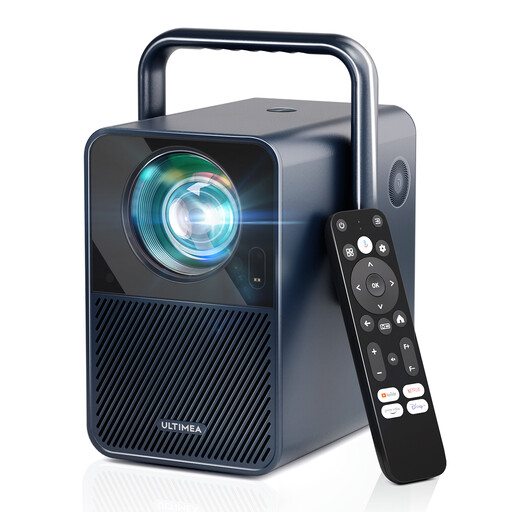 No image available
Ultimea Poseidon E40, Native 1080P
Suitable for watching through built-in apps: the product name lists Android TV 11.0 and Netflix.
Native 1080P, 1000 ANSI lumens, autofocus and automatic keystone correction.
Joybuy
 No image available
Yaber L2, Native 1080P
Suitable for different projection locations: the product name lists a flexible stand and compatibility with ceiling mounting.
Native 1080P, 520 ISO lumens, built-in Google TV and two 5 W speakers.
Joybuy
 No image available
XGODY N7 Cine, Native 1080P
Suitable for watching films through built-in streaming apps: the product name lists Whale TV OS and a Netflix licence.
Native 1080P, 1000 ANSI lumens, autofocus, automatic keystone correction and obstacle avoidance.
Joybuy
 No image available
Magcubic HY350Max, Native 1080P
Suitable if you want to point the projector in different directions: the product name lists 180° rotation.
Native 1080P, 900 ANSI lumens, Android 14 and automatic keystone correction.
Joybuy
 No image available
XBJ 360° projector, Full HD 1080P
Suitable if you want to adjust the projection direction: the product name lists a 360° rotating design.
Full HD 1080P, autofocus and automatic keystone correction.
Joybuy
Frequently asked questions
What should you measure before setting up a projector in a shared living room?
Measure the available distance to the wall and the clear image width. Compare these with the specifications for the exact model: Epson lists a projection distance of 2,34–3,81 m for an 80-inch image on the EH-TW6150.
How can you keep maintenance and disruption to a minimum during film nights?
Check the manual for ventilation space and maintenance, and compare the noise figures for each picture mode. Epson rates the EH-TW6150 at 36 dB(A) in Normal mode and 28 dB(A) in Eco mode; its stated brightness is lower in Eco mode. Agree a suitable playback volume with your housemates too.
Does a projector bought online in the Netherlands always come with exactly two years’ guarantee?
No. According to ACM ConsuWijzer, statutory guarantee in the Netherlands doesn’t have a fixed duration of exactly two years. What you can expect depends, among other things, on the product and normal use. Online purchases usually also come with a 14-day cooling-off period from delivery, subject to legal exceptions.
What does CE mean on a projector sold in the Netherlands?
According to information from the European Union, specific CE rules apply to certain categories of electrical and electronic equipment. Check the relevant product information and conformity for the model in question; CE isn’t an assessment of its suitability for animated films.


