Who is this buying guide for?

Viewers with limited projection space

You share a compact living room and want to know whether your preferred image size will work from the available spot. BenQ, Nebula and Epson publish throw ratios for individual models; compare the figure for the exact model with the lens position and available wall width.

Housemates who want to watch together in peace

You want dialogue to be easy to hear and an audio setup that works for shared viewing. BenQ, Nebula and Samsung list sound features for specific products, but these are no substitute for trying the projector in your own room.

Viewers who put their projector away after use

You don’t have a permanent projection spot and want to move or put away the projector after watching. So, check the weight, power supply and what’s needed to set it up again for each model.

What should you look for when buying?

Portable projector with a standard throw distance

A good fit if: you want to put the projector away after watching and have enough distance between the lens and the wall. BenQ and Nebula give the GV50 and Capsule 3 Laser a throw ratio of 1.2:1.

Bear in mind: the light, power supply or battery life, and fan noise in your shared viewing space.

Adjustable smart projector

A good fit if: you regularly switch walls or viewing angles and want built-in smart TV features. Samsung describes The Freestyle 2nd Gen as having an adjustable setup and automatic screen adjustment.

Bear in mind: Samsung says you need a Samsung account to use apps, the Battery Base is sold separately, and digital screen positioning can make the image smaller.

Ultra-short-throw projector for a fixed spot

A good fit if: you have a suitable, stable spot close to the wall but no room further back for projection. Epson gives the EH-LS300B a throw ratio of 0.26–0.35:1, as an example of this setup.

Bear in mind: Epson has marked the EH-LS300B as discontinued; check the specifications again for any current model.

ConcernWhat to look for when buyingWho is this more important to?
Will the image fit the room? Measure the distance from the lens to the wall and the usable wall width; compare these with the throw ratio and supported image size of the exact model. If there’s very little free space, I want to know in advance whether my preferred image size will fit from the available spot. Around 33% of consumers give limited projection space their highest priority.
Is the sound suitable for watching together? Compare the stated fan noise in viewing mode, the speaker and any audio output; discuss where the sound can be positioned. When I watch with housemates, I want to follow the dialogue without fan or speaker noise disturbing anyone else. Around 27% of consumers prioritise watching together in peace.
Can the projector be put away? Check the weight, mains power, battery life in the intended mode and whether you’ll need to realign it after moving it. If the room is used for other things too, I want to be able to put the projector away after a film night. Around 20% of consumers give moving and storing it their highest priority.
Will the image work with the room’s lighting? Compare brightness using the same unit of measurement; also consider native resolution, image size and whether the room can be darkened. When watching with ambient light, I want to know whether the combination of my room and preferred image size will work for me. Around 20% of consumers prioritise visibility in their usual room lighting.

Buying pitfalls

  • Choosing based only on the maximum image size

    The stated maximum image size doesn’t tell you whether your preferred image will work from the projector’s position in your room.

    Measure the distance from the lens to the wall and check the throw ratio of the exact model. An ultra-short-throw model is a different positioning option, not automatically the right choice.

    You may need a different setup or a suitable screen; check what your chosen model and room require.

  • Treating the Capsule 3 and Capsule 3 Laser as the same model

    Nebula lists different light sources and brightness levels for the Capsule 3 and Capsule 3 Laser: 200 and 300 ANSI lumens respectively.

    Check the full model name and the specifications of the specific listing before comparing variants.

  • Assuming portable always means you don’t need a mains socket

    Samsung says the Battery Base for The Freestyle 2nd Gen is sold separately.

    Before buying, check what’s included with the version you’re considering and how you’ll power the projector at your viewing spot.

    If you want to use the projector without a mains socket, you may need the Battery Base, which is sold separately.

  • Buying a BenQ GV31 without checking the recall

    BenQ has issued a warning that the battery in the specific GV31 model may overheat and asks owners to stop using it immediately.

    If you have a GV31, check the official recall information and contact BenQ about the solution being offered. This warning concerns the GV31, not the GV50.

Brands to compare for this viewing setup

BenQ

BenQ describes the GV50 as a portable laser projector with flexible positioning and a built-in battery, designed for situations without a permanent installation.

  • BenQ lists the GV50 as having 1080p resolution, 500 ANSI lumens, a throw ratio of 1.2:1 and audio outputs.
  • These are stated product specifications, not measurements taken in your room. The recall concerns the GV31; check that model separately and don’t confuse it with the GV50.

Nebula

Nebula positions the Capsule 3 Laser as a compact, portable projector with a battery, for situations where you need to clear the projection spot after watching.

  • Nebula lists 300 ANSI lumens, 1080p and a battery life of 2.5 hours in eco mode.
  • The Capsule 3 without ‘Laser’ is a separate model with a different light source and stated brightness; check the full model name.

Samsung

Samsung designed The Freestyle 2nd Gen for portable projection, with an adjustable viewing angle and built-in smart TV features.

  • Samsung describes automatic screen adjustment and 360° sound.
  • Samsung says you need a Samsung account to use apps. The Battery Base is sold separately, and digital screen positioning can make the image smaller.

Epson

The EH-LS300B is an example of an ultra-short-throw setup for anyone who needs to place the projector close to the wall; Epson has marked this model as discontinued.

  • Epson lists a throw ratio of 0.26–0.35:1 for the EH-LS300B.
  • This is not a current product recommendation. Don’t assume the specifications apply to another or replacement model without checking.

Joybuy products to compare

These Joybuy products are projectors to compare for watching short films in a shared home. Check that each model’s positioning, power supply and connections suit your viewing spot.

ETOE Dolphin 2 RGB laser projector, 1080p

ETOE Dolphin 2 RGB laser projector

The built-in battery and adjustable stand may suit you if you want to move the projector between viewing sessions.

1080p; 800 ANSI lumens; built-in battery with a stated life of 2 hours; Google TV; HDMI 2.1 and USB-C.

View at Joybuy

XGIMI Vibe One Match Night EU Edition with projection screen and stand

XGIMI Vibe One Match Night EU Edition

The built-in battery and included projection screen with stand may suit a setup that you want to put away after use.

Full HD 1080p; 250 ISO lumens; JBL audio; built-in battery; Google TV. This version also includes a projection screen with stand.

View at Joybuy

XGIMI MoGo 4 Match Night EU Edition with EA SPORTS FC 26 game code

XGIMI MoGo 4 Match Night EU Edition

The built-in battery may suit a setup that you want to put away after a film night.

Full HD 1080p; 450 ISO lumens; Harman Kardon audio; Google TV; battery with a stated runtime of 2.5 hours. This version includes an EA SPORTS FC 26 game code.

View at Joybuy

Projector with built-in apps, automatic image correction and 180° rotation

Projector with built-in apps and 180° rotation

Automatic image correction and rotation may suit you if you want to adjust the projection angle.

Built-in apps and Play Store; Wi-Fi 6; Bluetooth; HDMI-compatible; screen size range of 50–200 inches; digital zoom of 50%–100%.

View at Joybuy
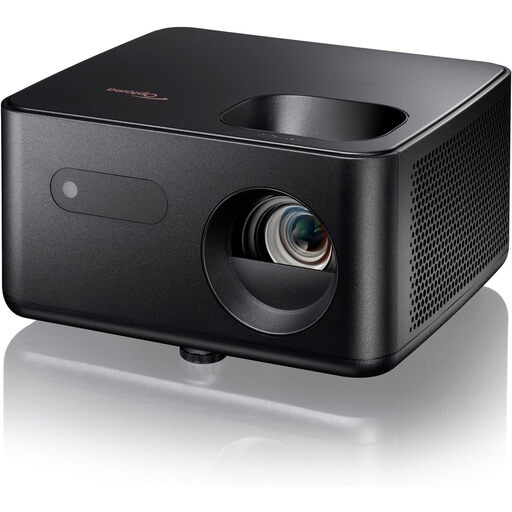
Optoma Photon Life PK31 projector

Optoma Photon Life PK31

Compare this projector with your viewing spot in mind, and check the throw ratio, connections and included accessories before buying.

View at Joybuy

Frequently asked questions

How can I tell before buying whether the image will fit on our wall?

Measure the available wall width and the distance from the intended lens position to the wall. Compare these with the throw ratio and supported image size of the exact model; don’t assume the same figure applies if you change the lens position or choose a successor model.

How can I check whether a projector is covered by a safety notice?

Check notices against the full model name. BenQ has issued a recall for the GV31 because its batteries may overheat, and asks owners to stop using it immediately and get in touch about the solution. This notice concerns the GV31, not the GV50.

Do I have a cooling-off period and statutory warranty when buying a projector online?

For online consumer purchases, you generally have a statutory cooling-off period of up to 14 days after delivery, subject to applicable exceptions. You also have a statutory guarantee: if the product doesn’t meet what you could reasonably expect under normal use, the seller is responsible for providing a solution in line with the applicable terms. ACM ConsuWijzer explains these consumer rights.

Which Dutch product rules apply to an electric projector?

Electrical equipment placed on the market in the Netherlands must meet the applicable European product rules. Among other things, the manufacturer must affix the required CE marking and draw up an EU declaration of conformity; equipment with Wi-Fi or Bluetooth may also be subject to radio equipment rules. Business.gov.nl emphasises that a CE marking is not an independent quality mark and does not, on its own, prove that a specific product listing has been checked.

Where can we take an old projector when we buy a new one?

When buying a new, similar appliance, private individuals are covered by the Dutch take-back scheme for old appliances, including for online purchases. The Dutch government also lists collection points and municipal recycling centres.
