What should you look for?
First, work out where the seat at either end is in relation to the screen. Then choose a picture and sound setup that suits your room.
| What to consider |
What should you look for? |
Who should pay particular attention? |
| View from the side seats |
Check the viewing angle of the exact screen material and the position of the seat at either end. Elite Screens lists a total viewing angle of 180° for CineWhite and 90° for CineGrey 3D. |
If I’m watching from a seat at the side, I want the screen material to suit that viewing angle. Around 39% of consumers put side viewing first. |
| Singing and film sound |
Check the projector’s audio outputs, as well as the connections on your playback source and sound equipment. BenQ lists eARC and a 3.5mm audio output for the W4100i. |
If singing and music are central to the experience, I want to know how the sound will reach my speakers. Around 23% of consumers prioritise the audio setup. |
| Projector position and alignment |
Measure the distance to the screen and how far the projector will be from the screen’s centre line. For lens shift, also check the applicable vertical setting: BenQ lists a maximum horizontal shift of ±15% for the W4100i at a 20.9% vertical shift. |
If my projector can’t sit directly in front of the screen, I want to know whether its optical adjustment range suits my measured setup. Around 23% of consumers make positioning their top priority. |
| Room lighting and maintenance |
Decide whether you can darken the room, and check that the screen material is designed for those lighting conditions. Also check the light source for each model and the terms that apply to any maintenance or lifespan claims. |
If I’ll have ambient light in the room or watch regularly, I want to choose a screen and maintenance routine to suit my space. Around 15% of consumers prioritise these factors. |
Projectors at Joybuy
These product picks are suited to watching musical films, where automatic correction, flexible positioning or built-in sound may be important. For a projector placed on the market in the Netherlands, check the required CE marking and applicable product information. Business.gov.nl and the Dutch government describe the relevant EU product rules for electrical equipment.
 No image available
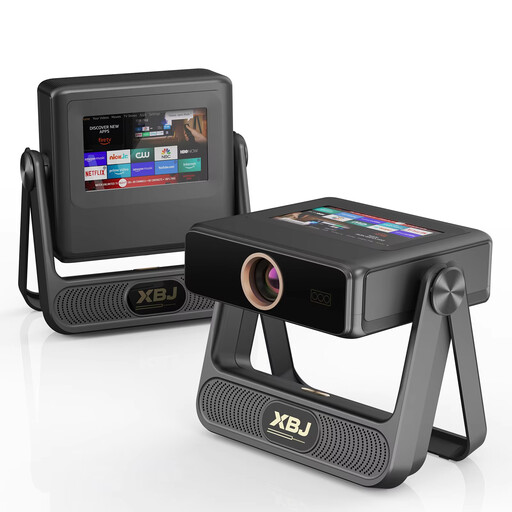
XBJ A5Pro Outdoor Smart Projector, Grey
Automatic focus and keystone correction may be useful if you change the projector setup, but they don’t alter the screen’s viewing angle.
The title lists native 1080P, 900 ANSI lumens, 4K decoding, Auto-Focus and Auto Keystone Correction.
Joybuy
 No image available
XGIMI MoGo 4 Portable Projector, Match Night EU Edition with EA SPORTS FC 26 Game Code
The portable design and built-in Harman Kardon audio suit anyone who wants to use the projector flexibly and play sound through the device.
The title lists Full HD 1080p, 450 ISO lumens and a 2.5-hour battery life.
Joybuy
 No image available
Projector with built-in apps, automatic screen correction and 180° rotation
Automatic screen correction and a rotating projector may be useful if you want flexibility when adjusting the projection direction. They don’t replace checking the screen’s viewing angle.
The title lists a screen size of 50–200 inches, digital zoom of 50%–100% and 180° rotation.
Joybuy
 No image available
N3 Max Smart Projector
The Dolby Audio feature and automatic focus and keystone correction listed may be useful if built-in sound and picture adjustment matter to you. Also check that the audio connections suit your equipment.
The title lists 1000 ISO lumens, a sealed optical engine, 4K Support, Native Netflix and VIDAA OS.
Joybuy
 No image available
XBJ TYYK8QBS Portable Projector
The portable design, rotating mount and built-in stereo speakers may suit a setup you want to adjust flexibly. Check picture correction and screen positioning separately.
The title lists native 1080P, a 360° rotating mount, automatic keystone correction, WiFi 6 + 5G and BT5.4.
Joybuy
Frequently asked questions
Do I need lens shift because I’m sitting away from the centre of the screen?
Not for that reason alone. First, check the viewing angle of your chosen screen material. Horizontal lens shift is useful when the projector itself needs to sit to one side of the screen.
Can I easily move a projector with automatic keystone correction?
Automatic correction can make it easier to realign the picture, but after moving the projector, check the projection distance, screen size and picture quality. Digital keystone correction isn’t optical lens shift and, according to BenQ, can affect picture sharpness and image size.
What should I look for in a soundbar for musical films?
Check the audio connections and supported formats of the projector, playback source and soundbar. BenQ lists eARC and a 3.5mm audio output for the W4100i; those specifications don’t automatically tell you what your playback source or soundbar supports.
How should I clean a screen used by people sitting at the side?
Follow the cleaning instructions for your chosen material. For CineGrey 3D, Elite Screens recommends a microfibre cloth and water; don’t assume the same advice applies to other screen materials.
Is a CE logo on a projector an independent quality mark?
No. According to the Dutch government, CE isn’t an independent quality mark; it indicates that the manufacturer declares the product complies with the applicable EU rules. Check the required marking and product information for the specific item.


