What should you look for when buying?
First, work out whether only you will be sitting off-centre, or whether the projector also needs to sit outside the screen axis. These two situations call for different checks: the screen’s viewing angle for your seat, and the projection geometry for the projector.
| What to consider |
What should you check? |
Who is this important for? |
| View from the side seat |
Compare the viewing angle or half-gain angle of the exact screen material with your seating position. Also check whether the stated viewing angle of an ALR screen suits your setup. |
If I watch from my usual side seat, I want to follow the details without sitting directly in front of the screen. Around 36% of consumers give the view from a side seat top priority. |
| Projector placement |
Measure the distance from the lens to the screen and how far off-centre it is. Check the throw ratio and both horizontal and vertical lens shift for the exact model. |
If the projector cannot sit on the screen axis, I want to know in advance whether the distance and lens shift will work in my room. For around 29% of consumers, placement is their main concern. |
| Picture with ambient light |
Consider the light output of the specific model alongside the screen material and viewing angle. A stated light output alone cannot predict how bright the image will look from your seat. |
If I also watch with the room lights on, I want the screen and projector to suit those conditions. Around 21% of consumers prioritise watching in ambient light. |
| Playback and ease of use |
Check the connections on the exact version, your playback device and the audio connection you want. Also check the light source type and any stated lifespan if that information is relevant. |
If playback convenience and practical considerations matter most, you’ll want to know whether you can connect the devices you plan to use. Around 14% of consumers give these practical points top priority. |
Projectors at Joybuy
These projectors are designed for home and video entertainment. If you plan to watch from a side seat, check the screen’s viewing angle separately, and make sure the distance and placement of your chosen model will work in your room.
 No image available
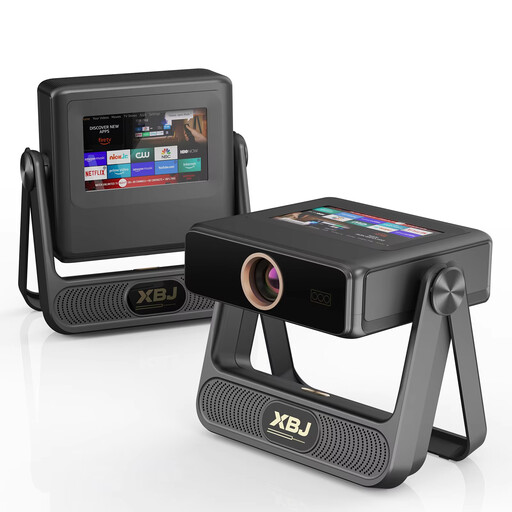
XBJ A5Pro Smart Projector, native 1080P
Worth considering if you need native 1080P and a connection for an external source; check the throw distance and screen viewing angle for your setup.
Native 1080P, 900 ANSI lumens, autofocus, automatic keystone correction, Wi-Fi 6 and HDMI compatibility.
View at Joybuy
 No image available
Video projector with built-in apps and 180° rotation
A good fit if built-in streaming apps or the ability to rotate the projector are part of your setup; also check the connections you need.
Wi-Fi 6, Bluetooth, automatic image correction and 180° rotation. Stated image size: 50–200 inches; digital zoom: 50%–100%.
View at Joybuy
 No image available
N3 Max Smart Projector
Worth comparing if you’re looking for native 1080P and streaming features; check that the connections and physical placement will work with your screen.
Native 1080P, 4K support, 1000 ISO lumens, autofocus and keystone correction. The product name mentions Netflix and VIDAA OS.
View at Joybuy
 No image available
XGIMI Elfin Flip mini laser projector
Consider this model if optical zoom and 1080P Full HD suit your placement plan; match the lens distance to your desired image width.
1080P Full HD, 1600 ISO lumens, RGB triple laser, optical zoom and automatic focus correction.
View at Joybuy
 No image available
Optoma Photon Beam PK52
Worth comparing if 4K UHD, optical zoom and two HDMI connections suit your playback setup; check the throw distance for your room.
4K UHD, 3500 lumens, DuraCore laser light source, 1.3× manual zoom and two HDMI 2.0 inputs. Stated throw distance: 1–8 m; image size: 28–300 inches.
View at Joybuy
Frequently asked questions
Do I need lens shift because I’m sitting in a side seat?
Not for that reason alone. Lens shift helps you adjust the position of the projected image; for your seat, the screen material’s viewing angle also matters. Look into lens shift particularly if the projector itself needs to sit outside the screen axis.
How can I check before installation that the image will fit on the screen?
Measure the distance from the projector lens to the screen, decide on your desired image width, then check the throw ratio, zoom and lens shift of the exact model. Use the model calculator or manual before choosing a fixed mounting position.
Can I use strong keystone correction instead of positioning the projector more accurately?
Keystone correction can adjust the image geometry, but BenQ notes that the adjustment can affect aspects such as the edge of the image and its sharpness. So first check the physical placement and any optical lens shift.
Who can help if my projector bought online develops a fault, and can I cancel the purchase?
According to the Dutch government, if a product is faulty, the seller must provide a solution; a manufacturer’s guarantee is in addition to your statutory rights. For distance purchases, you generally have a 14-day cooling-off period, subject to applicable exceptions and conditions.


