What should you look for?
First, distinguish between your viewing position and the projector’s position: these involve two different alignment questions.
| What to consider |
What should you check? |
Who is this important for? |
| Viewing from seats to the side |
Compare the seats at either end with the stated viewing angle for the exact material variant. Elite Screens specifies a total viewing angle of 90° for CineGrey 3D, but this figure applies to that material. |
If I’m watching from the ends of the sofa, I want to know whether the screen covers that viewing angle. Around 38% of consumers say visibility from side seats is their top priority. |
| Projector to one side of the screen’s centre line |
Measure the lens position, image width and distance; check both the horizontal and vertical shift range, and how the two work together. BenQ warns that greater keystone correction can affect sharpness and image size, among other things. |
If the projector has to sit off-centre, I want to know whether optical alignment will work in my set-up. Around 23% of consumers prioritise projector position. |
| Documentary detail and lighting |
Compare the stated resolution and brightness measurement basis with your source, screen material and room lighting. Also check that your playback device can be connected. |
If I want to see detail in documentaries in my room’s lighting, I compare the specifications with my source and screen. Around 23% of consumers say detail and ambient light are their top priority. |
| Limited space or a flexible set-up |
Check the throw ratio, required distance, zoom and compatibility with the exact screen variant. Automatic keystone correction or focus does not mean the projector has horizontal optical lens shift. |
If I have limited distance from the screen or move my set-up around, I first want to know whether the device will physically fit. Around 16% of consumers prioritise space or portability. |
Projectors at Joybuy
These projectors suit home cinema and documentary set-ups. Check each model’s positioning, specifications, connections and screen options to find what works in your room.
 No image available
Optoma UZ38X 4K UHD Dual-Laser projector
Worth comparing if 4K UHD resolution and connecting an external documentary source are important to you.
The product information lists 3,800 lumens, a throw ratio of 1,21:1–1,59:1, 1,3× manual zoom and two HDMI inputs. A screen and source device are not included.
View at Joybuy
 No image available
HP CC360 FHD Smart projector
Compare this model if you want to connect an external HDMI source and native Full HD is sufficient for your documentary content.
The product information lists native 1920 × 1080 resolution, 220 ANSI lumens and a throw ratio of 1,2.
View at Joybuy
 No image available
2026 Video Projector
Worth a closer look if you want flexible projection angles; check first that its positioning will work with your screen.
The product information lists HDMI compatibility, automatic image correction, digital zoom and 180° rotation.
View at Joybuy
 No image available
XGIMI AURA 2 UHD 4K Ultra Short Throw projector
A contender for a set-up where the projector needs to sit close to the screen; check that your room and screen are suitable.
The product name lists UHD 4K, ultra-short-throw, Dolby Vision and 2,300 ISO lumens.
View at Joybuy
 No image available
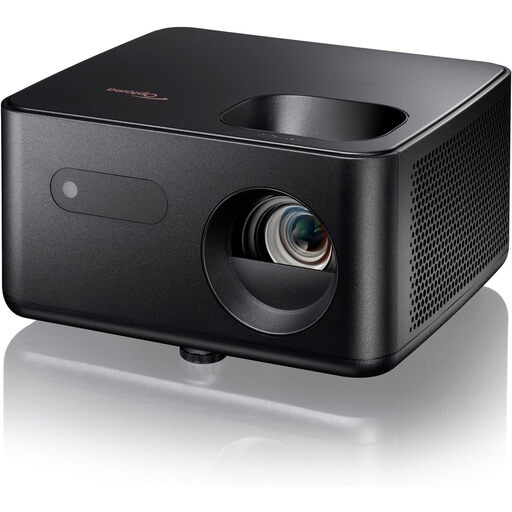
Optoma Photon Life PK31 projector
Compare this model with the other options, taking into account the positions your room allows.
Before buying, check the throw ratio, brightness and available connections for the exact model.
View at Joybuy
Frequently asked questions
Do I need lens shift because I’m sitting at an angle to the screen?
Not just because of where you’re sitting: check the viewing angle for the exact screen material. Horizontal lens shift is relevant if the projector itself needs to sit off-centre. Elite Screens gives CineGrey 3D a total viewing angle of 90°.
How can I check that the image will fit my screen before installation?
Measure the distance from the lens to the screen and your desired image width, then compare these with the model’s throw ratio. BenQ defines throw ratio as the projection distance divided by the image width. Check separately if you need horizontal shift.
Can I use automatic keystone correction instead of positioning the projector properly?
Automatic correction can align the image, but it does not mean the projector has horizontal optical lens shift. BenQ warns that greater keystone correction can affect sharpness and image size, among other things.
What should you consider when it comes to use, maintenance and extra equipment?
Check the light source and operating mode, connections, screen compatibility, and whether you need mounting or playback equipment. Epson specifies a lamp life of 5,000 hours in Eco mode for the EH-TW7000; this is not a fixed replacement date.
What are my rights when buying online in the Netherlands?
For distance purchases from a business, the Dutch government generally states a 14-day cooling-off period, subject to legal exceptions. There is no fixed statutory guarantee period in the Netherlands: the product must meet what you could reasonably expect. If something is wrong, contact the seller.


