Start by choosing a projector that can produce your desired image size from the available distance, and whose stated light output suits the amount of light in the room. Then compare the details of your documentary source, its handling of dark scenes, the connections and the sound. Specifications alone can’t predict what the picture will look like in your room.
Who is a projector suitable for?
For detailed images
If you want to watch nature, space and other science footage on a large screen, pay attention to the resolution of both the source and the projector, colour reproduction and detail in dark scenes. Epson Netherlands highlights resolution and brightness as key considerations when choosing.
For a bright living room
Can’t always darken the room, and want to weigh light output against image size and the visibility of dark scenes? Epson Netherlands highlights brightness and screen size as key considerations when choosing.
For limited space
Want a large image, but need to work out what projection distance, image width and screen position are practical at home? BenQ Netherlands points out that screen size and projection distance need to be considered together.
What should you look for when choosing one?
First measure the available projection distance and image width. Then compare the lighting conditions, image detail, connections and sound with your viewing setup.
| What to consider |
What to look for when buying |
Who is this important for? |
| Detail, colour and dark scenes |
Check the output resolution of both the source and the projector. Compare colour and picture settings with the source format and lighting conditions. |
When I watch nature or space footage on a large screen, I want to make out fine details and follow dark scenes clearly; around 28% of consumers prioritise detail, colour and shadow reproduction. |
| Visibility in ambient light |
Note how much light falls on the screen, and only compare light output figures when the unit of measurement and basis are clear. |
When I can’t always darken the room, I want to know how easy it is to watch in that space; around 22% of consumers give visibility in ambient light top priority. |
| Image size and positioning |
Measure the distance from the lens to the screen and the available image width. Check the throw ratio, zoom and lens shift of the exact model. |
If the projector can’t go at the back of the room, I need to find a practical image size from the space I do have; around 22% of consumers prioritise positioning and image size. |
| Dialogue and source connections |
Check the connections on both the projector and player, and make sure the audio connection suits your preferred sound setup. |
I want to follow the spoken commentary clearly and connect my documentary source without any fuss; around 17% of consumers give sound and source connections top priority. |
| Light source and long-term use |
Compare the type of light source, the conditions attached to its stated lifespan and the fan noise in each operating mode. |
If I watch often, I want to know in advance what maintenance the light source and operating modes involve; around 11% of consumers prioritise long-term use. |
Common buying mistakes
-
Assuming ‘supports 4K’ means 4K output
Support for an input signal and the stated output resolution are two different things. So, a 4K input specification alone doesn’t tell you what resolution the projector actually displays.
Check the output resolution of the exact model, as well as the resolution of your documentary source.
-
Choosing a screen size without measuring the distance
The image size you can achieve depends on the throw ratio, distance and available image width. A large advertised screen size doesn’t guarantee that it will fit in your room.
Measure the distance from the lens to the screen and compare it with the projection details for the exact model, including the intended positioning.
-
Directly comparing light output figures with different labels
A figure without the same measurement basis tells you little about how visible images will be in your room. Ambient light can also affect how well you can watch dark scenes.
Check the unit and measurement basis for each model, and assess the picture settings in the conditions in which you’ll be watching.
-
Choosing an ultra-short-throw projector without considering the screen
For the Samsung The Premiere 7, Samsung recommends a dedicated ultra-short-throw screen for the best viewing experience. The screen setup may therefore need to be part of your decision.
Compare the complete setup, including a suitable projection surface, before choosing this option.
A suitable ultra-short-throw screen may be an additional purchase.
Brands to consider
Epson
The EH-TW7100 is a home cinema model for a fixed setup where optical adjustment features may be useful.
- According to Epson, the EH-TW7100 has lens shift, optical zoom and two HDMI ports.
- Check that the projection distance works for your room, and review the conditions attached to the stated lamp life.
BenQ
The W2720i is a home cinema model with stated 4K UHD output and connections to compare with your setup.
- BenQ specifies 4K UHD output, 2500 ANSI lumens and eARC for the W2720i.
- The stated throw ratio of 1.0–1.3 needs to suit the distance in your room; figures alone can’t predict the picture you’ll get.
Samsung
The Premiere 7 is an ultra-short-throw model designed to sit close to the projection wall.
- Samsung highlights short-distance projection and integrated sound for this model.
- Samsung recommends a dedicated ultra-short-throw screen for the best viewing experience, so check that the screen setup will work for you.
JMGO
According to the manufacturer, the N1S Ultra is a portable 4K laser projector with flexible positioning and smart features.
- JMGO’s official product support lists Google TV, autofocus, HDMI connections and a 1.2:1 throw ratio.
- Check the exact version and light output of the model on offer before comparing it with the manufacturer’s specifications.
Optoma
The UHD38x is a 4K UHD model that Optoma also positions for home entertainment.
- Optoma Europe lists a lamp, two HDMI 2.0 inputs and a 1.5–1.66:1 throw ratio for the UHD38x.
- Check that the available distance is suitable, and review the lamp details for the operating mode you plan to use.
Projectors on Joybuy
These projectors are options for a home cinema setup where you can match the image size to the available projection distance and compare connections with your documentary source.
 No image available
Optoma UZ38X 4K UHD Dual-Laser Projector
An option for a fixed setup where you want to match the image size to the available distance.
The product description lists 4K UHD, 3,800 lumens, two HDMI inputs and 1.3× zoom. The throw ratio is 1.21:1–1.59:1; check that the lens distance is suitable.
Joybuy
 No image available
JMGO N1S Ultra 4K Triple Laser UHD Projector
An adjustable projector to consider if you want to adapt the setup to the space available.
The product description lists 4K UHD, 3,000 ANSI lumens, HDMI connections and automatic keystone correction. The throw ratio is 1.2:1; check the distance needed for your desired image size.
Joybuy
 No image available
Optoma Photon Beam PK52
An option for a fixed setup with several connections for external sources.
The product description lists 4K UHD (3840 × 2160), 3,500 lumens, two HDMI inputs and 1.3× zoom. The throw ratio is 1.21:1–1.59:1; measure the lens distance and desired image width.
Joybuy
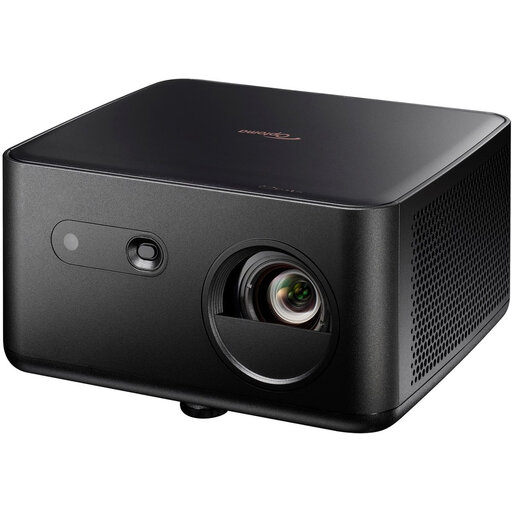 No image available
Optoma Photon Life PK32 4K UHD Projector
An option to consider if you’re looking for 4K UHD and an eARC audio connection.
The product description lists 1,100 ISO lumens, HDR10/HLG, a 4LED light source and two HDMI 2.0 inputs with eARC. The throw ratio is 1.12:1–1.46:1; check the distance and image size.
Joybuy
 No image available
BenQ TK700 Standard Throw Projector
An option for a fixed setup if the model suits the projection distance available.
The product description lists 4K UHD (3840 × 2160), 3,200 ANSI lumens, HDR10/HLG and 1.3× zoom. The minimum installation distance is 1.5 metres; bear this in mind when measuring.
Joybuy
Frequently asked questions
How can you tell whether a projector can produce a large enough image?
Measure the distance from the lens to the screen and the available image width. Compare these measurements with the throw ratio, zoom and positioning instructions for the exact model; the maximum advertised screen diagonal alone isn’t enough.
Do you always need 4K for a science documentary?
No, Full HD is also worth considering. 4K matters most with a large screen and a source that has sufficient detail. Check the actual output of both the player and the projector, not just whether 4K is supported as an input signal.
How can you reduce noise or maintenance while watching?
Compare fan noise and the stated lifespan for each operating mode. If your projector is noisy, BenQ recommends ECO mode and says it can extend the light source’s life; check that the picture is bright enough for your room in this mode. Follow your model’s manual for cleaning and ventilation.
What are your rights if a projector bought online isn’t suitable?
For many online distance purchases from a business, you have a 14-day cooling-off period; check the terms that apply to your purchase. The Dutch government also states that there is a statutory guarantee in the Netherlands, with no fixed general guarantee period. If a product is faulty, contact the seller to discuss a suitable solution.


