
Viewers with limited projection depth
You want to watch a rugby match on a bigger screen, but have limited space between the projector and the wall. The throw ratio and placement options will determine which models are suitable.


First, measure the distance from the lens to the wall and the available wall width. Then choose between short-throw and ultra-short-throw projection. Match the brightness to how much light you can block out during the match, and check in advance how your specific live broadcast will look on the projector. BenQ and Epson model specifications provide concrete distances and image sizes to help with your calculations, but they can’t tell you exactly how the picture will look in your room.
You want to watch a rugby match on a bigger screen, but have limited space between the projector and the wall. The throw ratio and placement options will determine which models are suitable.
You don’t always watch in a completely dark room. You’ll therefore want to know how the brightness compares with the ambient light and your preferred image size.
You want to watch the picture and commentary through your own TV or streaming source during the match. The right connection and access to the specific broadcast are important.
First, measure the available wall width and projection distance. Then assess the ambient light and the connection you’ll need for your match source.
| What to consider | What should you check? | Who is this important for? |
|---|---|---|
| Picture and seating area | Measure the wall width and the possible distance from the lens to the wall. Compare these with the throw ratio and image size of the exact model. | If I have limited depth, I want to know whether the image I want will fit without the projector getting in the way or blocking the viewing line. This is the main buying concern for around 29% of consumers. |
| Light in the room | Match the stated brightness to your preferred image size and how much ambient light you can block out. | If I can’t make the room completely dark, I want to avoid the match picture becoming hard to see. Watching in the available light is the main buying concern for around 23% of consumers. |
| Fast-paced action | Check which motion features the exact model has, and test the picture with your own match source. Don’t base your choice on a resolution label alone. | If I want to follow fast-moving action clearly, I look at motion handling as well as resolution. This is a top priority for around 18% of consumers. |
| Live broadcast | Check whether the specific service is available on the device, or use a suitable external source via HDMI. | I want to know before the match whether my own source will work, not just whether the projector has an app or a connection. Access to the live broadcast is the main buying concern for around 18% of consumers. |
| Complete setup | Take stock of your wall, audio equipment and match source. Check which connections and accessories will work with your setup for each model. | If I want to plan the whole setup, I also consider what I already have and what I still need. This is the main buying concern for around 12% of consumers. |
The stated image size alone doesn’t tell you whether the projector will work at the distance available in your room.
Measure the wall width and the possible distance from the lens to the wall, then compare them with the specifications for the exact model.
Room lighting and motion handling are separate considerations. A specification won’t necessarily predict how a rugby match will look in your room.
Only compare brightness when it’s measured on the same basis, and check the motion features of the model you’re considering.
Philips’ product information and a Joybuy listing give different resolutions and maximum image sizes for the Philips NeoPix 230. This could lead you to expect the wrong level of sharpness or image size.
Check the model code and key specifications with Philips, and ask the seller to clarify before placing your order.
The TK705STi is a short-throw model worth considering if you can leave some space between the projector and the wall in a compact room.
The EH-LS800B and EH-TW7000 are examples of different home cinema setups: ultra-short-throw projection versus greater flexibility in where you place the projector.
The GT3500HDR is an ultra-short-throw laser projector that Optoma also positions for live sport.
The NeoPix 230 Smart is a compact projector with a rotating stand and built-in apps, giving you flexible placement if you usually watch in a darkened room.
This selection includes portable projectors and a short-throw model. For each device, check whether the projection distance and connection for your match source will work in your room.
 No image available
This portable model has a built-in battery, making it a good option if you want to move the projector around.
The title lists 720P, autofocus, a 10400mAh battery and 4K support; 4K is not the stated native resolution. Dual WiFi and Bluetooth 5.0 are also listed.
 No image available
This short-throw model may suit you if you have limited projection depth. Check the distance needed for your preferred image size.
The product specifications list WXGA, a throw ratio of 0,52:1, 3.800 ANSI lumens, a sports mode, HDMI and a built-in speaker. The stated native resolution is WXGA.
 No image available
This portable model has HDMI, so you can connect an external match source. Check separately that the source gives you access to the broadcast you want.
The product information lists native 1080p, 700 ANSI lumens, autofocus and automatic keystone correction.
 No image available
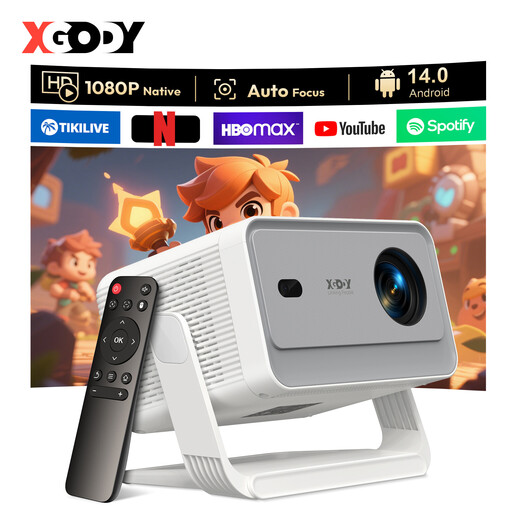
This portable model has HDMI for connecting an external match source. Check that the service and source you choose are suitable for how you plan to use it.
The product information lists native 1080p, 650 ANSI lumens, Android 14.0, autofocus and automatic keystone correction.
 No image available
The HDMI connection lets you use an external source. Check whether the specific match is available through that source.
The product information lists native 1080p, 220 ANSI lumens, autofocus and keystone correction. Wireless screen mirroring and pre-installed streaming apps are also mentioned.
Measure the available wall width and the possible distance from the lens to the wall. Compare these with the throw ratio and image size of the exact model. The words ‘short throw’ alone aren’t enough to determine where you can place it.
No, you can also connect a suitable external receiver or streaming device via HDMI. Do check that you can watch your specific match through the service and device you choose; this isn’t guaranteed by the projector’s features.
Follow the instructions for your chosen model on placement, cleaning and any consumable parts. Optoma lists a laser light source for the GT3500HDR, while Epson lists a lamp with a stated lifespan in Eco mode for the EH-TW7000. These are different maintenance considerations, not a guarantee of how long the projector will last.
Online consumer purchases generally come with a 14-day cooling-off period from delivery, although there are exceptions. This is separate from your statutory rights if a product doesn’t perform as you could reasonably expect under normal use. ACM ConsuWijzer explains that the seller must resolve the issue in line with the applicable terms.
Ondernemersplein states that a business or organisation showing TV pictures to employees or guests needs a licence. For the specific event, also check the terms that apply to the broadcast.