Start by measuring the distance between your seat and the screen. Choose an image size that makes the subtitles easy to read, then check whether the projector can produce that size from the space available. In a bright room, ambient light and light control matter more; in a darkened room, you can focus more on image definition and flexible positioning. A higher resolution won’t automatically make subtitles larger.
Who is this relevant for?
Viewers reading subtitles from a distance
You sit a long way from the screen and want to follow the dialogue easily. Choose the image size based on where you sit, not the maximum diagonal shown on the box. Epson Netherlands and NPO explain why viewing distance and subtitles matter.
Drama fans in a bright living room
You don’t want to, or can’t, darken the room completely every time you watch. So consider ambient light, brightness and the projection surface. BenQ Netherlands and Epson Netherlands explain the factors to weigh up.
Viewers with limited space for positioning
You want a large, easy-to-read image, but the projector can’t necessarily sit at the back of the room. Compare the lens-to-screen distance with the throw ratio of the exact model. BenQ Netherlands covers positioning and image alignment in its guide to living room projectors.
What should you look for?
First, work out what image size you can comfortably read from your seat. Then check whether the projector can produce it from your planned position, and consider the ambient light and equipment you’ll need.
| What to consider |
What to look for |
Who is this important for? |
| Readable subtitles |
Measure the distance from your seat to the screen and the available screen width. Check the text at your intended image size using your own video source. |
If you want to follow dialogue from a seat further away, the image size needs to work for you and fit the room. Around 40% of consumers say readability is their main concern. |
| Ambient light |
Consider how dark the room really is when you watch. Compare brightness only when you know how it was measured. |
If you don’t want to darken the room every time, you’ll want to know how the image looks in the available light. Around 23% of consumers prioritise visibility in ambient light. |
| Projection distance and positioning |
Measure the lens-to-screen distance, available screen width and mounting position. Check the throw ratio and any zoom on the exact model. |
If the projector can’t go at the back of the room, you’ll need to be able to get the image size you want from another position. Around 23% of consumers make positioning their top priority. |
| Connections and usage |
Check which HDMI connections and playback devices you’ll need, and look at the information on the light source and warranty terms. |
If you want to tailor the whole setup to your playback source and long-term use, you’ll also need to consider equipment and maintenance. Around 14% of consumers make their overall setup their main priority. |
Common buying mistakes
-
Confusing projection distance with viewing distance
The distance between the projector and the screen partly determines how wide the image can be. The distance between you and the screen determines where you’ll be watching the subtitles from.
Measure these distances separately before choosing a screen size or model.
An unsuitable position may mean you need a different setup or mounting arrangement.
-
Looking only at the maximum image diagonal or lumen rating
A large image also needs to suit the room, projection surface and available light. Lumen ratings aren’t necessarily comparable if they’re based on different measurement methods.
Compare brightness with the measurement method in mind, and assess your intended image size in your own viewing conditions.
Depending on the room, you may need to darken it or use a suitable projection screen.
-
Assuming the manufacturer’s warranty covers all your statutory rights
According to ACM ConsuWijzer, your statutory guarantee is separate from a manufacturer’s warranty, which is offered by the manufacturer itself.
Keep your proof of purchase and contact the seller if the product is faulty.
Brands to consider
Epson
Epson offers home projectors positioned as Full HD and 4K PRO-UHD, including the EH-TW840 and EH-TW6250.
- Epson says the EH-TW840 has a white and colour light output of 4,000 lumens and two HDMI ports. The EH-TW6250 is listed with 2,800 lumens and 1.6× zoom.
- These are specifications for different models, not the result of a comparative test. On their own, they don’t prove that subtitles will be readable from your seat.
BenQ
BenQ offers home cinema and living room projectors, including the TK705i, which BenQ lists as 4K UHD.
- According to BenQ, the TK705i has a throw ratio of 1.0–1.3:1, which helps you work out what image size you can get from a given distance.
- BenQ points out that ambient light and installation position matter. The listed specifications aren’t an independent assessment of subtitle readability.
XGIMI
XGIMI offers models with flexible positioning, including the HORIZON S Pro.
- XGIMI lists a throw ratio of 1.2:1 for the HORIZON S series and an adjustable stand for the HORIZON S Pro.
- The HORIZON S Pro’s stated 1,800 ISO lumens aren’t automatically measured on the same basis as other lumen ratings. Check the unit of measurement and consider the room you’ll be watching in.
Joybuy products
This Joybuy selection features projectors to help you match the available projection distance to your preferred image size. For each model, check that the listed features suit your viewing distance, room and playback source.
 No image available
Optoma H117ST WXGA projector
The listed throw ratio makes this model worth considering if the projector needs to sit close to the screen.
WXGA resolution; 3,800 ANSI lumens; 0.52:1 throw ratio; image range 0.91–7.7 m diagonal.
View at Joybuy
 No image available
Yaber L2 projector
The listed throw ratio can help you check whether the projector can produce your preferred image size from the available distance.
Native 1080P; 520 ISO lumens; 1.17:1 throw ratio; stated screen size 40–150 inches.
View at Joybuy
 No image available
XGODY N7 Cine Smart Projector
The stated throw ratio is useful when matching the projector position to your preferred image size.
Native 1080P; 1,000 ANSI lumens; 1.1:1 throw ratio; image size up to 140 inches.
View at Joybuy
 No image available
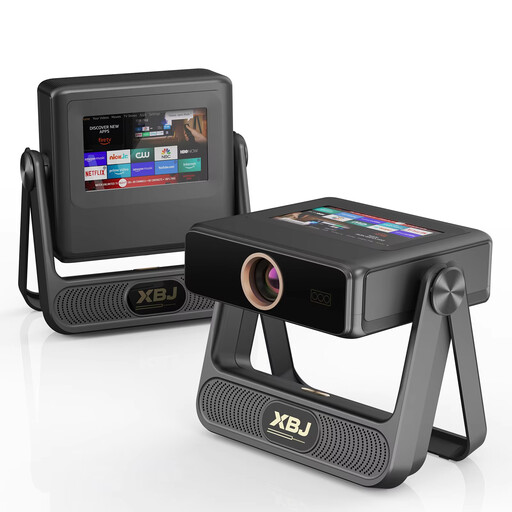
XBJ A5Pro projector
Compare the stated maximum image size with the distance from your seat. A maximum diagonal alone doesn’t tell you whether subtitles will be readable.
Native 1080P; 900 ANSI lumens; image size up to 300 inches.
View at Joybuy
 No image available
HP CC360 FHD Smart Projector
The stated throw ratio and example image size help you check whether the model suits the available installation distance.
Native 1080P; 220 ANSI lumens; 1.2 throw ratio; stated image size of 80 inches at 2.1 m.
View at Joybuy
Frequently asked questions
Are 4K and a large maximum image diagonal enough to make subtitles readable?
No. Choose an image size based on where you sit, then check the subtitles from the playback source you use. After that, make sure the projection distance and screen width allow for that size.
Where do I turn on subtitles?
It depends on your playback source. NPO, for example, explains how to find the settings in its player or app. A projector can’t guarantee that every programme or streaming service offers subtitles.
What should I consider when mounting a projector on the ceiling?
Check the mounting position, any lens shift and the instructions for the exact model. BenQ explains that lens shift can help position the image; check which features your model actually has.
What are my rights when buying online or if a product is faulty in the Netherlands?
According to ACM ConsuWijzer, online purchases generally come with a cooling-off period of up to 14 days after delivery, subject to legal exceptions. Your statutory guarantee is separate from a manufacturer’s warranty. If a product doesn’t meet reasonable expectations, contact the seller.


