What should you look for when choosing?
Start with the viewing light and the distance between the lens and screen. Then check whether text is readable from the back row and whether your chosen source can play the quiz programme.
| What to consider |
What to look for when buying |
Who is this important for? |
| Readable quiz text |
Compare the stated brightness with its unit of measurement, your desired image size and the amount of light on the screen. If possible, assess the text from the back row. |
If quiz questions need to remain visible while the room is lit, you’ll want to be able to read the text clearly from your seat. Around 28% of consumers say readability in ambient light is their top priority. |
| Image size and distance |
Measure the distance from the intended lens position to the wall and the available wall width. Check the throw ratio of the exact model. |
If the projector needs to be close to the wall, you’ll want to know in advance whether you can achieve the desired image width. Around 22% of consumers prioritise a setup that fits their space. |
| Access to the broadcast |
Check the channel or service, how you’ll receive it, the connection you need and whether that combination works with the projector or receiver. |
You’ll want to play the right quiz programme through an available viewing service or TV receiver. Around 22% of consumers put access to the right broadcast first. |
| Clear sound |
Check the audio output or compatible wireless connection, and listen to see whether the sound is clear from the furthest seat. |
If everyone needs to follow the questions and presentation, you’ll want the sound to be clear throughout the room. Around 17% of consumers prioritise sound that everyone can hear clearly. |
| Use and maintenance |
Check the light source type, model-specific maintenance information and any equipment needed for reception or sound. |
If you’re planning several quiz nights, you’ll want to know what’s involved in using and maintaining your setup. Around 11% of consumers focus mainly on running costs and maintenance. |
Projectors at Joybuy
These models are projector options for home entertainment and quiz viewing. Check each model to make sure its setup, lighting requirements and reception options suit your space and broadcast.
 No image available
XGODY N7 Cine Smart Projector
Could suit a setup with an external receiver; check whether the broadcast you want is available through that option.
Native 1080p and 1.000 ANSI lumens. HDMI connection; throw ratio of 1,1:1. The product name also mentions 4K support, not native 4K resolution.
View at Joybuy
 No image available
XGODY Gimbal N6 Pro Portable Projector
A portable smart projector to consider for a setup you can move around; check that its brightness suits the lighting in your room.
Native 1080p and 700 ANSI lumens. HDMI connection, Wi-Fi 6, Bluetooth 5.4 and built-in 5 W stereo speakers.
View at Joybuy
 No image available
XGIMI MoGo 4 Portable Projector, Match Night EU Edition (EA SPORTS FC 26 Game Code)
The built-in battery and portable design could suit a setup you move around; check separately whether the live broadcast you want is available.
Full HD 1080p and 450 ISO lumens; don’t compare this ISO rating directly with ANSI lumens. Google TV, built-in battery and two 6 W Harman Kardon speakers.
View at Joybuy
 No image available
N3 Max Smart Projector
Could suit a smart setup; check whether the channel or viewing service you want is available through the built-in platform.
Native Netflix and VIDAA OS. Brightness is listed as 1.000 ISO lumens; don’t compare this directly with ANSI lumens. The description mentions autofocus and automatic keystone correction.
View at Joybuy
 No image available
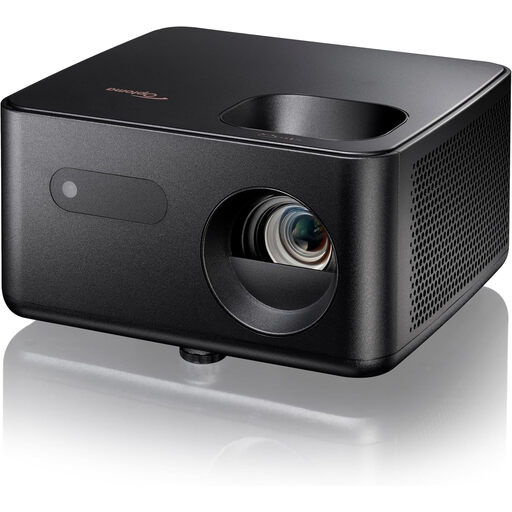
Optoma Photon Life PH31
A Full HD projector to consider if you want to connect an external video source; check readability in relation to the room and light on the screen.
1080p Full HD and HDMI input. Brightness is listed as 1.500 lumens, without an ANSI measurement unit. The description mentions automatic vertical keystone correction and a built-in 5 W speaker.
View at Joybuy
Frequently asked questions
How can you check in advance whether the projector will fit in the right place?
Measure the distance from the planned lens position to the wall and work out the available image width. Compare this with the throw ratio or distance table for the exact model; BenQ Netherlands explains that throw distance is a factor when planning the image.
Can you automatically watch a live quiz programme with a built-in streaming app?
No. Check which channel or service the programme is available on, and whether your subscription, projector or connected receiver supports that option. A licence for group screenings doesn’t provide a TV signal by itself.
Are group quiz screenings automatically permitted in the Netherlands?
Not simply because the space is shared; the nature of the screening is what matters. Videma explains that permission is required to show TV programmes commercially to third parties, notes that an event licence may be needed for event-style screenings, and highlights separate music and signal rights. Before organising a screening, establish which situation and channel apply.
What rights do you have when you buy a projector online?
For a standard online consumer purchase, you’ll generally have a statutory 14-day cooling-off period after delivery, although exceptions may apply. ACM ConsuWijzer also states that the statutory guarantee applies alongside any seller’s guarantee: with normal use, the product must do what you could reasonably expect of it.


