
Workshop host with a film on USB
You want the film to play without any issues. So, check the storage format and video and audio codecs supported by the exact model. BenQ Netherlands points out that audio codecs aren’t always supported.


Start by deciding how you’ll play the video. Play a local file directly only if the manual for the exact model confirms support for its storage format and video and audio codecs. Otherwise, connect a laptop or media player via HDMI. Choose a brightness level suited to the workshop lighting and measure the distance to the wall: a quoted light output or throw ratio doesn’t guarantee a clear picture in your space. Also check that everyone can hear the spoken instructions, and make sure you have permission to show the film.
You want the film to play without any issues. So, check the storage format and video and audio codecs supported by the exact model. BenQ Netherlands points out that audio codecs aren’t always supported.
You want the demonstration to remain visible while the work lights are on. According to Epson Netherlands, your viewing environment is one of the factors to consider when choosing brightness.
You need to place the projector close to the wall or move it regularly. Measure the distance and compare it with the throw ratio of the exact model. ViewSonic says the M2e weighs 1.0 kg.
A good fit if: you want to work without a laptop and the manual for your chosen model confirms support for your storage format and video codecs.
Bear in mind: a USB port or file reader alone doesn’t confirm that both the picture and sound will work with your film.
A good fit if: you want to play the file on a separate device, for example if direct playback hasn’t been confirmed.
Bear in mind: you’ll need an extra device and compatible connections. Also check how you’ll make the sound audible throughout the workshop space.
| What to consider | What should you check? | Who should pay particular attention? |
|---|---|---|
| Video file playback | For the exact model, check USB playback, storage format and video and audio codecs. Test the entire film with sound beforehand. | If I want to work without an extra player, I need to know whether my own file will play from start to finish. Around 33% of consumers prioritise reliable playback of a local video. |
| Visibility under work lights | Note which lights will stay on during the film and compare the quoted brightness at your desired picture size. | If the work lights can’t be switched off, I want participants to be able to follow the picture. Around 27% of consumers prioritise visibility in a lit room. |
| Projection distance and placement | Measure the distance between the lens and the wall and decide on your preferred picture width. Compare these measurements with the model’s throw ratio. | If the projector needs to be close to the wall or moved between workshops, I want to be able to set it up in a suitable position. Around 20% of consumers give placement and distance top priority. |
| Audible instructions | Check the audio outputs and test the sound from the back of the room while the usual workshop activities are taking place. | For an instructional film, I want participants to hear the spoken instructions, not just see the picture. Around 20% of consumers prioritise clear speech. |
A USB connection may be for power or servicing. Even if a projector can read files, it may not support your film’s audio codec.
Check the port’s function and the codecs supported by the exact model. Test the entire film with sound before taking the projector to the workshop.
If the file won’t play directly, you may need an external player.
How useful the quoted brightness will be depends on the ambient light and picture size. The projector also needs to be able to create your preferred picture from the available position.
Measure the distance to the wall, decide on your preferred picture width and assess the image with the lights that will actually be on during the screening.
You may need a different position, screen size or blackout solution.
BenQ has announced a recall of the GV31 due to a risk of the battery overheating.
Do not use a GV31. Follow BenQ’s recall instructions.
The models mentioned suit different set-ups: the GV50 for portable use, and the TK710 variants for an HDMI source and a higher quoted light output.
The M2e is worth considering if you want to open local files and move the projector around.
Epson offers models for different viewing environments. According to Epson Netherlands, ambient light is one of the factors to consider when choosing brightness.
The NeoPix 100 shows why a media player and a USB connection need to be assessed separately.
The Elfin Flip 4K is worth considering for a portable set-up where optical zoom could be useful.
The M2 Pro is worth looking at if you’re comparing projectors with optical zoom.
These projectors are suited to showing films from an external HDMI source or to portable set-ups. Check how each model plays video, the space available and the picture size you need.
 No image available
The HDMI input lets you connect a laptop or media player. Its short throw ratio is useful if the projector needs to be close to the wall.
WXGA resolution; 3800 ANSI lumens; throw ratio 0.52:1; built-in 10 W speaker.
The USB-A connection is described as a power output. Use HDMI to connect an external playback device.
 No image available
Its portable design and rotating set-up are useful if the projector needs to be positioned in different places around the workshop.
Native 1080P; 1000 ANSI lumens; 360° rotating design.
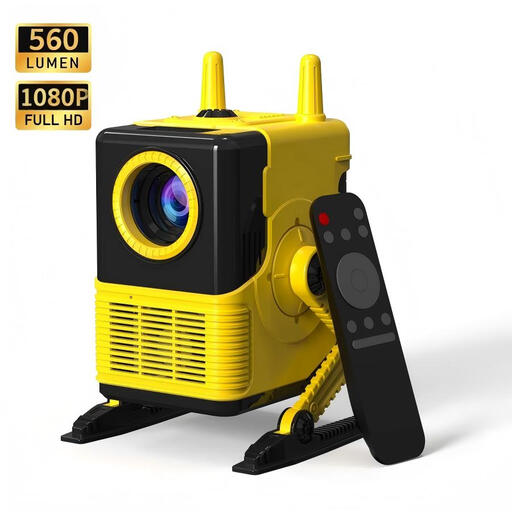 No image available
The HDMI connection lets you connect an external player. Beforehand, check that the projector can produce your preferred picture size from where you plan to set it up.
1080P support; 560 lumens; HDMI and USB connections.
 No image available
The built-in battery and speakers are listed features for a portable set-up. Check whether its available brightness suits the lighting in your workshop.
Full HD 1080p; 450 ISO lumens; built-in battery and speakers.
 No image available
The HDMI connection lets you use an external playback device. The rotating body may also be useful if you need to adjust the projection direction.
Wi-Fi 6; Bluetooth; 180° rotation; HDMI connection.
Not based on the USB or MP4 label alone. Check USB playback, the storage format and video and audio codecs for the exact model. BenQ Netherlands explains that a file extension alone doesn’t guarantee audio support, so test the entire file beforehand.
Measure the distance from the lens to the wall and decide on your preferred picture width. Compare these measurements with the model’s throw ratio. Also make a backup and test the film with sound. ViewSonic recommends making a backup for the M2e, as USB storage isn’t always recognised.
Check whether you have the necessary rights or permission for the screening you’re planning. The Dutch Government says that a private copy of protected material can’t simply be made public. This doesn’t mean that every screening at a private workshop automatically does or doesn’t count as making it public. If an organisation films identifiable participants or processes footage of them, privacy rules may also apply, as explained by the Dutch Data Protection Authority.
No. BenQ is asking GV31 owners to stop using the projector immediately due to a risk of the battery overheating, and to follow the recall instructions.