If you regularly present in daylight, choose a presentation projector with a brightness suited to the ambient light and the image size you need. A short throw distance can help when space is limited, while a compact model makes more sense if you often carry your projector around. Manufacturer specifications cannot guarantee that colours and fine details will be clearly visible in your room, so check your own files in similar conditions.
Who is this choice relevant to?
Portfolio presenter in a bright room
You want images and small annotations to remain visible during the day. Match the brightness to the screen size and ambient light; Epson Netherlands and ViewSonic Europe provide model-specific figures to help you do this.
Design student looking to discuss colour
You show illustrations, photography or colour choices and want to know whether a claim about colour says anything about your projector’s accuracy and picture mode. BenQ Netherlands distinguishes between colour gamut and colour accuracy in its information.
Student who moves between presentation rooms
You need to carry your projector around or have limited distance from the wall. In that case, portability and throw ratio may matter more than achieving the largest possible image; Epson Netherlands and Optoma Europe describe models suited to a range of these situations.
What should you look for when choosing?
| Consideration |
What to look for |
Who it matters most to |
| Visibility in daylight |
Match the brightness to the ambient light and image size; assess the picture in a similarly lit room. |
If I want to show portfolio images and small annotations during the day, visibility in the room comes first. Around 29% of consumers rank daylight visibility as their top priority. |
| Colour and detail |
Check the native resolution and model-specific colour information; view your own files in the picture mode you intend to use. |
When colour blocks, photography or fine linework matter, I want to be able to discuss those details at the intended image size. For around 23% of consumers, colour and detail are the top priority. |
| Throw distance |
Measure the distance from the lens to the screen and the image width you want; compare these with the exact model’s throw ratio. |
If there’s little space between the projector and screen, I need to be able to achieve the desired image width from that position. A suitable throw distance is the top priority for around 18% of consumers. |
| Portability |
Check the size, weight, power requirements and cables you’ll need to carry; also consider the native resolution. |
If I regularly take the projector between rooms, I want to weigh the carrying load against the sharpness my portfolio needs. Around 18% of consumers give portability their highest priority. |
| Light source and maintenance |
Compare the light source and its stated lifespan under the specified mode; check the warranty terms and replacement parts. |
If I use the projector occasionally, I want to know what maintenance the chosen light source requires. Light source and maintenance come top for around 12% of consumers. |
Buying pitfalls
-
Choosing based only on the highest lumen rating
A stated brightness rating on its own doesn’t tell you how accurately colours will be reproduced or how clearly the image will remain visible at your chosen size and in your ambient light.
First, assess the lighting conditions and the image size you want. Then check your own images and text in similar conditions.
-
Assuming a wide colour gamut proves colour accuracy
BenQ Netherlands treats colour gamut and colour accuracy as separate properties. A calibration statement for the W2720i does not automatically apply to other models or picture modes.
Look for information on the exact model and picture mode; ask for a practical test if colour assessment is crucial.
-
Measuring the throw distance only after you buy
Short-throw models have different throw ratios from models designed for longer setups. The ratio helps determine whether you can achieve the desired image width at the available distance.
Measure the space and calculate the throw ratio for the exact model before choosing.
You may need to adjust the setup or choose a suitable screen.
-
Confusing the manufacturer’s warranty with your full statutory protection
ACM ConsuWijzer explains that statutory warranty in the Netherlands has no fixed term and does not automatically end when a commercial warranty expires.
Keep your proof of purchase and warranty terms. If a consumer product is faulty, contact the seller.
Brands to consider
Epson
Epson Netherlands describes the EB-FH54 as a Full HD presentation model and the more compact EB-1780W as a WXGA model designed for portability.
- Epson rates the EB-FH54 at up to 4.100 lumens. For the EB-1780W, Epson states a white and colour light output of 3.000 lumens.
- The EB-1780W is WXGA, not Full HD. These product specifications alone don’t prove that colours will be accurate in your portfolio setup.
BenQ
According to BenQ, the LH600ST+ offers a short throw distance. The W2720i is a separate model for which BenQ provides a factory calibration report.
- BenQ specifies a throw ratio of 0,69–0,83:1 and 3.000 lumens for the LH600ST+.
- The calibration statement for the W2720i does not automatically apply to the LH600ST+ or other BenQ projectors.
Optoma
Optoma Europe describes the ZH350ST as a compact Full HD laser projector with a short throw distance.
- Optoma specifies 3.500 lumens and a throw ratio of 0,496:1; the stated lifespan of the laser light source is 30.000 hours.
- These manufacturer figures are not a practical test of daylight visibility or colour accuracy.
ViewSonic
ViewSonic Europe positions the LS740HD as a Full HD laser projector for installation, including in educational spaces.
- ViewSonic states 5.000 ANSI lumens, a light source lifespan of up to 30.000 hours and 1,3× optical zoom.
- The stated figures alone don’t determine how portfolio colours will look with your screen and ambient light.
Joybuy projectors for portfolio presentations
These Joybuy projectors cover different aspects of your choice, including image detail, portability and setup flexibility. Check that the required CE marking and EU declaration of conformity are available for the exact model.
 Image unavailable
Optoma UZ38X 4K UHD Dual-Laser Projector
The stated native 4K UHD resolution may be useful if you want to show fine details in your portfolio.
The product description states 3.800 lumens, 1,3× optical zoom and horizontal and vertical keystone correction; these are not guarantees of visibility in your room. A projection screen and source device are not included.
View at Joybuy
 Image unavailable
N3 Max Smart Projector
The title describes a portable model with autofocus and keystone correction, which may suit changing setups.
The title states 1.000 ISO lumens and 4K support; this does not mean it has native 4K resolution, nor is it a practical test of daylight visibility.
View at Joybuy
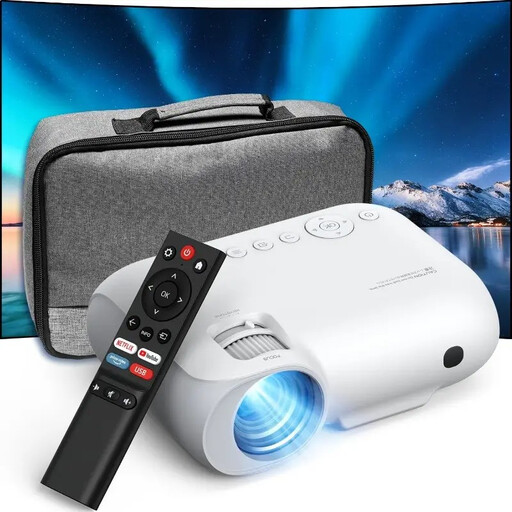 Image unavailable
YOTON Y7 native 1080p Full HD projector
The native 1080p Full HD resolution may be useful for portfolio images and detail; check small text at the image size you intend to use.
The product description lists HDMI, USB and AV connections and says it can be used for presentations. The stated 9.000 lumens has no specified measurement basis, so you can’t compare it directly with ANSI or ISO lumens.
View at Joybuy
 Image unavailable
JMGO N1S Ultra 4K Triple Laser UHD Projector
The stated 4K UHD resolution may suit presentations where image detail matters.
The product description lists 3.000 ANSI lumens and an adjustable gimbal for projecting onto walls and ceilings, among other surfaces. These specifications don’t guarantee colour accuracy or visibility in your room.
View at Joybuy
 Image unavailable
Dangbei Atom Portable Laser Projector
The title describes a portable projector; the stated Full HD resolution may be useful if you want to show fine details.
The product description states 1.200 ISO lumens, autofocus and automatic keystone correction. The model has no built-in battery and runs on mains power; the lumen rating is not a practical test of visibility in your room.
View at Joybuy
Frequently asked questions
Does 4K support mean your portfolio will be projected sharply?
No. 4K support doesn’t automatically mean the projector displays images in native 4K. Check the native projection resolution and view small text at the image size you want to use; for example, Epson describes the EB-1780W as WXGA and the EB-FH54 as Full HD.
How can you tell whether a projector will suit your room?
Measure the distance from the intended lens position to the screen and decide on the image width you want. Compare these with the exact model’s throw ratio: BenQ specifies 0,69–0,83:1 for the LH600ST+ and Optoma specifies 0,496:1 for the ZH350ST.
Can the lumen rating tell you whether your portfolio will be visible during the day?
Not on its own. Visibility also depends on the ambient light and image size, so check your own files in conditions similar to those in your presentation room.
What CE requirements should you check for a projector in the Netherlands?
Check that the required CE marking and EU declaration of conformity are available for the exact model. Electrical equipment placed on the market in the Netherlands must meet the applicable EU product requirements; a brand name alone doesn’t prove this.
Are you entitled to only two years of statutory warranty on a projector in the Netherlands?
No. According to ACM ConsuWijzer, statutory warranty in the Netherlands has no fixed term: it depends on how long you can reasonably expect the product to last with normal use. The seller is your point of contact if a consumer product is faulty; the manufacturer’s warranty is separate.


