What should you look for when choosing?
Start with the room and the image size you want. Then check the resolution, colour reproduction and connections for your presentation setup.
| Priority |
What to look for |
Best suited to |
| Visibility for a group |
Assess the ambient light and the image size you want. Check text and fine details from the furthest viewing position. |
If I’m presenting in a room with ambient light, I want my audience to be able to see the image without completely darkening the room. Around 36% of consumers prioritise visibility when presenting to a group. |
| Design details and colour |
Compare the native resolution and available picture settings; test your own reference images on the surface you plan to use. |
When subtle colours and small details are central to my work, I want to assess them on the projection surface myself. Around 29% of consumers give detail and colour assessment top priority. |
| Throw distance |
Measure the distance between the lens and the projection surface, then work out the image width you want. Remember to allow for walkways too. |
In a small room, I want to position the projector without people walking through the image. Around 21% of consumers consider a suitable setup their main priority. |
| Transport and connections |
Check the weight, power supply and whether the connections are compatible with your laptop and other image sources. |
If I present at different locations, I want to know in advance how I’ll transport the projector and connect it to my equipment. Around 14% of consumers prioritise portability and connectivity. |
Projectors on Joybuy
These projectors suit a range of portfolio setups, from portable presentations to a brighter image or a higher stated resolution. Check that the specific version has the required CE marking; according to the Dutch government, electrical appliances placed on the market in the EU must meet the applicable safety requirements.
 No image available
ETOE Dolphin 2 RGB Laser Projector
A portable option if you want to use a projector at different locations; assess the picture quality in your own room.
The product name lists 1080P FHD, 800 ANSI lumens, Google TV, a built-in battery, HDMI 2.1 and USB-C.
Joybuy
 No image available
Optoma UZ38X Dual-Laser Projector
Worth considering if you’re looking for a projector with a stated 4K UHD resolution; test your portfolio on the surface you plan to use.
The product name lists 4K UHD, 3.800 lumens, DLP, a 1.3× zoom and a 15 W speaker.
Joybuy
 No image available
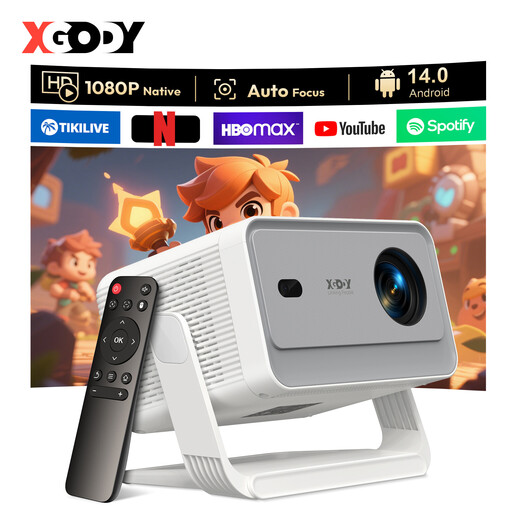
XGODY Gimbal A6 Pro Portable Projector
A portable model to consider if you want to set up the projector at different locations; check in advance that your portfolio will be easy to read.
The product name lists native 1080P, 650 ANSI lumens, autofocus and keystone correction, Android 14.0, HDMI and USB.
Joybuy
 No image available
JMGO N1S Ultra 4K Triple Laser UHD Projector
An option if you’re looking for a projector with a stated 4K UHD resolution; the resolution listing doesn’t prove colour accuracy.
The product name lists 4K UHD and triple-laser technology.
Joybuy
 No image available
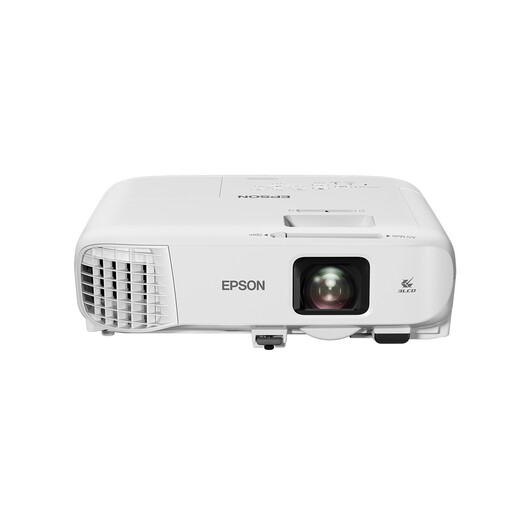
Epson EB-992F Standard Throw Projector
A standard-throw presentation model to consider if you have enough space for the setup. Test the image in the lighting conditions of your presentation room.
The product name lists 4.000 ANSI lumens, 3LCD and 1080p (1920 × 1080).
Joybuy
Frequently asked questions
How can you check whether your portfolio is easy to read from the back of the room?
View the image in the actual room and in the lighting conditions you expect to use. Test a slide with your smallest relevant text and finest details from the furthest viewing position; a lumen or resolution rating alone can’t tell you how that combination will look.
How can you avoid shadows during a presentation?
Measure the distance to the projection surface and allow for people’s walking routes. BenQ gives the LH600ST a throw ratio of 0,69–0,83, designed for projection from a shorter distance.
Should you factor in a replacement lamp if you use the projector regularly?
It depends on the light source in the exact model. Epson gives the EB-FH54 a stated lamp lifespan of 12.000 hours in Eco mode; ViewSonic describes the LS740HD as a laser projector with a stated light source lifespan of up to 30.000 hours. Also check the service and warranty terms.
What product safety should you check when buying a projector?
Check that the specific version on offer has the required CE marking. According to the Dutch government, electrical appliances placed on the market in the EU must meet the applicable safety requirements; a general product description doesn’t confirm this for every version.
Can you try out a projector bought online and return it if necessary?
For distance purchases from a business, you’ll often have a 14-day cooling-off period, although there are exceptions. The Dutch government advises checking the seller’s information about the cooling-off period before placing your order.


