
Student with a portfolio on USB
You want to show photos and videos without relying on a laptop or internet connection. So check storage support and make sure your files can be played. ViewSonic describes USB and MicroSD file management for the M1X.


If you want to present your portfolio without a laptop, choose a projector only if its reader and supported file formats are compatible with your storage device and files. With a laptop, you can play files from that device and connect the projector using a suitable video connection. Also consider ambient light, projection distance and portability. Specifications alone don’t guarantee that your files will play properly or that colours will be reproduced accurately.
You want to show photos and videos without relying on a laptop or internet connection. So check storage support and make sure your files can be played. ViewSonic describes USB and MicroSD file management for the M1X.
You can’t always darken the room, and you want text and images to remain visible. Compare the stated brightness and the setup required, rather than focusing only on a compact design. Epson rates the EB-FH52 at 4,000 lumens according to ISO 21118:2020.
You carry the projector yourself and may not have access to a power socket where you’re presenting. Weight and power supply are therefore important factors to consider. ViewSonic lists the M1X as weighing less than 1 kg and having a battery.
Choose this if: you want to show your portfolio without a laptop and the projector can read your storage device and files. BenQ specifies a USB-A reader for the GP100A; the ViewSonic M1X manual describes USB and MicroSD as file sources.
Bear in mind: a reader function doesn’t automatically mean that every photo, video or document format is supported.
Choose this if: you want to open files on a laptop or your presentation includes material that may not play reliably from USB. Epson says the EB-FH52 has two HDMI inputs.
Bear in mind: you’ll also need to bring your laptop and possibly a suitable adapter. Test the complete setup beforehand.
| What to consider | What to look for | Who is this important to? |
|---|---|---|
| Opening local files | Check the reader function, supported storage and file formats; test a selection of files from your own portfolio. | If you want to show photos and videos without a laptop, you’ll want to make sure your files open. Around 33% of consumers say playback from local storage is their top priority. |
| Visibility in the room | Compare the stated brightness and measurement standard, the lighting conditions, the desired image size and the available projection distance. | If you can’t darken the room properly, you’ll want your presentation to remain legible. Around 27% of consumers prioritise visibility in a brightly lit room. |
| Design details and colour | Check the native resolution and relevant picture settings; test small text, fine lines and familiar colours on the intended surface. | If viewers need to see fine lines, typography and colours, you’ll want to assess your design work for yourself. An estimated 27% of consumers focus mainly on detail and colour reproduction. |
| Portability and power | Check the weight, power supply, available setup space and whether you can run a full presentation with your chosen settings. | If you travel between classrooms or aren’t sure there’ll be a power socket, you’ll want a setup you can carry and use. Around 13% of consumers prioritise portability and power supply. |
A port may have a reader function or be intended for something else. Even if it is a reader, that doesn’t necessarily mean your files will be supported.
Check what the port is for and test photos and videos from your own portfolio. If you can’t play files directly, you may still need a laptop or adapter.
Brightness, resolution and picture settings don’t, by themselves, tell you how accurately your design work will appear on the projection surface.
Compare the relevant specifications and view test images of your own design work in the intended location.
Epson describes the EB-FH52 as discontinued. A product listing at Joybuy doesn’t change that status.
Before buying, check the exact model code, the condition of the item and the seller’s terms. Epson states that this model has been discontinued.
The EB-FH52 we looked at is a presentation projector worth comparing if brightness, connections and positioning in the room are key considerations.
The GP100A is a portable LED projector to consider if you want an explicitly stated reader function as well as a connection for a laptop.
The M1X is worth considering if low weight, battery use and file management from local storage are important to you.
This selection includes projectors for presentations from a laptop and a model whose product information states that it can display files from USB. Check the connections, file compatibility and image quality for your setup.
 No image available
For presentations from a laptop, the product name lists HDMI 2.1 as a connection.
The product name states native 1080p and 800 ANSI lumens.
 No image available
For a laptop setup, the product information lists HDMI as a connection.
The product name states native 1080p and 1,200 ANSI lumens.
 No image available
For presentations from a laptop, the product information lists an HDMI connection.
The product information states native 1080p and 700 ANSI lumens.
 No image available
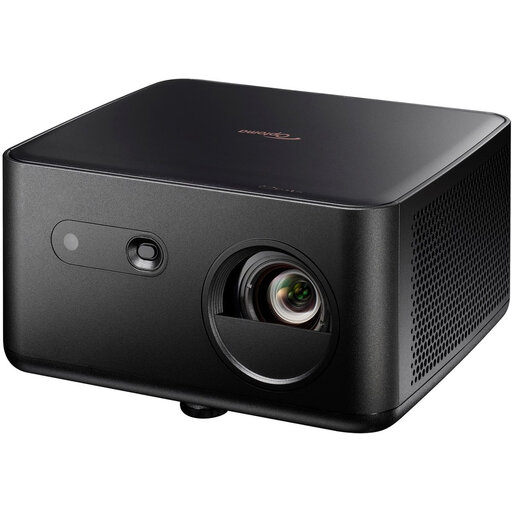
For a laptop setup, the product name lists two HDMI inputs.
The product information states UHD resolution and 1,100 ISO lumens.
 No image available
For playback without a laptop, the product information states that files can be played from USB flash drives.
The product name states native 1080p and 500 lumens.
No. Check whether the port acts as a file reader and whether the projector supports your storage device and files. BenQ specifies a USB-A reader for the GP100A; the ViewSonic M1X manual describes file management from USB and MicroSD. Test your own files beforehand.
Compare your laptop’s or adapter’s video output with the projector’s input, and test the complete setup. Epson lists two HDMI inputs for the EB-FH52. For some mobile devices, the ViewSonic M1X manual states that an additional adapter may be needed.
Depending on your setup, you may need an adapter or carrying solution. With a lamp-based model, the light source type also affects maintenance. In the Netherlands, statutory consumer rights are separate from any manufacturer’s warranty. If a product is faulty, contact the seller.
No. According to the Dutch government, the Netherlands has no fixed statutory warranty period of two years; what you can expect from a product depends on the circumstances. For distance purchases made by a consumer from a business, a 14-day cooling-off period applies in many cases, subject to exceptions.