Who is this choice relevant to?

Viewer with limited setup space

You have a small seating area and want to work out where the projector and screen can go. BenQ Netherlands and Epson Netherlands explain why the projection distance for the specific model determines where it can be positioned.

Opera lover with their own audio setup

You want to listen to the recording through your existing speakers or a soundbar. Check the connections on both the projector and playback device; BenQ Netherlands recommends checking the options available for each model.

Viewer in a bright living room

You can’t always darken the room and want to consider image size and ambient light together. ProjectorCentral explains that ambient light affects how much brightness is needed for a visible image.

What should you consider?

Ultra-short-throw projection

A good fit if: you have little space in front of the screen and can position the projector close to the wall in a fixed spot.

Bear in mind: the position and desired image size need to work together. Check there’s also enough space for the furniture and screen.

Short-throw with separate audio

A good fit if: you can place the projector a short distance from the screen and want to play the sound through a separate audio system.

Bear in mind: you’ll still need space in front of the screen, and should check that the audio output is compatible with your equipment.

Portable projector

A good fit if: you move your seating area around or don’t want to install the projector permanently.

Bear in mind: even with a portable model, the distance needs to suit your desired image size. If you’re using the battery, check the stated run time.

What to consider What to look for Who it’s most relevant to
Suitable setup space Measure your desired image width and the distance from the lens to the screen. Check these against the throw ratio or distance calculator for the exact model, as BenQ Netherlands recommends. I want to know whether the projector and screen will fit in my small seating area before choosing a model. Around 33% of consumers with this viewing need are mainly looking for a setup that will work in their space.
Audio setup Check which audio output the exact model has and whether your playback device or receiver can connect to it. BenQ Netherlands highlights the importance of checking the model when connecting external audio. I want to hear the singing and music through built-in speakers or my own audio equipment. Around 27% of consumers with this viewing need consider sound their main selection criterion.
Image in ambient light Consider when you’ll be watching and what image size you want. Only compare brightness figures when the unit of measurement is clear. ProjectorCentral highlights the effect of ambient light on the brightness required. I can’t always darken the room and want to know in advance whether the image will still be visible at my chosen size. Around 27% of consumers with this viewing need are mainly concerned about ambient light.
Playback and run time Check that you have the connections you need or the right app for your recording. If you’ll be using the battery, compare the stated run time in the relevant mode with the length of the recording. I want to be able to start and watch the opera recording without running into problems with my chosen playback method or power supply. Around 13% of consumers with this viewing need prioritise ease of playback and run time.

Common purchasing mistakes

  • Assuming a large stated image size will fit your seating area

    The image size you can achieve depends on the distance and positioning of the specific model.

    Measure your planned setup and check it against the specifications or distance calculator for that model, including for ultra-short-throw or portable projection.

    You may need a different position or screen if your desired image size won’t fit.

  • Comparing lumen figures with different units of measurement directly

    A brightness figure on its own doesn’t tell you whether the image will be clearly visible at your chosen size and in your ambient light conditions.

    Check the unit of measurement shown and consider brightness alongside your desired image size and the light in the room.

  • Assuming built-in speakers or a battery will handle every opera recording

    Connections vary by model. XGIMI states that the MoGo 4 Laser offers up to 2.5 hours of video playback on battery in eco mode.

    Check the full audio connection in advance. If you’ll be using the battery, compare the length of your recording with the stated run time in the relevant mode.

    Depending on your setup, you may need separate audio equipment or mains power.

Relevant brands to consider

Epson

The EH-LS670B is an example of a fixed ultra-short-throw setup with integrated sound.

  • Epson states that the EH-LS670B has 3.600 lumens and 20 W 2.1-channel sound.
  • These specifications don’t determine how the picture or sound will be in your seating area. Check the required distance, image size and listening setup.

BenQ

The TH671ST is a short-throw model designed to sit in front of the screen, with a connection for external audio.

  • BenQ states that the TH671ST has a throw ratio of 0,69–0,83:1, 1080p, two HDMI inputs and a 3,5mm audio output.
  • The stated fan noise is 33/29 dB in normal/eco mode; these figures don’t tell you how noticeable it will be from your seat.

Philips

The NeoPix 230 and NeoPix 444 are different compact home projectors, with specifications that apply to each model individually.

  • Philips states that the NeoPix 230 has native Full HD and a swivelling stand. For the NeoPix 444, Philips states native Full HD and 500 ANSI lumens.
  • Check the projection distance and brightness for each model individually to see what suits your room and desired image size.

XGIMI

The MoGo 4 Laser is an example of a portable projector with a built-in battery and speakers.

  • XGIMI states that it has 1080p, 550 ISO lumens, two 6 W speakers and up to 2,5 hours of video playback on battery in eco mode.
  • For a long recording, check whether you’ll need mains power and whether your preferred playback app is available for your use.

Joybuy products for watching at home

This selection includes projectors for watching at home, including portable models and a model designed for a fixed position close to the screen.

XGODY Gimbal N6 Pro projector

XGODY Gimbal N6 Pro

The built-in apps listed may suit you if you want to play the recording directly through an app. Check that your app and recording are available.

The product name lists native 1080p, 700 ANSI lumens, WhaleOS 3.0, Wi-Fi 6 and Bluetooth 5.4.

View at Joybuy

Video projector with built-in apps and flexible positioning

Video projector with built-in apps

The rotating design may be useful if you want flexibility when positioning the projector in your seating area. Check the distance required for your chosen image size in advance.

The product name lists 180° rotation, automatic screen correction, Wi-Fi 6 and HDMI compatibility.

View at Joybuy
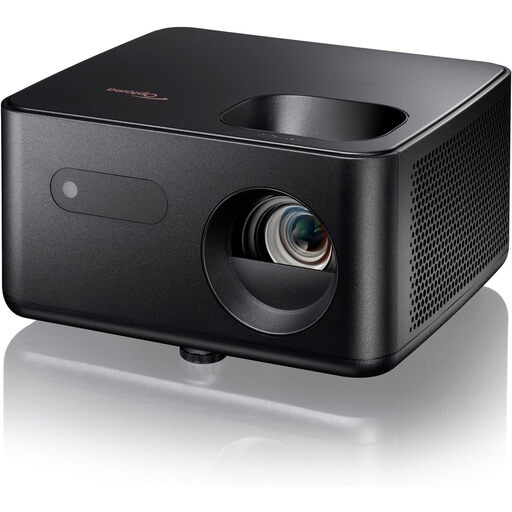
Optoma Photon Life PK31 projector

Optoma Photon Life PK31

This projector is included as an option for a portable viewing setup. Before buying, check how the required image size and connections will work in your space and with your playback device.

View at Joybuy

Optoma Photon Go projector

Optoma Photon Go

This model is included as an option for a fixed ultra-short-throw setup. Check the distance required for your desired image width and whether the fixed position will work with your furniture and screen.

View at Joybuy

Yaber K2s projector

Yaber K2s

The Google TV feature listed may be useful if you want to play recordings through apps. Check that the app and recording you want are available for your use.

The product name lists native 1080p, Wi-Fi 6, Google TV, Sound by JBL and Dolby Audio.

View at Joybuy

Frequently asked questions

How do I work out the projection distance before buying?

Measure the distance from the planned lens position to the screen, then decide how wide you want the image to be. Next, check the throw ratio or distance calculator for the exact model. The room dimensions alone won’t tell you whether the projection will fit.

Can I connect my existing speakers?

That depends on the projector’s outputs and your audio equipment’s inputs. BenQ states that the TH671ST has a 3,5mm audio output. Before choosing a setup, check the connections available on the specific model and throughout your audio system.

What should I check before use and when carrying out maintenance?

Set the projector up in its intended position and check the image size, focus and connections there using your own playback device. For maintenance and any software updates, refer to the manual and support information for the exact model. Epson, for example, offers a distance simulator and firmware updates for the EH-LS670B.

What are the returns and warranty rules in the Netherlands?

According to the Dutch government, online purchases from a business usually come with a 14-day cooling-off period. You’re also entitled to a product that meets legal standards. The Netherlands has no fixed statutory warranty period, and if a product is faulty, the seller is your point of contact.

Can I show an opera recording to other people?

A projector does not, in itself, give you the rights to a recording. The Dutch government states that a private copy for personal use may not be distributed or made available to the public. This does not mean that every screening for a group is permitted. If you plan to show a recording beyond personal use, check the rights and terms for that specific recording.
