Choose a projector to suit your desired screen width and available projection distance, then adjust the picture settings and audio connections to match your setup. Also check the specific recording, playback source and subtitles: a built-in streaming platform or a 4K claim does not guarantee that every opera or older recording will be suitable.
Who is this buying guide for?
Opera fans who value subtle picture detail
If you watch opera in a darkened room, you’ll want to follow costumes, faces and dark scenes clearly. So compare picture settings and the intended screen size, rather than looking only at the stated lumen count.
Listeners with their own audio system
If you want to listen to the singing and orchestra through your existing speakers, it’s worth checking the audio outputs and the entire connection chain. BenQ Netherlands lists eARC and a 3.5 mm audio output among the W2710’s features.
Viewers with limited space for setup
If you need to place a projector close to the screen, make sure the available space suits your desired picture width. Epson documents both projectors designed for placement further away and the ultra-short-throw option offered by the EH-LS800B.
What should you look for when choosing?
Start with your screen width and the available projection distance. Then decide how you’ll play audio and your chosen recording with subtitles.
| What to consider |
What to look for |
Who is this for? |
| Dark scenes and picture settings |
Compare picture modes and contrast figures on a like-for-like basis; check how they were measured and the projection technology used by the exact model. |
If I want to follow dark stage scenes and faces clearly on my chosen screen size, I’ll look at the picture settings rather than just the lumen count. Around 33% of consumers prioritise picture detail. |
| Audio and fan noise |
Check which audio output you need and the stated noise level; if possible, listen from where you plan to sit. |
If you want to hear the singing and orchestra through your own system, you’ll want to know whether the connections suit your complete setup and whether projector noise might be distracting. Around 27% of consumers put audio and quiet operation first. |
| Screen size and projection distance |
Measure the usable distance and screen width; compare them with the exact model’s throw ratio, zoom and lens-shift capabilities. |
If the available space determines where the projector can go, I’ll want to know in advance whether it can produce the picture width I want. Around 20% of consumers start with placement. |
| Playback source and subtitles |
For your chosen service and recording, check the picture resolution, subtitle options and how the complete HDMI or app setup works. |
If you want to watch a particular opera with subtitles, you’ll want to make sure the recording works with your intended playback setup. Around 20% of consumers give top priority to the source and subtitles. |
Common pitfalls
-
Assuming a 4K claim means every opera recording is 4K quality
Recordings can be available at different resolutions. The Metropolitan Opera also describes older standard-definition videos; Epson describes 4K PRO-UHD as picture enhancement using pixel shifting.
First check the resolution of the recording you want, then see how the chosen model’s projection technology will work with it.
-
Looking only at maximum brightness
A lumen count alone doesn’t tell you how picture modes, contrast figures or noise levels compare. Manufacturers may also quote different measurement and operating modes.
Compare the models’ specifications on a like-for-like basis, and decide on your screen size, picture setting and audio setup first.
-
Assuming built-in streaming gives you access to every recording
Available titles and subtitle options depend on the service and the specific recording. OperaVision notes that productions may only be available for a limited time.
Before you buy, check the title you want, the subtitle options and how you’ll play it. You may need an external playback device or a different connection.
Relevant brands
BenQ
The W2710 is a reference point for a traditional home cinema setup; BenQ also presents the TK710 laser projector as suitable for gaming and brighter rooms.
- BenQ Netherlands lists a throw ratio of 1,13–1,47:1, eARC, a 3.5 mm audio output and noise levels of 30/28 dB in normal/eco mode for the W2710.
- These manufacturer specifications are not an independent assessment of how audible or picture quality will be in your room. The TK710’s gaming features don’t automatically offer extra benefits for opera recordings.
Epson
Epson documents models for projection from further away, as well as an ultra-short-throw option, each with different setup requirements.
- According to Epson, the EH-TW7100 has lens shift, optical zoom and two HDMI ports.
- Epson describes 4K PRO-UHD as picture enhancement through pixel shifting; this label is not a general claim that all models offer native 4K. For ultra-short-throw projection, also check the exact screen size and alignment.
XGIMI
According to XGIMI, the HORIZON 20 combines built-in streaming and speakers with optical zoom and lens shift.
- A combination of built-in features may reduce the need for separate devices.
- Having Google TV does not confirm that every opera service, title or subtitle option will work. The manufacturer’s picture and sound claims are not an independent comparison with separate equipment.
Optoma
The UHZ66 is an example of a laser projector with optical zoom and an external audio output.
- Optoma lists a throw ratio of 1,4–2,24:1 for the UHZ66.
- Optoma gives a minimum/maximum noise level of 28/35 dB for this model. Check whether the distance and operating mode suit your room; these figures are not an independent assessment of how audible the projector will be during an opera.
Projectors at Joybuy
This selection at Joybuy includes projectors for home cinema and video playback, with a range of audio, connection and placement features. Check each model to see whether it suits your screen, playback source and preferred subtitles.
 No image available
XGODY Gimbal A8 projector
Worth considering if native 1080p projection and a tilting setup suit the way you plan to use it.
Native 1080p; throw ratio 1,08:1; Bluetooth audio; integrated stand that rotates 0–90°.
Joybuy
 No image available
XGODY N7 Cine Smart projector
Worth comparing if you’re looking for native 1080p and automatic picture adjustment.
Native 1080p; throw ratio 1,1:1; HDMI and Bluetooth; built-in speakers; design rotates 90°.
Joybuy
 No image available
HP CC360 FHD Smart projector
Worth considering if native 1080p and an external audio connection suit your needs.
Native 1080p; Cinema picture mode; 1000 ANSI lumens; 3.5 mm audio output; built-in speakers.
Joybuy
 No image available
Video projector with built-in apps and rotating body
Worth considering if built-in apps and flexible positioning are important for your setup.
Built-in apps and access to the Play Store; digital zoom range 50%–100%; claimed screen size 50–200 inches; 180° rotating design.
Joybuy
 No image available
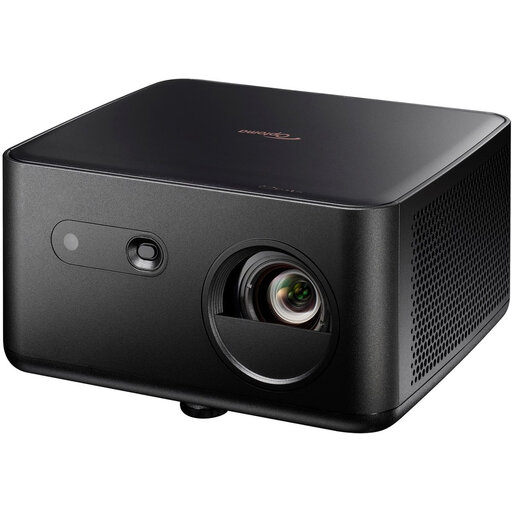
Optoma Photon Life PK32 4K UHD DLP projector
Worth comparing if UHD playback and connection to external audio suit your playback setup.
UHD resolution 3840 × 2160; HDMI with eARC; 3.5 mm audio output; throw ratio 1,12:1–1,46:1.
Joybuy
Frequently asked questions
Is a 4K claim enough for older opera recordings and subtitles?
No. Also check the resolution of the specific recording and the projector’s projection technology. OperaVision describes HD and 4K streams; the Metropolitan Opera also offers older standard-definition videos. Epson describes 4K PRO-UHD as picture enhancement through pixel shifting.
How can you tell whether the picture will fit your screen?
Measure your screen width and available projection distance, then compare them with the exact model’s throw ratio. For example, BenQ Netherlands lists 1,13–1,47:1 for the W2710; zoom and lens shift only provide the adjustment range stated for the model you choose.
What should you know about warranties and service in the Netherlands?
There is no fixed statutory warranty period in the Netherlands. According to the Dutch government, if a product is faulty, you can contact the seller; any manufacturer’s warranty may be available in addition to your legal rights. Before you buy, also check the seller’s and manufacturer’s terms.
What should you look for in a projector’s CE marking?
Products in categories that require CE marking must carry it. The European Commission stresses that a CE mark does not mean the EU has independently approved the product as safe. Check the product information and which regulations apply to the specific product.
Can you return a projector bought online if it doesn’t suit your room?
For a standard online purchase made by a consumer from a professional seller, you generally have 14 days from delivery to withdraw from the contract, according to the European Union’s Your Europe information. Check the applicable terms and any return costs. This is separate from your rights if a product is faulty.


