
Viewers who care about natural colours
You mainly watch in a home cinema where you can block out the light, and want to weigh up colour, fine detail and suitable HDR performance against brightness.


Start with your viewing space: measure the projection distance and work out how much daylight you can block while watching. Then compare resolution, colour and HDR support, connections and light source. A higher lumen rating alone won’t tell you which projector is right for your screen and room.
You mainly watch in a home cinema where you can block out the light, and want to weigh up colour, fine detail and suitable HDR performance against brightness.
You can’t always darken the room and want to assess brightness alongside your preferred screen size and the amount of light in the room.
You have a fixed shelf or ceiling position, or limited projection distance, and want to check in advance whether the projector can produce the picture you want from that position.
For nature documentaries at home, picture quality, light in the room, placement and maintenance all matter. First, work out which of these is the biggest constraint on your choice.
| What to consider | What to look for when buying | Who should give this more weight? |
|---|---|---|
| Colour and detail | Compare the picture resolution and supported HDR formats; check that your video source can output those formats. | If I mainly watch in a darkened room, I want to weigh up colour and fine detail. Around 33% of consumers prioritise colour and detail. |
| Ambient light | Think about when you watch, how much light you can block out and how large the screen will be. | If I can’t always darken the room, I want to know whether my preferred screen size will work with the available light. Around 25% of consumers give ambient light top priority. |
| Placement | Measure the distance from the lens to the screen and the desired picture width; check the throw ratio and optical adjustments of the exact model. | With a fixed shelf or ceiling position, I want to know in advance whether the distance and picture width will work. Around 25% of consumers start with placement. |
| Maintenance | Check the type of light source, the conditions attached to any stated lifespan and the service terms. | If I watch for many hours, I want to know what type of light source it uses and the conditions under which its lifespan is stated. Around 17% of consumers prioritise maintenance and long-term use. |
Joybuy Netherlands’ product page for the YOTON Y7 lists native 1080p and 4K input support as separate features.
Check the native picture resolution separately from the resolutions of signals the projector can receive.
The available distance and desired picture width will help determine whether a model will fit in your planned position. A projector with optical adjustments won’t necessarily suit every room layout.
Measure the distance from the lens to the screen and compare it with the throw ratio, zoom and lens shift of the exact model.
A lifespan figure may be linked to a specific light source or operating mode. For example, Epson states 5,000 lamp hours for the EH-TW7000 in Eco mode.
Compare the conditions attached to lifespan claims, and ask about service and any replacements before buying.
Epson offers the lamp-based, 3LCD EH-TW7000 and the laser, 3LCD EH-LS7000 as different home cinema options.
The BenQ W2720i is a 4K home cinema projector with a 4LED light source.
The Optoma UHZ66 is a laser projector for home cinema use.
These Joybuy projectors are options for home cinema use. Compare their stated resolution, light source and available set-up with your video source, screen and viewing space.
 Image unavailable
The 4K specification makes this model worth comparing if fine detail on a large screen matters; also check that it will suit your room’s layout.
 Image unavailable
Compare this model’s connections and projection distance with your video source and desired picture width.
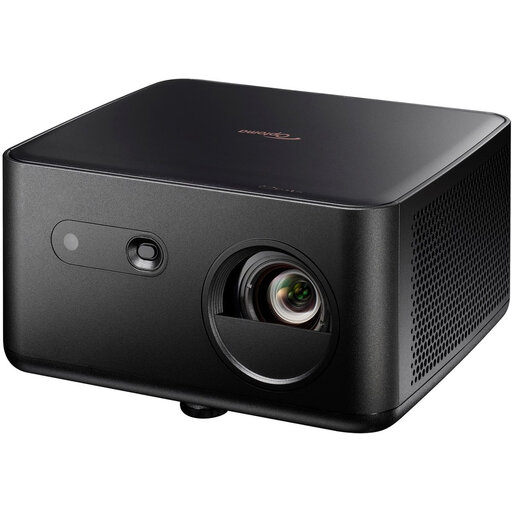 Image unavailable
The 4K UHD specification makes this model worth comparing with your video source and screen; also check that it will fit your room’s layout.
1,100 ISO lumens; HDR10 and HLG; 4LED light source; autofocus and automatic keystone correction.
 Image unavailable
The product name specifies Standard Throw, so measure the available distance and compare it with your desired picture width before choosing this model.
3,200 ANSI lumens; DLP; 4K (3840 × 2160); 3D.
 Image unavailable
The product name distinguishes 1080p HD from 4K HDR input support; check the resolution your source outputs and what the projector displays itself.
1,200 ISO lumens; HDR10.
Measure the distance from the lens to the screen and your desired picture width. Compare these with the throw ratio of the exact model and check whether zoom and lens shift will work with your set-up. For the EH-TW7000, Epson specifies a throw ratio of 1.32–2.15:1.
Not necessarily: support for a 4K signal doesn’t, by itself, tell you the native picture resolution. Joybuy’s product page for the YOTON Y7 lists native 1080p and 4K input support separately, so check both features for the exact model.
Check the type of light source, the conditions attached to any stated lifespan and the seller’s service terms. A figure that applies to a specific mode, such as Epson’s figure for the EH-TW7000, won’t necessarily apply to every use case.
For electrical and electronic equipment covered by the relevant European product rules, the Dutch government and EUR-Lex describe compliance with those rules, including CE marking and an EU Declaration of Conformity. The rules that apply depend partly on the exact version, so check the documentation for the model you’re considering.
You’re entitled to a product that meets what you can reasonably expect from it. According to the Dutch government, the Netherlands has no fixed statutory guarantee period; if a product is faulty, the seller is your point of contact. Any manufacturer’s or additional guarantee may be on top of this.