Who is this choice relevant to?

Viewer with limited storage space

Doesn’t want to leave a permanent projector or an extra speaker on the shelf after watching a documentary. So consider the dimensions, positioning and built-in sound. Epson Netherlands’ buying guide highlights portability, while BenQ Netherlands describes the adjustable positioning of the GV50.

Viewer in a small room

Has limited distance from the projection wall or a walkway in front of the picture. The throw ratio helps determine the picture width achievable from the space available. BenQ Netherlands and Optoma Europe list the ratio for their specific models.

Nature enthusiast

Wants to see fine detail and may watch in varying ambient light. Compare the native resolution and assess the brightness with your viewing space in mind. Epson Netherlands’ buying guide highlights both resolution and brightness as factors to consider.

What should you look for when choosing?

Factor to consider What should you check? Who is it important for?
Positioning and shelf space Measure the lens distance, desired picture width, furniture depth and walkway. Compare these with the throw ratio and positioning requirements of the exact model. If there’s little space between the projector and the wall, you’ll want to know in advance whether the picture will fit. Around 28% of consumers rank positioning as their top buying priority.
Visibility in ambient light Consider whether you can darken the room. Compare brightness only when the same measurement standard is used, and take picture size and operating mode into account. If you can’t always darken the room, you’ll want the picture to remain easy to watch in your space. Around 22% of consumers prioritise visibility in ambient light.
Detail in nature footage Check the projector’s native resolution and the resolution of your source. 4K support doesn’t automatically mean 4K playback. If you want feathers, leaves and landscapes to look sharp, the displayed resolution matters. Around 22% of consumers say picture detail is their main consideration.
Streaming documentaries Check that your preferred app and connection are available. Also see whether the projector has the HDMI and audio connections you need for external equipment. If you want to watch documentaries without a separate streaming box, check that your preferred service is available first. Around 17% of consumers put easy streaming at the top of their list.
Total cost and equipment Check what’s included with the model and what equipment you already have. Consider sound, power and whether you’ll need an external player. If you want to limit the number of extra devices and accessories, include everything your setup will need in your calculations. Around 11% of consumers prioritise total cost and the equipment required.

Common buying mistakes

  • Looking only at the size of the projector

    A compact casing doesn’t tell you how much distance is needed to produce your desired picture size. BenQ lists a 1.2:1 throw ratio for the GV50; Optoma gives 0.18:1 for the Photon Go. These require different positioning.

    Mark out where the lens, wall and walkway will be, then check the distance and desired picture width for the exact model.

  • Treating lumen figures as directly comparable real-world measurements

    Manufacturers use different measurement standards, and visibility also depends on the viewing environment. A quoted figure alone can’t predict how the picture will look in your room.

    Check the measurement standard and assess brightness at a comparable picture size and in the same operating mode. Plan to darken the room if needed.

  • Assuming a battery or built-in app means you can watch without limits

    Optoma lists up to 1.5 hours of battery playback for the Photon Go. A built-in platform also doesn’t automatically mean your particular streaming service is available.

    Check that your preferred service is available and confirm the stated playback time suits your needs. Plan to use mains power if the battery life may not be enough.

  • Confusing a manufacturer’s warranty with all your statutory rights

    According to the Dutch government, a manufacturer’s warranty or paid extended warranty is in addition to your right to a product that conforms to the purchase agreement.

    Check what extra rights a paid warranty product actually provides, and keep your purchase details in case you need to contact the seller.

Brands and models to consider

BenQ

The GV50 is a portable model with adjustable positioning, designed for people who want to move their projector between different viewing spots.

  • BenQ lists Full HD 1080p, 500 ANSI lumens, a fixed 1.2:1 throw ratio and built-in sound for the GV50.
  • These specifications apply to the GV50; they don’t show that every BenQ model is suitable for a small room or daylight use. Measure the desired picture width from your chosen position.

Epson

According to Epson, the Lifestudio Pop EF-61W combines Full HD, Google TV and built-in sound in a portable projector.

  • Epson lists 700 lumens and integrated sound for the EF-61W. Its built-in features may be useful if you want to reduce the number of separate devices.
  • Epson notes that the right brightness depends on the viewing environment. The quoted lumen figure isn’t an independent comparison with other models.

Optoma

The Photon Go is an ultra-short-throw model for setups with little space between the projector and the wall.

  • Optoma lists a 0.18:1 throw ratio, Full HD and two 10 W speakers for this model.
  • Optoma quotes up to 1.5 hours of battery playback. If you’re watching a longer documentary, it’s sensible to plan to use mains power.

XGIMI

The MoGo 4 Laser is a portable projector with an adjustable stand and built-in battery.

  • XGIMI lists 1080p, 550 ISO lumens and up to 2.5 hours of video in eco mode for this model.
  • ISO lumens aren’t directly comparable with the ANSI lumens of another model. The stated battery life applies to the specified mode.

Samsung

The Freestyle 2nd Gen is a compact projector that can be directed at different surfaces.

  • Its adjustable positioning may be useful if you want to use the projector in different viewing spots.
  • Samsung notes that the Battery Base is sold separately and that moving the picture when projecting onto the ceiling can result in a smaller image. Information about The Freestyle+ doesn’t automatically apply to the 2nd Gen.

Projectors at Joybuy

This selection includes portable projectors for different positioning needs, as well as an ultra-short-throw model. Check the throw distance, connections and features of the exact version of each model.
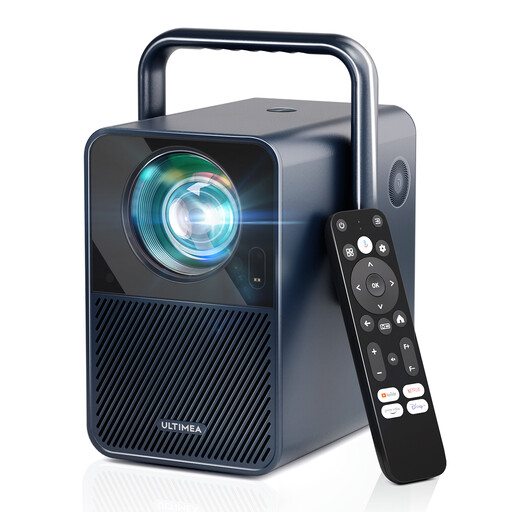
Ultimea Poseidon E40 projector

Ultimea Poseidon E40, native 1080P

Could suit you if you’re looking for a compact setup with built-in streaming. Check that the throw distance works for your room first.

The product information lists native 1080P, Android TV 11.0 with Netflix, a 1.23:1 throw ratio and autofocus.

View at Joybuy

Yaber L2 projector

Yaber L2, native 1080P

Could suit you if you want built-in streaming and adjustable positioning. Check that your intended throw distance and picture width are achievable.

The product information lists native 1080P, Google TV, two 5 W speakers, a 1.17:1 throw ratio and a 360° gimbal.

View at Joybuy

Video projector with built-in apps and 180° rotation

Video projector with built-in apps and 180° rotation

Could be worth considering if you want to adjust the projection direction and stream directly from the device. Check that the listed apps suit the way you plan to use it.

The product title lists built-in apps, access to the Play Store and 180° rotation. Wi-Fi 6, Bluetooth and digital zoom are also mentioned.

View at Joybuy

XBJ TYYK8QBS projector with 360° rotating stand

XBJ TYYK8QBS, native 1080P

Could suit you if you’re looking for a portable projector with adjustable positioning. Check where you can place the device and how you want to use the sound.

The product information lists native 1080P, a 360° rotating stand, built-in stereo speakers, Wi-Fi 6 + 5G and BT5.4.

View at Joybuy

XGIMI AURA 2 UHD 4K ultra-short-throw projector

XGIMI AURA 2 UHD 4K, ultra-short throw

Could suit you if there’s little space between the projector and the wall. Measure your setup and desired picture width before choosing a model.

The product title lists UHD 4K, ultra-short throw, 2300 ISO lumens, Dolby Vision and a 60 W Harman Kardon speaker.

View at Joybuy

Frequently asked questions

How can I tell if the picture will fit on my wall?

Measure from the intended lens position to the wall and compare the distance with the throw ratio and stated picture size for the exact model. For example, Optoma gives a throw distance of 0.26 to 0.4 m for the Photon Go.

Can I watch a whole documentary without a mains socket?

It depends on the model, playback time and operating mode. Optoma lists up to 1.5 hours of battery playback for the Photon Go; XGIMI quotes up to 2.5 hours of video in eco mode for the MoGo 4 Laser. Plan to use mains power if the stated playback time isn’t enough.

Will I need a separate streaming stick or speaker?

Not always. BenQ lists Google TV and built-in sound for the GV50, while Epson lists these features for the EF-61W. Check that your preferred streaming service is available and that the built-in sound meets your needs.

What are my rights when buying online in the Netherlands?

For distance sales, you generally have a 14-day cooling-off period, according to the Dutch government. You’re also entitled to a product that conforms to the purchase agreement; the Netherlands doesn’t have a fixed, general statutory warranty period of two years. If a product is faulty, the seller is your point of contact.

Is CE marking relevant for a projector sold in the Netherlands?

Yes. Applicable EU product rules apply to electrical and electronic equipment, including rules on CE marking. According to the European Union, the mark is a declaration by the manufacturer and isn’t, by itself, an independent certification. Check the conformity information for the version you’re actually buying.
