
Viewer with limited space for positioning
Wants to watch a recorded performance on a large screen without a projector or cables getting in the way. So measure the clear wall, the space on your furniture and the distance to the projection surface.


First, measure the clear wall width and the distance between the projector position and the projection surface: these determine what image size will fit in your living room. An ultra-short-throw projector sits close to the wall and keeps the walkway clear; a short-throw projector needs a position further into the room. Then assess the ambient light, playback source and audio connections.
Wants to watch a recorded performance on a large screen without a projector or cables getting in the way. So measure the clear wall, the space on your furniture and the distance to the projection surface.
Wants to watch even when the room isn’t darkened. Consider the projection surface and lighting conditions together before choosing a model or screen.
Uses their own recording or playback device and wants to know in advance how the video source and any external audio equipment will connect to the projector.
A good fit when: there’s room for a projector by the wall, but not for a device in the middle of a narrow room.
Bear in mind: precise positioning and a flat projection surface are essential. If you’re also considering an ALR screen, check that it’s compatible with the projector.
A good fit when: you have a stable position between the seating area and the wall, and the projected image will fit on the clear wall.
Bear in mind: the projector and cables take up space in the room. BenQ positions the X500i as a gaming projector; gaming features aren’t necessarily needed to watch a recorded performance.
Start with the available wall width and projection distance. Then consider light, video source and audio: these determine whether the setup you choose will work well for your recording.
| What to consider | What should you check? | Who is this important to? |
|---|---|---|
| Suitable image size | Measure the clear wall width, the space for the device and the distance from the lens to the projection surface. Compare these measurements with the installation specifications for the exact model. | If I don’t want a projector in the walkway of my narrow living room, I start by checking the clear wall and possible positions for the device. Around 29% of consumers put finding a suitable position first. |
| Ambient light and screen | Consider whether you can darken the room. If you’re looking at an ALR screen, check specifically that it’s suitable for the projection type and model. | If you want to watch with the windows or lights on, consider the lighting and projection surface together. For around 23% of consumers, dealing with ambient light is their main buying concern. |
| Connecting audio | Decide whether the built-in speakers will be enough; if not, check the connections on both the projector and the sound system. For the X500i, BenQ lists eARC, S/PDIF and a 3.5mm output, among other connections. | If I want to hear dialogue and music through my own sound system, I check the connections on both devices. Around 18% of consumers prioritise clear sound and the audio setup. |
| Image from the recording | Check the recording’s resolution and aspect ratio against the supported input signals. If the framing differs, allow for unused screen space rather than stretching the image. | If you mainly want the recorded stage image to fit the available frame properly, match the recording to the projector. For around 18% of consumers, picture display is their main concern. |
| Playing the recording | First, choose a playback source, such as an external player or laptop. Then check which input you need and, if you plan to stream directly, whether the specific service is available on the model. | If I want to watch my own recording, I check how it will play and what connection I’ll need. Around 12% of consumers prioritise the playback setup. |
Even an ultra-short-throw projector needs a specific distance for its model and must suit the available wall width.
Measure the wall and the projector position, then check the distance specified by the exact model for your desired image size.
You may need to rearrange your furniture or use a different projection surface.
A screen designed for ultra-short-throw projection isn’t automatically suitable for every projector or setup. For example, Epson describes the ELPSC36 as a screen for Epson ultra-short-throw laser projectors.
Check the projection type, compatibility with the model and screen size before choosing a screen.
A separate screen is an extra purchase; also check that its size will fit the available wall.
A smart platform or HDMI connection doesn’t automatically mean that a particular service or file format is supported.
First check which device will play the recording, then find out whether the required app or input is available on the exact model.
Depending on how you plan to play it, you may need a suitable external player or extra cables.
The EH-LS670B is an example of a fixed ultra-short-throw setup with built-in audio.
The X500i is an example of a short-throw setup for when you have a suitable projector position between the seating area and the wall.
The CineBeam S PU615U is a compact ultra-short-throw projector designed for a setup close to the wall.
The PX3-PRO, PT1 and L9Q illustrate different fixed ultra-short-throw setups and stated image sizes.
These Joybuy products are short-throw projectors designed to sit between the seating area and the wall. Measure the available distance and wall width before choosing a model.
 No image available
Its short-throw positioning makes it a good choice if you want to check the available distance to the wall before setting it up.
The product name lists WXGA and 3800 ANSI Lumens.
 No image available
Its short-throw positioning is worth considering if you have a suitable spot a short distance from the projection surface.
The product name lists 3600 ANSI Lumens and XGA (1024x768).
 No image available
This short-throw projector is worth comparing if the available distance from the wall will determine your setup.
The product name lists 3500 ANSI Lumens and XGA (1024x768).
 No image available
Its short-throw positioning makes the available distance to the wall an important point to check for this setup.
The product name lists 3000 ANSI Lumens, 3LCD and WXGA (1280x800).
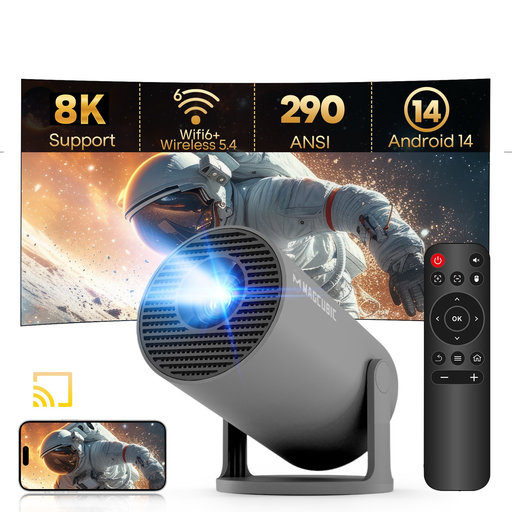 No image available
The title describes this projector as portable and mentions a rotating setup. Check that the space and power supply it needs will work with your viewing setup.
The stated native resolution is 720p (1280 × 720); support for 8K content doesn’t change its native resolution.
Measure the clear wall width and the possible distance between the lens and the wall, then compare these with the installation specifications for the exact model. A projection calculator can help; the term ‘short throw’ alone doesn’t guarantee a particular image size.
No, choose a screen to suit your setup and the ambient light. If you’re considering an ALR screen, check that it’s suitable for ultra-short-throw projection and your model. For example, Epson lists the ELPSC36 as compatible with certain Epson projectors.
First, decide which device will play the recording and which sound system you want to use. Then check the connections on both devices. For example, BenQ lists eARC, S/PDIF and a 3.5mm audio output for the X500i; check that these are compatible with your source and sound system too.
ACM ConsuWijzer says that the cancellation period for an online purchase ends 14 days after the product has been delivered. If a product doesn’t meet the standards you’re entitled to expect, the seller is responsible for the statutory guarantee, which includes free repair or replacement, according to the Netherlands Authority for Consumers and Markets.
According to the Dutch government, you may make a private copy for your own use, but you may not distribute it or make it available to the public. Check what permissions and terms of use apply to the recording you want to watch.