First, measure the distance from the lens to the wall and decide how wide you want the picture to be. Then choose a projector with a throw ratio suited to your setup. An ultra-short-throw model can sit close to the wall, while a short-throw model needs a little more space. A standard-throw projector will only work if your room has enough distance. Compare brightness figures only when they use the same measurement method, and check the connections and sound options too.
Who is this buying guide for?
Viewers with limited space for placement
You want a big picture for films without putting a projector in the middle of your guests. The distance from the lens to the wall will help you work out which projection type is right for your room. ViewSonic and XGIMI publish throw ratios for the models mentioned here.
Hosts with a bright living room
You want to know whether the picture will work with the lighting you have during film night. Compare brightness figures only when they use the same measurement method; BenQ explains that lumen figures can be based on different measurements.
Viewers who want a quick set-up
You want to connect a film source and sound without a complicated temporary set-up. Check the connections and built-in features on the exact model, such as the HDMI ports listed by BenQ and ViewSonic.
What should you look for when buying?
In a narrow living room, start by checking the available projection distance and picture width. Then consider the lighting, the set-up and the features you need for film night.
| What to consider |
What should you check? |
Who is this important for? |
| Projection distance and placement |
Measure the distance from the lens to the wall and the available picture width. Check the throw ratio and permitted image size for the exact model. |
If I have little space in front of the wall, I want to know whether the picture size I want will fit. Around 36% of consumers rank placement and projection distance as their main concern. |
| Picture quality in ambient light |
Consider whether you can darken the room, and compare brightness figures only when they use the same measurement method. ANSI lumens, LED lumens and light-source lumens are different specifications. |
If there is ambient light during film night, I want to assess brightness without treating different lumen figures as equivalent. Around 29% of consumers prioritise visibility in ambient light. |
| Set-up, playback and sound |
Check the HDMI and audio connections, supported playback methods and any built-in speakers on the exact model. |
If I’m having guests round, I want to be able to connect my film source and know in advance what sound options are available. Around 21% of consumers prioritise an easy set-up, playback and sound. |
| Costs and service |
Compare the price of the exact version and check the light source type, maintenance information and seller. Statutory guarantees are separate from any seller or manufacturer’s guarantee, according to ACM ConsuWijzer. |
If I want to use the projector after film night too, I want to weigh up the purchase and service together. Around 14% of consumers put costs and service at the top of their list. |
Common buying mistakes
-
Choosing an image size without measuring the distance
The distance you need depends on the throw ratio and the picture width you want. For the same picture width, a ratio of 1,2:1 requires more distance than 0,69–0,83:1. XGIMI and ViewSonic publish these ratios for the models mentioned here.
Measure the available picture width and the distance from the planned lens position to the wall. Then check the throw ratio and placement instructions for the exact version.
-
Treating all lumen figures as the same measurement
ANSI lumens, LED lumens and light-source lumens are different ways of measuring brightness. Comparing figures based only on the word ‘lumens’ can therefore be misleading.
Make a note of the measurement method used for each brightness figure and compare only figures based on the same method.
-
Confusing ‘4K compatible’ with native 4K resolution
Support for a 4K input signal and native resolution describe different features. The Yoton Y6 product information lists native 1080P resolution and support for 4K input.
Check the native resolution and supported input signals separately.
-
Looking only at the manufacturer’s guarantee
A manufacturer’s guarantee does not replace the statutory guarantee provided by the seller. ACM ConsuWijzer describes these as separate entitlements.
Keep your purchase information and check who the seller is, as well as the terms of any additional guarantee.
Brands to consider
Epson
The EH-LS670B is an example of an ultra-short-throw model for a set-up close to the projection wall.
- Epson lists a laser light source, 3.600 lumens, integrated sound and Google TV for this model.
- These are manufacturer specifications, not independent picture or sound test results. Check that the placement and intended image size will work in your room.
BenQ
The TH671ST is a short-throw option for anyone with a space in front of the screen.
- BenQ lists two HDMI inputs and a 5 W speaker for this model.
- Check that the connections and sound options suit your film source and room. These specifications apply to the model mentioned, not all BenQ projectors.
ViewSonic
The European X2-4K is a short-throw option to consider if you can measure the distance and check the connections in advance.
- ViewSonic lists a throw ratio of 0,69–0,83:1, two HDMI inputs and built-in speakers.
- The stated 2.900 LED lumens are not directly comparable with an ANSI lumen figure. The product specifications are provided by the manufacturer.
XGIMI
The HORIZON S series is an option if you have enough space for a standard-throw set-up.
- XGIMI gives a throw ratio of 1,2:1 and a recommended image size of 60–150 inches for this series.
- Check that your room has enough space between the lens and screen. For the same picture width, 1,2:1 requires more distance than the ratio listed for the ViewSonic X2-4K.
Projectors on Joybuy
This Joybuy selection includes projectors for films and home entertainment, including models described as short-throw. Check the throw ratio for each model and make sure the required distance will work in your living room.
 No image available
Yaber L2 projector
The stated throw ratio of 1,17:1 makes this a model worth considering if you’re looking at a short-throw set-up. Measure the distance to the wall first.
Specifications include native 1080P, 520 ISO lumens, Google TV, dual 5W speakers and a 360° gimbal. The stated image size is 40–150 inches.
View on Joybuy
 No image available
Yoton Y6 5.2 projector
This model could suit you if you want to connect your own film source. Check in advance which connections and sound options you need.
Specifications include native 1080P, support for 4K input, HDMI, USB, AV and Bluetooth 5.2. The product information also mentions a built-in speaker.
View on Joybuy
 No image available
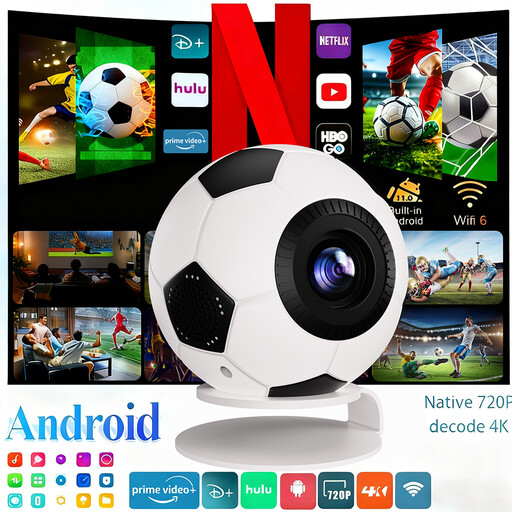
XBJ mini projector, 1080P Full HD
The listed streaming apps may be useful if you want to watch without a separate TV box. Check that your chosen film source and service work with the exact version.
The title specifies 1080P Full HD. The product information lists Android 14, HDMI, USB, WiFi 6, Bluetooth 5.4 and automatic keystone correction.
View on Joybuy
 No image available
BenQ MW809STH
This short-throw model is worth comparing if you have little space in front of the screen. Check the stated ratio against your desired picture width.
The product information lists a throw ratio of 0,49, 3.600 ANSI lumens, DLP and XGA resolution (1024 × 768).
View on Joybuy
 No image available
BenQ MX825STH
This short-throw model may be worth considering if you want to connect a film source and sound in the same set-up. Check that the resolution meets your needs.
The product information lists a throw ratio of 0,61, 3.500 ANSI lumens, XGA resolution (1024 × 768), two HDMI ports and a built-in 10W speaker.
View on Joybuy
Frequently asked questions
How can I tell before buying whether the picture will fit on my wall?
Measure the available picture width and the distance from the planned lens position to the wall. The throw ratio shows the distance from the lens to the screen in relation to the picture width. Also check the permitted image size and placement instructions for the exact model.
Can I simply stream from my phone during film night?
Don’t rely on a mention of Wi-Fi or screen mirroring alone. Check which app, HDMI connection or other playback method the exact model supports for your film source and service.
Who should I contact about a fault after buying in the Netherlands?
Report a fault to the seller. According to ACM ConsuWijzer, statutory guarantees are separate from any seller or manufacturer’s guarantee. What you could reasonably expect from the product under normal use is also relevant.
Can I show a film at home to guests?
Buying a projector does not in itself give you the right to screen films. The Dutch Government says you may only use copyright-protected films with the creator’s permission; whether a particular gathering counts as a public screening depends on the circumstances. Netflix also states that accounts are for personal, non-commercial use only.


