What should you look for?
Ultra-short throw
Choose this when: you can place the projector on a piece of furniture close to the projection wall and don’t want a device in the middle of the walkway.
Trade-off: a screen suited to ambient light may need to be bought separately. Check that it’s compatible with the exact model.
Short throw
Choose this when: you have space further from the wall and the calculated lens distance works in your room.
Trade-off: you’ll need room for the projector and possibly cables or a mount. The throw ratio alone doesn’t confirm that the picture will fit your room.
Measure the available wall width and possible lens positions before comparing models. BenQ Nederland recommends taking the room size and distance between the projector and screen into account. Use the throw ratio of the exact model to calculate the required lens distance.
| What to consider |
What should you check? |
Who is this important for? |
| Space and picture size |
Measure the desired picture width and possible lens positions. Calculate the lens distance using the throw ratio of the exact model, then check the installation details. |
If the projector can’t go in the walkway, I want to know in advance where it will fit and how wide the picture can be. Around 42% of consumers put positioning space first. |
| Visibility in daylight |
Consider when you’ll be watching, how much light enters the room and whether any ALR screen you’re considering is suitable for the projection type and model. When comparing brightness figures, bear in mind how they were measured. |
I often watch during the day and want to check in advance whether the light in the room and the screen will suit my needs. For around 25% of consumers, daylight visibility is the main concern. |
| Access to programmes |
Check whether the app you want is available on the exact projector version for the Netherlands, or find out which connection your existing TV receiver or streaming device needs. |
I want to play my garden programmes without any hassle, so I check which app or connection my source needs. Around 17% of consumers make access to programmes their top priority. |
| Complete setup |
Work out whether you’ll need a compatible screen, mount, cables or source device as well as the projector, then compare the total cost. |
If I want a simple setup, I check what else I’ll need to use with my furniture and existing equipment. For around 16% of consumers, an easy-to-use and affordable setup comes first. |
Projectors on Joybuy
These Joybuy projectors are options to consider for home viewing. For each model, check the required positioning distance, the app or connection you want and the components your setup needs.
 No image available
XGIMI Vibe One portable projector, Match Night EU Edition with screen and stand
The portable version with a built-in battery may suit you if you don’t want to leave the projector in one fixed spot.
The product name lists Full HD 1080p, Google TV, 250 ISO lumens and JBL Audio, plus a projection screen with stand.
View on Joybuy
 No image available
Yoton Y6 5.2 Bluetooth 4K LCD, native 1080P
This projector may suit you if you want to connect an existing TV or streaming source. Check which input that source needs before you buy.
The product information lists native 1080p and HDMI, USB and AV connections, plus Bluetooth audio.
View on Joybuy
 No image available
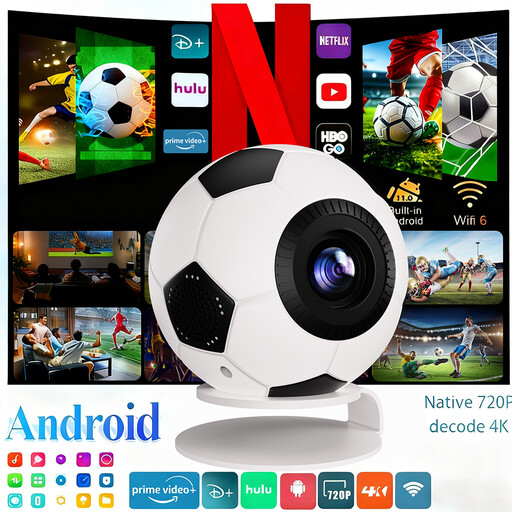
XBJ football-shaped mini projector, Android 14, 1080P Full HD
The built-in streaming apps listed may be useful if you want to start watching programmes on the projector. Check whether your service is available.
The product name lists 800 ANSI lumens. The product information mentions Android 14, HDMI and USB connections, wifi 6, Bluetooth 5.4 and automatic keystone correction.
View on Joybuy
 No image available
Optoma Photon Beam PK52
This option may suit you if you want to connect an external TV or streaming source via HDMI. Measure the distance needed for your desired picture size.
The product information lists a laser light source, 3.500 lumens, 4K UHD, two HDMI inputs and a picture size of 28 to 300 inches.
View on Joybuy
 No image available
BenQ MW809STH Short Throw, XGA (1024x768)
If you’re looking for a short-throw projector, use your room measurements to check the exact lens distance needed for your desired picture width.
The product name lists 3.600 ANSI lumens and XGA (1024x768). The product information mentions DLP, HDMI and screen sizes from 60 to 120 inches.
View on Joybuy
Frequently asked questions
How can I tell whether the picture will fit on my wall?
Measure the available picture width and the possible distance between the lens and the wall. For a first estimate, multiply your desired picture width by the throw ratio of the exact model, then check the installation details.
Do I need a special screen for daytime viewing?
Not in every room. First, consider how much light enters the room and check that any ALR screen you’re considering is compatible with the exact projector model. Such a screen may need to be bought separately.
What if a projector I bought online doesn’t fit in my room?
For a standard online consumer purchase in the Netherlands, you generally have a statutory cooling-off period of up to 14 days after delivery, with some exceptions. Check the terms that apply to your purchase and how you’re allowed to try the device during that period.
Is the manufacturer’s warranty the same as the statutory guarantee?
No. According to the Netherlands Authority for Consumers and Markets (ACM), the seller is responsible for the statutory guarantee if a product doesn’t meet what you can reasonably expect from it under normal use. A commercial manufacturer’s warranty doesn’t replace that responsibility.
What does a CE mark on a projector mean?
For electrical and electronic equipment that must carry a CE mark under EU rules, the version of the product being offered must meet the applicable requirements and bear the mark. According to the European Union, the manufacturer declares that the product meets the relevant rules; a CE mark doesn’t automatically prove that the product has been independently tested.


