Who is this buying guide for?

Viewers with limited projection space

You want to give your guests a suitable picture without moving furniture or seating. The required projection distance depends on the model and the image size you want; BenQ Netherlands explains why it’s worth measuring the distance and room in advance.

Organisers who can’t block out all the light

You’re screening the documentary while some ambient light is still present, and want to consider image size and stated brightness together. BenQ Netherlands’ specifications can help you make an initial shortlist, but they can’t replace assessing the set-up in your own room.

Organisers who want to plan playback and sound in advance

You want to know whether your chosen video source, connections and audio set-up will work together. For the EH-LS670B, Epson Netherlands lists built-in sound and Google TV; check which source and audio connection you’ll actually use with the model you’re considering.

What should you consider when choosing?

Ultra-short throw by the wall

Choose this option if: there’s little space between the seating and the projection wall, and you have room for a piece of furniture next to the wall.

Bear in mind: the exact distance and available wall space vary by model and the image size you want.

Short throw from a table or piece of furniture

Choose this option if: there’s a stable place for the projector in front of the seating.

Bear in mind: the projector, cables or viewers could obstruct the space between the furniture and the screen.

A smaller image from a standard distance

Choose this option if: your measured distance and wall width allow for a smaller image that suits the occasion.

Bear in mind: check that the exact model can produce the image size you want from that position.

Consideration What to look for when buying Who is this most important to?
Getting the right image size Measure the available wall width and the distance to the planned position; check the model specifications for your desired image size. If I want to leave the furniture where it is, the image size I can achieve from the space available is crucial. This is the main concern for around 36% of consumers who prioritise placement.
Visibility in ambient light Note how much daylight or lighting will remain on, and compare brightness ratings using the same unit and model context. If the lights stay on during the documentary, I want to match the image size to the conditions in the room. Around 29% of consumers give visibility in lit conditions top priority.
Following spoken dialogue Check whether the projector has built-in speakers and which audio output or external sound set-up you can use. If guests need to follow the dialogue from their seats, I want to know in advance how the sound will be connected. Around 21% of consumers who prioritise clear dialogue have this concern.
Connecting your source and equipment Check whether your documentary source works with an available app or input, and which cables or devices you’ll need. If I use a particular player or streaming source, I want to make sure it works with the projector. Around 14% of consumers put playback and the equipment needed first.

Common mistakes

  • Focusing only on the maximum screen size

    A stated maximum image size doesn’t tell you on its own whether the picture will fit from the space available. The actual distance and clear wall width also determine which set-ups are feasible.

    Measure the space and compare it with the projection specifications for the exact model and image size you want.

    You may need a different position or a suitable projection surface if the measured space doesn’t work with your desired image size.

  • Confusing ‘4K input’ with 4K output

    According to Optoma Europe, the Optoma GT2000HDR accepts 4K input, but its output resolution is 1920 × 1080. So a supported input signal doesn’t mean the model outputs the picture in 4K.

    Check the output resolution separately from the signals the projector can accept.

  • Assuming a screening for guests is automatically private

    A gathering doesn’t automatically count as a screening within a domestic setting. FilmService states that you need the rights holder’s permission in advance for a screening outside that setting; the Dutch government notes that you can’t make protected material available to the public without permission.

    Consider the specific arrangements and audience in advance, and check the terms of your film source and whether you need permission.

Brands to compare for this set-up

Epson

Worth considering if you’re looking at an ultra-short-throw set-up by the wall.

  • For the EH-LS800B, Epson lists an 80-inch image from 2,3 cm away from the wall. For the EH-LS670B, Epson lists built-in sound and Google TV.
  • These are different models: the EH-LS800B’s placement distance doesn’t automatically apply to the EH-LS670B. The picture and sound specifications come from the manufacturer.

LG

The CineBeam S PU615U is an example of a compact ultra-short-throw projector.

  • For this model, LG lists a 40-inch image at 8,1 cm and a 100-inch image at 39,3 cm.
  • LG doesn’t list a built-in battery. Bear this in mind when planning the power supply and a flat projection surface; the manufacturer’s picture claims aren’t an independent test.

Optoma

The GT2000HDR is a short-throw model to consider if there’s space available in front of the seating.

  • Optoma specifies a throw ratio of 0,496:1, two HDMI 2.0 inputs and a 3,5 mm audio output.
  • The datasheet lists 4K input and an output resolution of 1920 × 1080; these specifications describe different things.

BenQ

The TK705STi is a short-throw option for a set-up with some distance from the wall.

  • For this model, BenQ lists a throw ratio of 0,8, 3.000 ANSI lumens and Google TV with streaming apps.
  • BenQ’s claims about colour and viewing with the lights on are manufacturer claims, not an independent assessment of a documentary night in your room.

Joybuy products for short-throw set-ups

These Joybuy products are aimed at short-throw set-ups from a table or piece of furniture, with a focus on short projection distances and available connections for picture and sound.
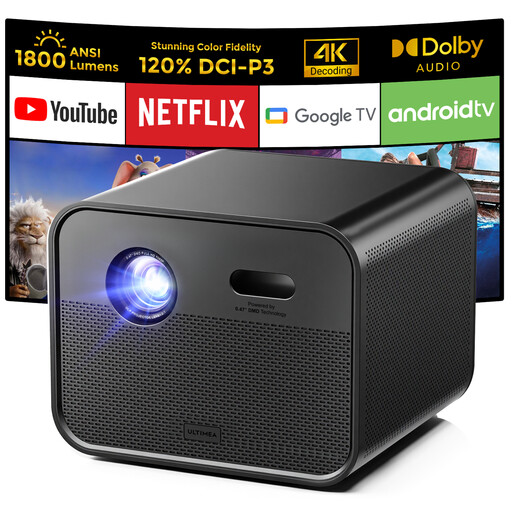
Ultimea Poseidon E100 Full HD projector

Ultimea Poseidon E100 Full HD projector

An option to consider if you want to avoid using an external player and the model suits your available projection distance.

Native resolution: 1920 × 1080. Stated brightness: 1800 ANSI lumens. Throw ratio: 1.2:1; stated image size: 20–300 inches.

The product description lists Google TV and two built-in 10 W speakers.

View at Joybuy

Optoma H117ST short-throw projector

Optoma H117ST short-throw projector

A model to consider if the space available and the image size you want are suited to the stated projection distance.

Native resolution: WXGA 1280 × 800. Stated brightness: 3800 ANSI lumens. Throw ratio: 0.52:1; stated projection distance: 0,4–3,4 m.

The product information lists HDMI, VGA, composite video and a built-in 10 W speaker. According to this information, Full HD content isn’t displayed at native Full HD resolution.

View at Joybuy

Yaber L2 native Full HD projector

Yaber L2 native Full HD projector

An option if you want to include Google TV and built-in sound in your set-up, provided the projection distance is suitable.

Native resolution: 1080p. Stated brightness: 520 ISO lumens. Throw ratio: 1.17:1; stated image size: 40–150 inches.

The product description lists Google TV and two built-in 5 W speakers.

View at Joybuy

BenQ MW809STH short-throw projector

BenQ MW809STH short-throw projector

A short-throw model to compare if a table or furniture-based set-up suits the distance available in your room.

XGA resolution: 1024 × 768. Stated brightness: 3600 ANSI lumens. Throw ratio: 0.49. The product information lists an HDMI input.

View at Joybuy

BenQ MX825STH short-throw projector

BenQ MX825STH short-throw projector

An option to compare if you’re looking for a short-throw set-up with HDMI and built-in sound.

XGA resolution: 1024 × 768. Stated brightness: 3500 ANSI lumens. Stated image size: 60–120 inches.

The product description lists two HDMI inputs and built-in 10 W speakers.

View at Joybuy

Frequently asked questions

How do I know whether a projector will fit in my narrow living room?

Measure the available picture width and the distance from the planned position to the wall. Then check the image size and projection distance for the exact model; an advertised maximum diagonal measurement isn’t enough on its own.

What should I consider if there’s still light in the room during the documentary?

Note how much daylight or lighting will remain on, and consider the stated brightness alongside the image size you want. Manufacturer specifications can help you compare models, but they don’t show on their own what the picture will look like in your room.

Will I need a separate player or speaker?

It depends on your source and the model. According to Optoma Europe, the Optoma GT2000HDR has HDMI inputs and an audio output; Epson lists built-in sound and Google TV for the EH-LS670B. Test your chosen source and audio set-up in advance.

Can I screen a documentary for guests at home?

A screening for guests doesn’t automatically count as being within a domestic setting. FilmService states that you need the rights holder’s permission in advance for screenings outside that setting; the Dutch government notes that protected material can’t be made available to the public without permission. The specific arrangements and audience matter, so check the terms of your film source too.

What if a projector I bought online isn’t suitable or develops a fault?

For online consumer purchases, you generally have a cooling-off period of up to 14 days after delivery, subject to legal exceptions, according to ACM ConsuWijzer. The product must also meet what you could reasonably expect; ACM ConsuWijzer states that there isn’t one fixed warranty period that applies to all projectors.
