First, measure the distance from the lens to the screen and the available wall width. Then choose between ultra-short, short or standard throw, depending on the image size you want. If there’s ambient light, consider the brightness and screen setup too. For films, check separately whether Dutch-language audio or subtitles are available through your app and playback device.
Who is this guide for?
Viewer with limited space for positioning
Wants to find out what image size will fit the room and whether the projector needs to sit close to the wall or further back. Hisense Netherlands, BenQ Netherlands and Epson Netherlands offer guides covering positioning and throw distance.
Evening viewer who cares about picture quality
Wants to balance image size and sharpness in low ambient light, and check whether the projector’s sound is suited to their viewing position. Epson Netherlands and Samsung Netherlands outline considerations for your viewing setup.
Viewer of Dutch-language streams
Wants to check in advance whether their chosen service and playback device offer Dutch-language audio or subtitles for the films they want to watch. The Netflix Help Centre explains some of the factors that can affect which languages are available.
What should you look for when choosing?
Ultra-short throw
Choose this when: the projector needs to sit close to the screen wall and there isn’t room for a model positioned further back. Hisense Netherlands gives the PT1 an image size of 80 to 150 inches.
Trade-off: precise positioning is important. Samsung recommends a dedicated UST screen for the LSP9T for optimal viewing.
Short throw
Choose this when: there’s some space between the projector and screen, but a standard-throw projector won’t fit. BenQ Netherlands gives the TK710STi a throw ratio of 0,69–0,83.
Trade-off: you still need space in front of the screen. According to BenQ, the TK710STi’s built-in speaker is 5 W, so consider whether you’d prefer to use external audio.
Standard throw
Choose this when: the room dimensions and image size you want suit the throw distance required by the specific model.
Trade-off: Epson Netherlands says standard-throw projectors generally need a few metres between the projector and screen. A narrow room doesn’t automatically rule out this option.
| What to consider |
What should you check? |
Who is this important for? |
| Suitable image size |
Measure the available wall width and possible lens position. Compare these measurements with the throw ratio or distance chart for the exact model. |
If I have limited space, I want to know whether the image I want will fit on my wall before choosing a projector. Around 42% of consumers put physical fit first. |
| Picture quality for evening viewing |
Compare the resolution and picture mode for your preferred image size. Also consider fan noise and whether the built-in audio suits your viewing position. |
If I mainly watch films in the evening, I want the picture detail and sound to suit my setup. Around 25% of consumers prioritise picture quality in low ambient light. |
| Ambient light |
Check the stated brightness and the measurement standard used. Consider whether you can control the light and which screen is suited to your setup. |
If my living room isn’t always dark, I want to know how incoming light and the screen will affect my viewing setup. Around 17% of consumers prioritise viewing in ambient light. |
| Dutch-language options |
Using the device you’ll watch on, check which audio and subtitle options are available for specific films. Also check whether the projector supports your chosen service or requires an external playback device. |
If I want to watch Dutch-language films, I want to check the language options for my titles and playback setup in advance. Around 16% of consumers prioritise Dutch-language viewing. |
Common buying mistakes
-
Assuming the maximum image size will work at any throw distance
The image width you want and the optics of the exact model together determine how much distance you’ll need.
Draw the lens position and available screen wall to scale, then compare them with the model’s distance chart.
You may need to reposition the projector, choose a smaller image or adjust your setup.
-
Assuming a smart projector guarantees Dutch-language audio or subtitles
According to the Netflix Help Centre, available languages can depend on factors including the title, profile language, location and device.
Check the titles you want to watch and your language settings through the service and device you’ll actually use.
You may need a different compatible playback device, but even that won’t guarantee that every title offers the language option you want.
-
Considering only the projector when planning an ultra-short-throw setup
Samsung recommends a dedicated UST screen for optimal viewing with the LSP9T.
Check the screen and positioning advice for the specific model you’re considering.
A suitable screen and position may require extra space and changes to your room layout.
-
Confusing the manufacturer’s warranty with your rights as a consumer in the Netherlands
The Dutch government distinguishes between your right to a product that works properly and any manufacturer’s warranty. If a product is faulty, the retailer is your point of contact.
Keep your proof of purchase and product description. If you’re buying a parallel import, also check separately whether you can register it through the manufacturer’s official dealer channel; Hisense has its own terms for this.
Brands to compare
Hisense
Worth considering if positioning the projector close to the wall is important. The Dutch product range includes the PX3-PRO, PT1 and L9Q.
- Hisense Netherlands gives the PT1 an image size of 80 to 150 inches and the L9Q a stated brightness of 5000 lumen.
- These are model specifications, not results from a like-for-like performance test. Hisense warns that parallel imports may affect registration through its official dealer channel; this is separate from your statutory rights with the retailer.
BenQ
The TK710STi is a short-throw option if you have space between the projector and screen.
- BenQ Netherlands gives the TK710STi a throw ratio of 0,69–0,83, two HDMI inputs and eARC.
- According to BenQ, the built-in speaker is 5 W. Consider separately whether you’d prefer to use external audio for films.
Optoma
The European product specifications for the UHZ35ST describe a short-throw option.
- Optoma Europe gives the UHZ35ST a fixed throw ratio of 0,496:1 and a stated brightness of 3500 lumen.
- The fixed ratio offers less optical flexibility when positioning the projector than the stated zoom on the BenQ TK710STi. Before buying, check that the specifications apply to the exact European version.
Samsung
The Dutch product information for The Premiere LSP9T describes an ultra-short-throw projector with smart TV features.
- Samsung says you need a Samsung account to use apps and recommends a dedicated UST screen for optimal viewing with the LSP9T.
- Check the account and screen requirements for this model before planning your full setup.
Epson
According to Epson, the EF-22N combines a compact design with Google TV and a built-in adjustable stand.
- Epson Netherlands gives the EF-22N a brightness of 1000 lumen and two 5 W speakers.
- Check the throw distance for the exact version before considering this model for a narrow room. A compact body alone doesn’t tell you whether your chosen image size will fit.
Projectors on Joybuy
These Joybuy products are suited to watching films and flexible positioning. Check each model to make sure its throw distance and language options work for your room and playback setup.
 No image available
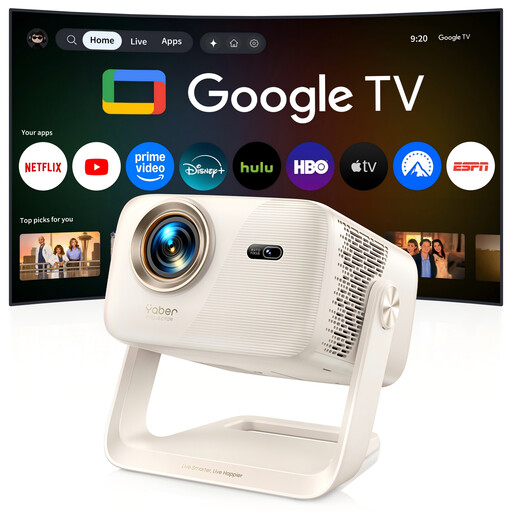
Yaber L2 projector
The product description mentions short-throw projection for use when space in front of the screen wall is limited.
The title lists native 1080p and two 5 W speakers. The product description mentions Google TV and a throw ratio of 1,17:1. Check that the positioning works in your room for the image size you want.
View on Joybuy
 No image available
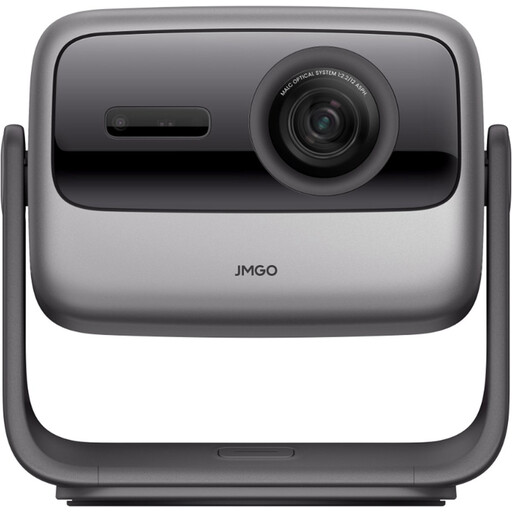
JMGO N1S Ultra 4K Triple Laser projector
The adjustable gimbal is useful if you want flexibility to change the projection direction, but that alone doesn’t tell you whether the throw distance will work in your living room.
The product title lists 4K Triple Laser. The product description mentions 3000 ANSI lumen and an adjustable gimbal. Check the lens-to-screen distance required for the image size you want.
View on Joybuy
 No image available
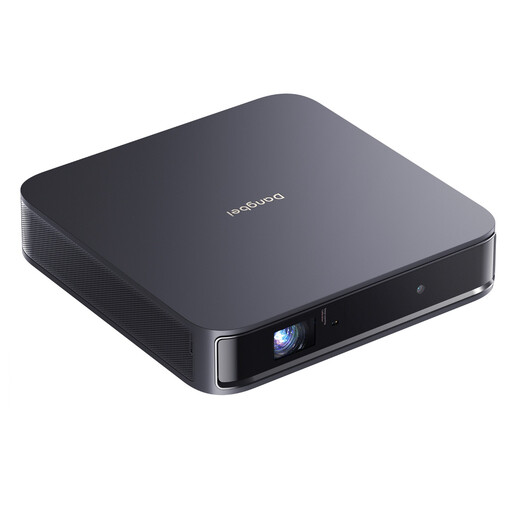
Dangbei Atom portable laser projector
The product description mentions a compact design for home cinema use. Check separately whether the throw distance works in your narrow room.
The title lists 1200 ISO lumen and built-in Netflix. The description mentions 1080p Full HD and two 5 W speakers. Streaming doesn’t guarantee that every title you want to watch offers Dutch-language audio or subtitles.
View on Joybuy
 No image available
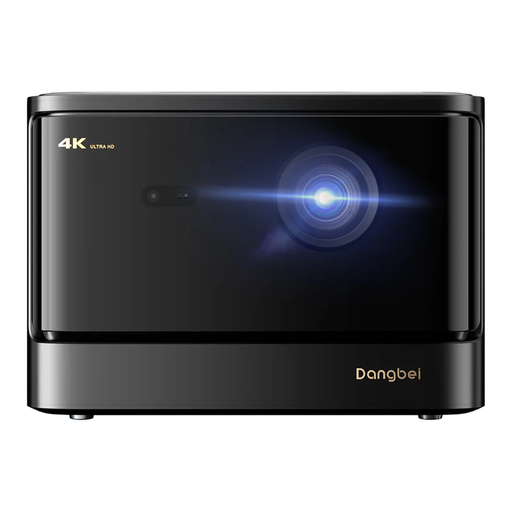
Dangbei DBOX02 4K GTV projector
The product description mentions home cinema use and built-in streaming. Check whether your chosen films are available in the language you want.
The product title lists 4K, HDR10+ and two 12 W speakers. The product name lists 2450 ISO lumen. Check the throw distance required for your preferred image size before deciding where to position it.
View on Joybuy
 No image available
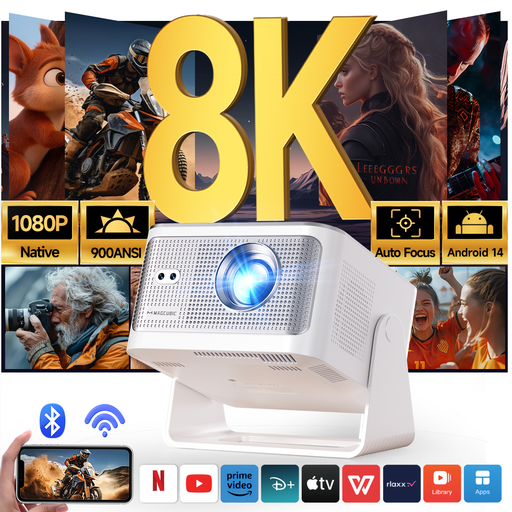
Magcubic HY350Max projector
The product description gives a throw ratio of 1:1 for small spaces. Compare this with the lens position and image size your room can accommodate.
The title lists native 1080p, 900 ANSI lumen and Android 14. Automatic picture correction doesn’t change the required throw distance.
View on Joybuy
Frequently asked questions
How can I check before buying whether the image I want will fit in my room?
Measure the available screen width and possible lens position, then compare them with the throw ratio or distance chart for the exact model. The stated maximum screen diagonal alone isn’t enough. For example, BenQ Netherlands gives the TK710STi a throw ratio of 0,69–0,83.
Does a smart projector automatically provide Dutch-language audio or subtitles?
No. Check the specific film through the service and device you’ll be using. The Netflix Help Centre says that available languages can depend on factors including your location, profile language, title and device.
Can an ultra-short-throw projector project directly onto a wall?
Samsung says the LSP9T can be used with a flat wall, but recommends a dedicated UST screen for optimal viewing. Check the screen and positioning advice for the model you’re actually considering.
What warranty do I have when buying a projector in the Netherlands?
According to the Dutch government, you’re entitled to a product that works properly; there’s no fixed statutory warranty period in the Netherlands. If a product is faulty, the retailer is your point of contact. Any manufacturer’s warranty does not replace this right.


