
Viewer with limited setup space
You share the living room and need to work out where the projector and screen can go. BenQ and Epson describe models with a short throw or optical adjustment features.


Start by checking the available throw distance and image width. A short throw can help if the projector needs to sit close to the wall, while optical zoom and lens shift can give you more flexibility in a fixed setup. Then consider ambient light, how you want to play your film and the audio connections. A portable model is handy if you want to put the projector away after movie night, but remember to check its stated brightness and battery life too.
You share the living room and need to work out where the projector and screen can go. BenQ and Epson describe models with a short throw or optical adjustment features.
You want to hear the singing and music clearly, while being considerate of your flatmates and neighbours. Audio connections and agreements about volume and viewing times all matter. The UK Government advises discussing possible noise issues with your neighbours and agreeing how to manage them.
You want to enjoy movie nights without a permanent installation, and are weighing portability against brightness, power supply and viewing time. Nebula states that the Capsule 3 Laser has a battery life of up to 2.5 hours in Eco mode.
First, measure the distance between the lens and the wall, along with your preferred image width. Then consider whether you can darken the room and how you want to play the film and its audio.
| What to consider | What to look for | Best suited to |
|---|---|---|
| Positioning and image size | Measure the distance from the lens to the wall and the image width. Compare the throw ratio and check whether the exact model offers optical zoom or lens shift. | If I need to put the projector in a limited space in a shared room, I want to know in advance whether the image will fit. Around 29% of consumers say positioning is their main concern. |
| Enjoying the music without disturbing others | Check the built-in speakers and the suitable audio output or HDMI ARC/eARC. Agree on volume and viewing times with your flatmates. | If I want to hear the singing and music clearly while being considerate of the people around me, I focus on the audio connection and agreeing ground rules. Around 29% of consumers prioritise keeping film sound at a manageable level. |
| Picture quality in ambient light | Check the stated brightness, including its unit of measurement and mode. Also consider whether you can darken the room and how large the image will be. | If I can’t make the room completely dark for every movie night, I want to weigh the stated brightness against my image size and the amount of light in the room. Around 24% of consumers prioritise watching in ambient light. |
| Playback and storage | Check that the app you want works on the exact model version. If you plan to use the battery, compare its stated runtime with the film’s length. | If I want to put everything away after movie night, I want to know whether I can play the film directly and whether the battery-powered setup will last as long as I need. Around 18% of consumers choose mainly for playback and easy storage. |
Manufacturers use different units of measurement and modes. Ambient light and image size also make a difference, so a single stated figure cannot fully predict how the picture will look in your room.
For the exact model, note the unit of measurement and mode, measure your preferred image width and check whether you can darken the room.
Digital keystone correction can crop and adjust the image. BenQ notes that this correction can affect picture quality.
First check the throw ratio and where you can position the projector. Then see whether optical zoom or lens shift is available, and use keystone correction for any remaining alignment.
Streaming features vary by model version, and the stated battery life applies to a particular usage mode.
Check that the app you want works on the exact version, and compare the film’s length with the battery life in your chosen mode.
If a film runs longer than the stated battery life, you may need to plug the projector in.
Compare specific home entertainment models if a short throw, audio outputs or stated brightness are important to you.
The home cinema models mentioned offer different options: a fixed setup with the EH-TW7000 or a portable projector with the EF-61W.
The Capsule range is worth considering if you want to move or put away your projector after movie night. Make sure you compare the exact version.
The Halo+ (New) is a portable option if you’re looking for a built-in battery, automatic picture adjustment and integrated speakers.
These projectors offer different options for picture adjustment, playback and sound for movie night. Compare their stated features with the space you have available, and check that the relevant CE marking is present on each specific product listing.
 No image available
Could be a good fit if you want built-in Google TV and speakers, with the flexibility to position the projector in different ways.
Native 1080p; 520 ISO lumens; 1.17:1 throw ratio; Google TV; two 5 W speakers; 360° gimbal.
 No image available
Could be a good fit if you want to adjust the projection direction and are looking for built-in smart features.
Native 1080p; 1,000 ANSI lumens; rotates through 360°; TOF autofocus; VIDAA; Dolby Audio.
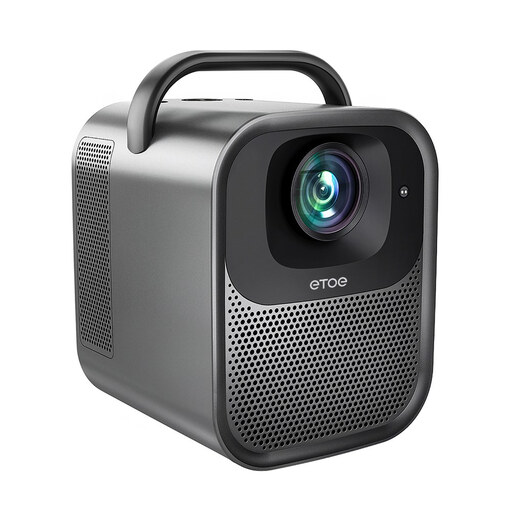 No image available
Could be a good fit if you want to play films using built-in Google TV and speakers.
Native 1080p; 1,300 ANSI lumens; autofocus and automatic keystone correction; Google TV; two 10 W speakers.
 No image available
Could be a good fit if you want to play films directly through Google TV and are looking for built-in audio.
Native 1080p; supports 4K; autofocus and keystone correction; Google TV; two 10 W JBL speakers; Dolby Audio.
 No image available
Could be a good fit if you’re looking for a portable projector that lets you adjust the direction of the projection.
Native 1080p; 900 ANSI lumens; 1:1 throw ratio; Android 14; rotates through 180°; automatic keystone correction.
Measure the distance from the lens to the wall and the available image width, then compare them with the throw ratio of the exact model. BenQ gives the TK705STi a 0.8:1 throw ratio, which means you need about 0.8 metres of distance for every metre of image width. Remember to take the lens position and available adjustment features into account too.
Not necessarily: some of the models mentioned have built-in speakers. If you want to use your existing audio equipment, check the suitable audio output or HDMI ARC/eARC on the exact model, and agree on volume and viewing times.
Position the projector as squarely as possible to the screen, and use keystone correction only for any remaining alignment. BenQ explains that digital correction can crop the image and affect picture quality.
Check that the app is available on the exact projector version you’re considering. Having a built-in smart platform or finding the app on another version doesn’t automatically mean it will work on every model.
According to the UK Government, electrical equipment placed on the EU market must have the applicable CE marking. Check the specific product listing: a product name or model specification alone does not confirm that the marking is present.