What should you look for?
Start by measuring the room and deciding how wide you want the screen to be. Then compare resolution, brightness and the connections you need for your source device and sound system.
| What to consider |
What to check |
Who this matters to |
| Visibility in a lit room |
Decide on your screen size and note the lighting conditions; compare brightness figures using the same unit of measurement. |
If I can’t darken the room completely, I want the image to be large and clear enough even from the back. Around 29% of consumers prioritise visibility in a lit room above all else. |
| Readability of historical sources |
Compare native resolution, aspect ratio and screen size; view a representative slide from the back row. |
When showing maps, dates and small captions, I want to be able to make out the details from the back. For around 23% of consumers, readability of sources comes first. |
| Clear, intelligible speech |
Check the audio connections on the projector and source device, then test the connection to the sound system. |
If the lecture includes spoken explanations, I want the audience to be able to hear the speaker from the back. Around 18% of consumers prioritise clear speech in the room above all else. |
| Throw distance and placement |
Measure the distance to the screen and your desired screen width; check the throw ratio for the exact model variant. |
When the mounting position is fixed, I want to know whether the projector can produce the desired image size from there. For around 18% of consumers, available space for positioning is their main purchasing concern. |
| Maintenance with frequent use |
Compare the light source type and its stated lifespan in the specified operating mode; check the warranty terms separately. |
If the projector will be used regularly for lectures, I want to know in advance what maintenance and service terms apply. Around 12% of consumers prioritise maintenance with frequent use above all else. |
Projector picks at Joybuy
This selection of Joybuy projectors includes options for historical text and images, different throw distances and connection to a room’s sound system. For each model, check the native resolution, distance to the screen and audio setup for your room.
 No image available
Optoma UZ38X 4K UHD Dual-Laser Projector
The product description lists native 4K UHD and a 3,5 mm audio output; check that your source device and room setup are compatible.
The product name lists 3.800 lumens; the description mentions a built-in 15 W speaker, 1,3× manual zoom and two HDMI inputs.
View at Joybuy
 No image available
XGODY N7 Cine Smart Projector
The stated short throw distance may be useful if the projector needs to be close to the screen; check whether the resolution provides enough detail for your slides.
The product information lists native 1080p, 1.000 ANSI lumens and a throw ratio of 1,1:1. The description mentions two built-in 8 W speakers.
View at Joybuy
 No image available
Dangbei DBOX02 Laser Projector 4K GTV
The product information lists two 12 W speakers; check that the sound is clear throughout the room before relying on the built-in audio.
The product name lists 4K and 2.450 ISO lumens. The description mentions HDR10+ and two 12 W speakers.
View at Joybuy
 No image available
BenQ MW809STH Short Throw Projector
The 0,49 throw ratio may be useful when mounting distance is limited. Bear in mind that the native XGA resolution has fewer pixels than Full HD or WUXGA, which can make detailed text less clear.
The product name lists 3.600 ANSI lumens; the native resolution is XGA (1024 × 768).
View at Joybuy
 No image available
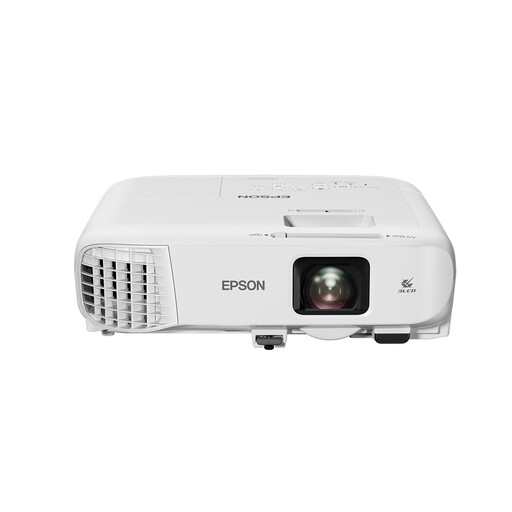
Epson EB-982W Standard Throw Projector
Use a representative slide to assess whether the native WXGA resolution shows enough detail at your planned screen size; it has fewer pixels than Full HD or WUXGA.
The description lists 4.200 ANSI lumens, 1,6× optical zoom and a built-in 16 W speaker.
View at Joybuy
Frequently asked questions
How can you tell whether the projector will fit in the available space?
Measure the distance between the lens and the screen, then decide how wide you want the screen to be. Next, check the throw ratio for the exact projector model; for example, the BenQ LU710 is listed with a ratio of 1,13–1,46.
Is the built-in speaker enough for a large audience?
You can’t tell just by checking whether the projector has a speaker. Check the audio connections on your chosen projector and source device, connect them to the room’s sound system if needed, and test how clearly you can hear from the back row.
Does a laser projector never need maintenance?
No. Epson gives the EB-L260F laser light source a lifespan of up to 20.000 hours. This figure applies to the light source; it doesn’t guarantee that the entire device will remain maintenance-free.
What warranty applies when you buy as a consumer in the Netherlands?
According to the Dutch Government, you’re entitled to a product that works properly, and the seller must provide a solution if there’s a problem. The Netherlands has no fixed statutory warranty period; the manufacturer’s warranty and any extra cover you buy are separate. Check the terms separately if an institution or business is buying the projector.
Can you show copyrighted films or photos during a history lecture without permission?
Don’t assume that you can. The Dutch Government states that you need the creator’s permission to use copyrighted films and photos, and that a private copy may not be made public. Whether a specific lecture requires permission or a licence, or qualifies for an applicable exception, depends on the material and the circumstances.


