
Host with seats far from the screen
Wants to choose a screen size that’s easy to see from the back row too. Start with the viewing distance, sightlines and screen size, as Epson Netherlands advises.


Start with the seats at the back and sides: decide what screen size will be easy to see from there, and check the screen’s viewing angle. Then choose a projector to suit the throw distance and ambient light in the room, and check separately that your preferred playback source and audio set-up will work. Manufacturer specifications can’t predict exactly how the picture or sound will perform in your space.
Wants to choose a screen size that’s easy to see from the back row too. Start with the viewing distance, sightlines and screen size, as Epson Netherlands advises.
Can’t fully dim the lights and wants to match the stated light output to the intended screen size and room. BenQ Netherlands and Epson Netherlands provide model-specific light specifications.
Has little distance between the projector and screen, or wants to stop guests walking through the projection path. Short-throw and ultra-short-throw are possible placement options; BenQ Netherlands and LG Netherlands describe examples for specific models.
First decide where everyone needs to be able to see the picture from. Then match the throw distance, lighting, playback and audio set-up to the room.
| What to consider | What should you check? | Who is this important for? |
|---|---|---|
| Picture size and visibility | Match the picture size to the viewing distance and check that guests at the sides are within the viewing angle of the chosen screen material. Epson Netherlands explains how viewing distance and screen size are related. | If I want good visibility from the back and sides too, I start with picture size and the screen’s viewing angle; around 33% of consumers prioritise visibility for the whole group. |
| Ambient light | Compare the stated light specification with the intended picture size and how much you can darken the room. A manufacturer’s claim about watching with the lights on is no guarantee of how it will perform in your space. | If I can’t fully darken the room, I want to weigh light output against picture size; around 27% of consumers prioritise ambient light. |
| Throw distance | Measure the distance from the lens to the screen and check the picture size for the exact model. BenQ lists a throw ratio of 0.8 for the TK705STi; LG gives a distance of 39.3 cm for a 100-inch picture and a maximum picture size of 100 inches for the CineBeam S PU615U. | If space is limited or the projection path crosses a walkway, I look at short-throw or ultra-short-throw; around 20% of consumers prioritise placement. |
| Playback and dialogue | Check that your preferred streaming service or external playback source, the required connections and any external audio will work with the exact model. Epson lists two HDMI ports and a built-in 2 W mono speaker for the EB-FH08. | If I want to play the series easily and make sure the group can hear the dialogue, I check the apps, connections and audio; around 20% of consumers prioritise playback and sound. |
A maximum picture size doesn’t tell you whether people in the back row will be able to make out the details or whether guests at the sides will have a good view.
Mark out the back and side seats before choosing a picture size.
You may need a different screen size or set-up if the sightlines don’t work.
Your choice of screen material depends on the projection type and the ambient light.
Check that the exact screen material is suitable for ultra-short-throw projection.
You may need a different, compatible screen material.
Apps, connections and speakers vary by model. Having a speaker doesn’t mean the dialogue will be clear from every seat.
Before buying, check your preferred playback source, connections and audio set-up for the exact model.
You may need an external playback source or audio set-up.
The EH-TW6250 and EB-FH08 are two different Epson models, with different placement and light specifications.
The TK705STi is worth considering if you want a shorter projection path and built-in streaming.
The CineBeam S PU615U is an ultra-short-throw model designed to sit close to the projection wall.
These Joybuy projectors suit different needs around picture size, placement and playback. Check which features work for your room and where the group will be sitting for each model.
 Image unavailable
The stated picture size of 40–150 inches can help you plan the seating; check the result from the back row.
The product name lists native 1080P, 1,000 ANSI lumens, 360° rotation, Dolby Audio, Wi-Fi 5, Bluetooth and AirPlay 2.
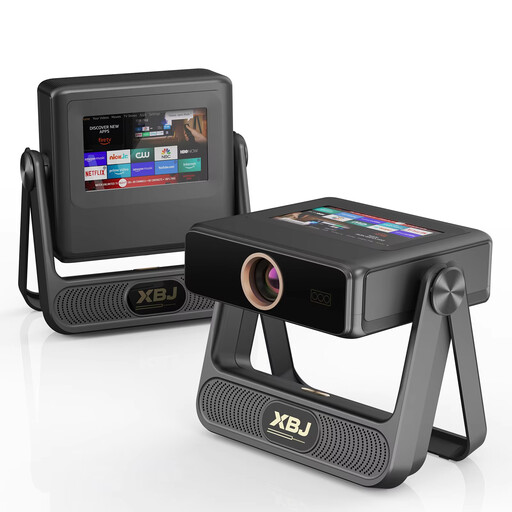 Image unavailable
The stated picture size goes up to 300 inches; check that your chosen size suits the viewing distance and the space available.
The product name lists native 1080P, 900 ANSI lumens, autofocus, automatic keystone correction, Wi-Fi 6 and Android OS.
 Image unavailable
The stated picture size of 50–200 inches can help you plan your screen; check that it suits the seating and the room.
The product name lists built-in apps, access to the Play Store, HDMI compatibility, 50%–100% digital zoom and 180° rotation.
 Image unavailable
Ultra-short-throw is a good option if placing the projector close to the projection wall is important. Bear the stated maximum picture size of 100 inches in mind when planning the back-row seating.
The product name lists 2,300 ISO lumens, Dolby Vision and a 60 W Harman Kardon speaker.
 Image unavailable
This option suits a set-up where you have room for a standard throw distance. Measure the distance from the lens to the screen and check that the exact model can achieve your preferred picture size.
First, decide where the screen will go and how far away the seats will be. Epson Netherlands recommends using the viewing distance in relation to screen height and the type of content as a guide; also assess the side seats based on the viewing angle of the chosen screen material. A projector’s maximum screen-size figure alone doesn’t tell you what size will be suitable to watch.
Keystone correction can digitally adjust the picture geometry, but BenQ warns that stronger correction can affect sharpness, picture quality and picture size, among other things. So first check the physical placement and adjustment options for the exact model.
You can’t tell just from the fact that a speaker is included. For example, Epson lists a 2 W mono speaker for the EB-FH08. Check that the sound is clear from the furthest seat and that you can connect your preferred external audio equipment.
When you buy at a distance, you’re often entitled to a 14-day cooling-off period, although whether it applies depends on the purchase. According to ACM ConsuWijzer, statutory guarantees in the Netherlands don’t have a fixed two-year term: what you can expect depends, among other things, on the product and normal use. Contact the seller if something is faulty.
It doesn’t depend only on the number of people attending. The Dutch government (Rijksoverheid) states that copyrighted film material may not be made available to the public without permission. If the event is outside the private sphere, check the rights for that specific screening and the terms of the playback service you’re using; this alone doesn’t provide a definitive answer about your event.