What should you look for when choosing?
Start by considering the lighting and choosing a safe spot for the projector. Then check the projection distance, sound and what you need to play the film.
| What to consider |
What to look for |
Who should prioritise this? |
| Visibility with the kitchen lights on |
Check how much light falls on the projection wall and compare the stated light output for the exact model. Epson Netherlands gives the CO-FH01 a white light output of 3,000 lumens and a colour light output of 3,000 lumens; this doesn’t guarantee a particular level of contrast in every room. |
If light from the kitchen falls on the wall during the film, I want to know whether the image will be easy to follow in that room. Around 29% of consumers give visibility with the kitchen lights on top priority. |
| Distance and safe placement |
Measure the distance to the wall and the available image width. Choose a spot away from cooking fumes and walkways, and compare your measurements with the specifications for the exact model. |
With limited free space, I want an image of the right size without placing the device somewhere unsafe. Around 23% of consumers put suitable and safe placement first. |
| Clear film sound |
Check whether the built-in speakers will be sufficient for your seating area and see which audio connections the exact model has. Epson Netherlands lists built-in sound for the EF-61W. |
If I can hear kitchen appliances, I want to follow the dialogue from my seat and know whether I’ll need separate speakers. Around 18% of consumers give clear sound top priority. |
| Quick setup and playback |
Check which streaming apps or playback source you need, how the projector will be powered and where cables can go. Epson Netherlands lists Google TV for the EF-61W; check that you can access the film and app you want. |
For a one-off film night, I want to keep installation to a minimum and pack everything away quickly afterwards. An estimated 18% of consumers put easy setup and playback first. |
| The complete setup |
Work out what you already have and what else you need, such as a playback source, audio equipment or a suitable mounting spot. Check any additional warranty terms separately from your statutory rights. |
When I consider the complete setup, I want to know what else I need to arrange besides the projector. Around 12% of consumers put the complete setup first. |
Projectors for these setups
These product picks focus on short-throw setups and portable or smart projectors for a film night. Measure your own viewing space and choose a spot away from cooking fumes.
 No image available
Optoma H117ST WXGA DLP projector, 3,800 ANSI lumens, 3D, white
A short-throw setup may suit you if you have limited distance to the projection wall.
The product description lists 3,800 ANSI lumens, a throw ratio of 0.52:1, HDMI and a built-in 10 W speaker.
View at Joybuy
 No image available
Yaber L2, native 1080p, Google TV, two 5 W speakers
This projector may suit you if you have limited setup distance and want to stream directly.
The product description lists 520 ISO lumens, a throw ratio of 1.17:1, autofocus, automatic keystone correction and two built-in 5 W speakers.
View at Joybuy
 No image available
XGIMI Vibe One Match Night EU Edition, with projection screen and stand
This portable model may suit you if you want to pack it away after film night and can darken the room.
The product name and description list Full HD 1080p, Google TV, 250 ISO lumens, a built-in battery and 3 W JBL speakers.
View at Joybuy
 No image available
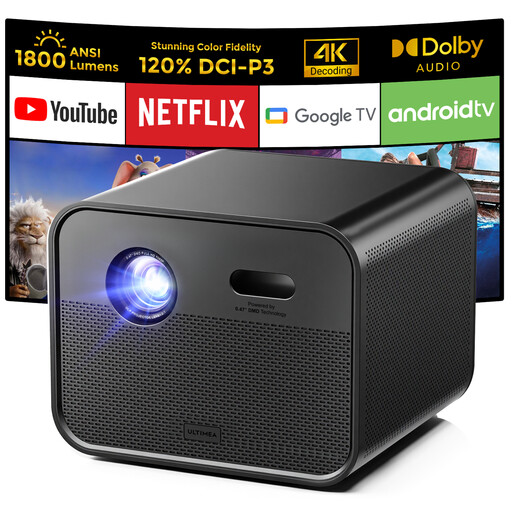
Ultimea Poseidon E100, native 1080p, Google TV, 4K support
This model may suit you if you want to stream directly and use the built-in speakers.
The product description lists 1,800 ANSI lumens, a throw ratio of 1.2:1 and two built-in 10 W speakers.
View at Joybuy
 No image available
Magcubic HY350Max, native 1080p, Android 14
This portable model may suit you if you’re looking for a smart setup and can work out the projection distance in advance.
The product description lists 900 ANSI lumens, a throw ratio of 1:1, a recommended distance of 1.35 m and a built-in 15 W speaker.
View at Joybuy
Frequently asked questions
How can you tell whether a projector will produce an image that suits your room?
Measure the distance from the intended spot to the projection wall and the available image width. Compare these measurements with the throw ratio or distance guidance for the exact model; for example, BenQ says the TK710ST can project a 100-inch image from 1.5 m. Also check where the device, cables and ventilation openings will be.
Can you mount a projector close to a kitchen?
This depends, among other things, on whether cooking fumes or greasy smoke can reach the mounting spot. Epson warns that greasy smoke may degrade materials and create a risk of the projector falling when its projectors are mounted on a ceiling or wall in such an environment. Follow the installation guide for your chosen model and choose another spot if in doubt.
Do you need a screening licence for a film night at home?
According to Auteursrecht.nl, you don’t need permission from the rights holders to screen a film within the strictly domestic circle of family and close friends; admission must not be charged. Permission may be required for screenings outside that circle, for example at an association’s event. Who you invite and whether admission is charged determine which rules apply.
What are your rights when buying online or if a product is faulty?
For online purchases from a business, you often have a 14-day cooling-off period, according to the Dutch government. Products must also be of satisfactory quality. In the Netherlands, there is no fixed statutory warranty period, and the retailer is your point of contact if there’s a problem. Check any additional warranty terms separately.


