What should you look for when buying?
First, decide how much light will be left on and where your photos are coming from. Then measure the available distance and consider whether a mains connection or a battery is better suited to the evening.
| What to consider |
What should you check? |
Who is this important for? |
| Visibility and detail |
Compare the stated brightness and measurement method, native resolution and preferred image size; take account of any lights that will be left on. |
If you want to view photos without making the whole room dark, visibility is your main consideration. Around 36% of consumers give this need top priority. |
| Connection to your photo source |
Check the video output on your phone or laptop and the projector’s input. For wireless or USB use, check which protocols and playback features the model actually supports. |
If you want to start the slideshow from your own phone or laptop, you’ll want to be sure the connection works. Around 29% of consumers put connectivity first. |
| Position and image size |
Measure the distance to the wall and compare it with the projection specifications for your preferred image size. Image correction does not replace checking the distance. |
If the room has few suitable places for a projector, you’ll want to know in advance whether it can produce the image you want from that spot. Around 21% of consumers give positioning and image size top priority. |
| Portability and battery life |
Check the weight, power supply and stated battery life for the relevant operating mode. Compare the battery life with the length of your presentation. |
If you want to move the projector between rooms or use it without a mains socket, portability and battery life are key. Around 14% of consumers put portability first. |
Projectors at Joybuy
Joybuy projectors for sharing holiday photos, with portability, connectivity and flexible positioning in mind.
 No image available
ETOE Dolphin 2, RGB laser, native 1080P, 800 ANSI lumens
A good fit if you want to move the projector around and can connect a compatible photo source.
The product title lists a built-in battery with up to 2 hours of battery life, HDMI 2.1 and USB-C.
Bear the stated battery life in mind; you may need mains power for a longer presentation.
View at Joybuy
 No image available
XGIMI Vibe One Match Night EU Edition, Full HD 1080p
Worth considering if you’re looking for a portable set-up with a projection screen and stand.
The product title lists a built-in battery, a projection screen with stand included and 250 ISO lumens.
According to the product specifications, battery life for video playback is up to 1.2 hours in Eco mode; you may need mains power for a longer presentation.
View at Joybuy
 No image available
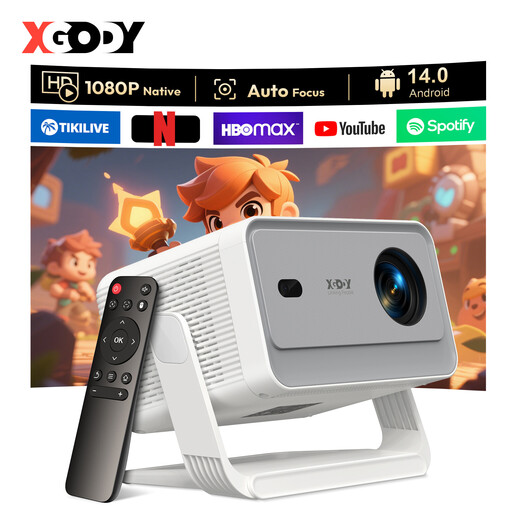
XGODY Gimbal A6 Pro, native 1080P, 650 ANSI lumens
Worth considering if you’re looking for a projector with autofocus and image correction for a flexible set-up.
The product title lists native 1080P, 650 ANSI lumens, Android 14.0, HDMI and USB.
View at Joybuy
 No image available
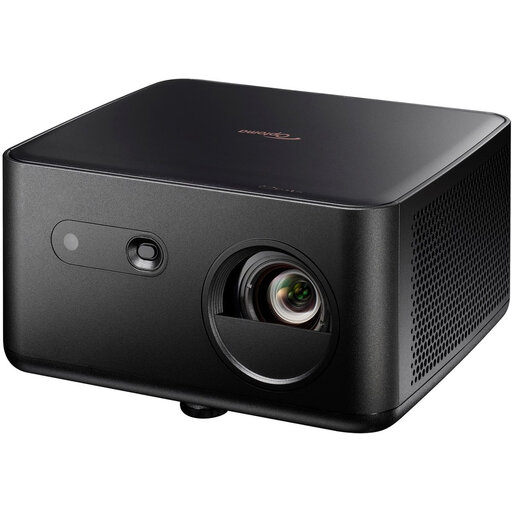
Optoma Photon Life PK32, 4K UHD, 1100 ISO lumens
Worth considering if you want to connect a compatible source via HDMI.
The product title lists 4K UHD, 1100 ISO lumens, autofocus, automatic keystone correction, HDMI 2.0 and USB-C.
View at Joybuy
 No image available
Magcubic HY350Max, native 1080P, 900 ANSI lumens
Worth considering if you want to position a projector flexibly and connect a compatible source.
The product title lists 180° rotation, automatic keystone correction, HDMI and wireless screen mirroring.
View at Joybuy
Frequently asked questions
Can I show holiday photos directly from my iPhone or Windows laptop?
Yes, as long as the connection is supported by both your device and the projector. Apple Support explains how to connect an iPhone using a suitable cable or adapter. For wireless projection from Windows, both the PC and the external display need to support Miracast. Check the connections on the exact model and try the full slideshow in advance.
How do I decide where to put the projector?
Measure the distance from the intended position to the wall and compare it with your preferred image size and the projection specifications for the exact model. Epson gives a distance of 1.76–2.86 m for a 60-inch image with the EB-FH52; this distance does not automatically apply to other projectors.
What maintenance and running costs should I allow for?
Check the power supply, light source and connection accessories required for the specific model. Epson gives the EB-FH52 lamp life as 5,500 hours, or 12,000 hours in economy mode; this is a specification, not a set replacement date. Also check whether you need a suitable cable, adapter or projection screen.
What are my rights when buying online in the Netherlands?
Online purchases generally come with a cooling-off period of up to 14 days after delivery, subject to legal exceptions. ACM ConsuWijzer explains this cooling-off period. Your statutory guarantee entitles you to a product that is fit for purpose; there is no fixed statutory guarantee period of two years. If a product is faulty, contact the seller.
Does a projector sold in the Netherlands need a CE mark?
The Dutch Government states that electronic devices placed on the market in the EU must carry a CE mark. Check the mark and product information for the specific item you’re considering.


