
Families in a bright living room
You want to look at photos together without fully darkening the room, so visibility and stated brightness matter more than portability.


Choose a projector based on the ambient light and the distance between the projector, the wall and the viewers. Then decide how you want to play your photos. In a room that cannot be fully darkened, consider the stated brightness alongside your desired image size. A portable model is best if you move the projector frequently and can darken the room. Check that the exact model’s photo player, connection or wireless compatibility suits where your photos are stored.
You want to look at photos together without fully darkening the room, so visibility and stated brightness matter more than portability.
You want the projector and image size to work in your existing room, so everyone can watch from their seats.
You want to know in advance whether you can play photos directly from a laptop, phone or USB storage device.
Start with the ambient light and viewing distance, as these determine the brightness and image size that will suit your room. Then decide how you want to play your photos and whether you’ll move the projector frequently.
| What to consider | What to look for when buying | Who is this important for? |
|---|---|---|
| Visibility in ambient light | Note the stated brightness and unit of measurement. Assess these alongside the light in the room and your desired image size. | If the living room can’t be made completely dark, I want everyone to be able to see the photos clearly. Around 36% of consumers prioritise visibility in ambient light above all else. |
| Image size and placement | Measure the distance to the wall and the furthest seat, then compare these with the model’s throw ratio and image range. | I want to know in advance whether everyone can see the image from the available seats and whether the setup will fit in the room. Around 29% of consumers prioritise image size and setup for multiple viewers. |
| Playing photos | Check the photo player, supported file formats and storage, or the HDMI connection or wireless compatibility you’ll need. | I want to start the holiday photos from the device or storage they’re on, without having to find a way to play them during the get-together. Around 21% of consumers prioritise connecting to the photo source above all else. |
| Portability and power | Check the weight, power supply and stated battery life for the mode you plan to use. | I want to be able to set up the projector in different places without always relying on a mains socket. Around 14% of consumers prioritise portability. |
A USB connection alone doesn’t confirm that a projector can play photo files directly. Philips lists a built-in photo player separately for the NeoPix 110.
Check the exact model’s photo player, supported file formats and storage, or plan to play your photos through a suitable laptop and HDMI.
You may need a compatible playback device or cable.
Viewing distance, seating and the available projection distance all help determine whether everyone can see the image and whether the setup will fit.
Measure the distance between the projector and the wall, and from the furthest seat, before choosing a model based on its maximum image size.
You may need to reposition the projector or the projection surface.
Epson Netherlands lists 3000 lumens of white and colour light output for the CO-FH02; BenQ Netherlands states 3800 ANSI lumens for the TH575i. These are manufacturer specifications using different terms, not results measured on the same basis.
Compare the units of measurement and assess the stated brightness alongside the ambient light and intended image size.
The Joybuy version of the XGIMI MoGo 4 is a Match Night bundle with a game code; it isn’t necessarily the same version as a standalone MoGo 4.
Compare the full version name and contents before considering a bundle as an alternative.
Check whether the bundle includes anything you don’t need or is missing any extras you want.
The CO-FH02 is a Full HD home projector for anyone who values a larger image to watch together and clearly stated light output.
The TH575i is a Full HD living room projector with HDMI-in, for anyone who takes stated brightness and projection distance into account.
The NeoPix 110 is suited to a simple photo slideshow in a room that can be darkened.
The MoGo 4 is a portable option for get-togethers in different locations.
These Joybuy picks focus on portable projectors for sharing photos in different locations. For each model, check that the power supply and playback method suit your room and photo source.
 Image unavailable
Suited to screenings in different locations; the product name lists a 10,400 mAh battery.
The product name lists 720P, automatic focus, Dual WiFi and Bluetooth 5.0. 4K is listed as supported, not as the native resolution.
 Image unavailable
Suited to anyone who wants to consider native 1080P and stated brightness in ANSI lumens when watching together.
The product name lists native 1080P, 800 ANSI lumens, HDMI 2.1 and USB-C. The built-in battery is rated for up to 2 hours.
 Image unavailable
Suited to anyone who wants to take a portable set with a projection screen and stand to a get-together.
The product name lists Full HD 1080p, 250 ISO lumens, Google TV and a built-in battery; this version also includes a projection screen with a stand. The stated video playback time is up to 1.2 hours in Eco mode and may be shorter at a brighter setting.
 Image unavailable
Suited to anyone who values native 1080P and connection options for their own device.
The product name lists 700 ANSI lumens, WiFi 6, Bluetooth 5.4, 16 GB ROM and HDMI/USB.
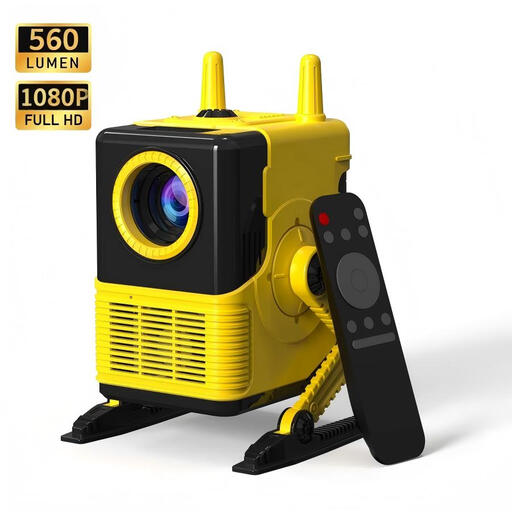 Image unavailable
Suited to anyone looking for HDMI/USB connections and image correction to help with positioning.
The product name lists 1080P support, 560 lumens, 4-point keystone correction, HDMI, USB, 2.4G/5.8G WiFi and Bluetooth 5.0.
Only if the model has a photo player that supports your files and storage device. Philips explicitly lists a built-in photo player for the NeoPix 110; check support for the exact model. Another option is to connect a suitable laptop via HDMI.
Measure the available projection distance and viewing distance, decide on your desired image size and check the projector’s throw ratio. Epson Netherlands advises matching the image size to the room, viewing distance and content. The maximum image size alone doesn’t tell you whether the setup will work in your room.
BenQ states that fan noise may occur and that ECO mode can reduce it on suitable models. Check the manual for your exact projector for the available settings and controls.
XGIMI advises keeping the MoGo 4 mini remote control’s button cell battery out of reach of children. XGIMI recommends stopping use if the battery compartment doesn’t close securely; this warning applies specifically to this product.
Online purchases in the Netherlands generally come with a statutory cooling-off period. ACM ConsuWijzer states that this is 14 days after delivery, subject to legal exceptions. This is separate from the warranty: if a product proves faulty under normal use, ACM ConsuWijzer says the seller must offer an appropriate solution, such as a repair, replacement or refund.