
Viewers with limited space for positioning
You want to project a suitably sized image from a short distance without the projector taking up your seating space. So, measure the space between the possible projector position and the wall.


First, measure the distance between the potential projector position and the wall, then work out how wide an image will fit. Next, choose between a standard, short-throw or ultra-short-throw projector. For history lectures, pay attention to native resolution and focus too, as these alone do not guarantee that small text will be readable. If there is ambient light, the stated brightness is relevant, but also check that the specific unit carries the required CE marking: the Dutch government says electronic devices placed on the EU market must have this marking.
You want to project a suitably sized image from a short distance without the projector taking up your seating space. So, measure the space between the possible projector position and the wall.
History lectures may include slides with dates, maps and small labels. As well as native resolution, consider focus, image size and how easy the image is to read from your seat.
If there is still ambient light in the room, weigh the stated brightness against the projector position and the image size you want.
First, measure the distance from the lens to the wall and the available image width. Then check the resolution, focus and connections that suit your lecture source and viewing conditions.
| What to consider | What should you look for? | Who should pay particular attention? |
|---|---|---|
| Projection distance and image size | Measure the distance from the lens to the wall and the available image width, then compare these with the model’s distance and image size specifications. | If I have little space between my seat and the wall, I want to know whether the image will fit within the available width. Around 34% of consumers say a suitable set-up is their top priority. |
| Slide readability | Check the native resolution and focus. If possible, view a slide with small text from the seat you plan to use. | When I need to follow dates, map labels and small text, I want to be able to make them out from my seat. Around 33% of consumers prioritise lecture slides that are easy to read. |
| Ambient light | Compare the stated brightness, including its unit of measurement, and take the room’s lighting conditions into account. | If I cannot darken the room properly, I want to know how the set-up will work with the light in my room. Around 20% of consumers make viewing in ambient light their top priority. |
| Lecture source and sound | Decide whether you will use a laptop, phone or app, and check the required inputs and any audio output. | When I want to play lectures from my own device, I want to know in advance whether I can connect both picture and sound. Around 13% of consumers prioritise straightforward source and audio connections. |
The distance label alone does not tell you whether the desired image size will fit on your wall; this depends on the exact model and set-up.
Measure the distance and usable image width, then compare them with the model’s distance and image size specifications.
Image size, focus, source material and viewing distance all affect how easy small text is to read.
Check the native resolution and focus and, if possible, view a slide with small labels from your own seat.
A manufacturer’s warranty does not automatically replace your statutory rights in the Netherlands. ACM ConsuWijzer explains that the seller may be responsible for providing a suitable solution if a product does not meet what you could reasonably expect from it.
Keep your proof of purchase and product specifications, and report any fault to the seller.
The TH671ST is a Full HD short-throw model, while the portable GV50 offers a different option for positioning and connectivity.
The EH340UST is an ultra-short-throw model designed to be positioned close to the wall.
The CO-FH01 is a Full HD model to consider if you have room for a standard projection distance.
The NeoPix 230 has a rotating stand for flexible positioning in a compact set-up.
The N2 mini is a compact projector with a tilting stand.
These Joybuy projectors are options to compare for lectures in a small seating area. Before buying, check that the specific unit carries the required CE marking: according to the Dutch government, electronic devices placed on the EU market must have this marking; a product listing alone is not proof.
 No image available
Native Full HD 1080p suits the need for detailed slides; check the focus and readability from your seat.
Stated brightness: 250 ISO lumens. The description lists up to 1.2 hours of video playback on the built-in battery in Eco mode.
 No image available
If your lecture source has a suitable HDMI output, check that this model’s HDMI connection is compatible with it.
The product information lists native 1080p Full HD, 700 ANSI lumens and a throw ratio of 1.4:1.
 No image available
Check the stated projection distance and image size against the space you have available; these are model specifications, not a guarantee that every size will work in your set-up.
The product information lists 700 ANSI lumens, native 1080p, a projection distance of 1–5 m and an image size of 40–200 inches.
 No image available
If you are considering a rotating set-up, check that the position works with your seat and projection wall.
The product title lists HDMI compatibility, an image size of 50–200 inches and digital zoom of 50%–100%.
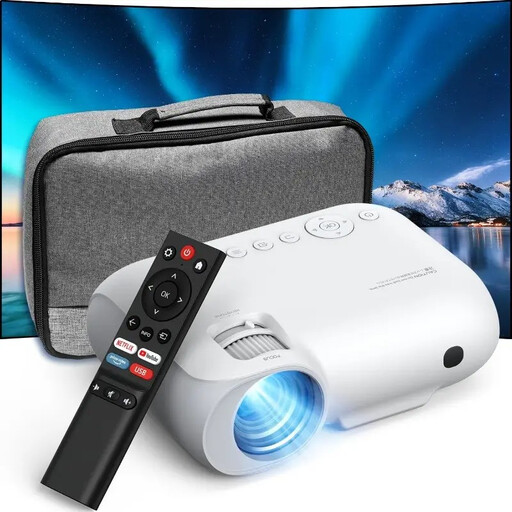 No image available
For a lecture played from a device with HDMI, check that the source’s connection is compatible with the HDMI connection on this projector.
The product information lists native 1080p Full HD, HDMI, Wi-Fi and Bluetooth. The product title states 9000 lumens; do not compare this figure with other models unless the same unit and measurement basis are used.
Measure the possible distance from the lens to the wall and the usable image width. Compare these with the stated image size at the distance specified for the exact model; the ‘short throw’ label alone does not tell you whether the image size will be suitable.
Keystone correction can straighten a trapezoid-shaped image when the lens is not facing the projection surface directly. First choose a suitable physical position, then check that small text on lecture slides remains sharp.
In the Netherlands, statutory rights apply alongside any manufacturer’s warranty. ACM ConsuWijzer explains that the seller must provide an appropriate remedy free of charge if, under normal use, the product does not meet what you could reasonably expect; there is no single fixed statutory guarantee period.
For online purchases, you generally have a statutory cooling-off period of up to 14 days after delivery. ACM ConsuWijzer advises checking the applicable exceptions and conditions for unboxing and trying out the product.
The Dutch government states that electronic devices placed on the EU market must carry a CE marking. Check the marking and product information for the specific unit; a web shop listing alone does not prove that the marking is present.