What should you look for?
First assess the lighting and how legible your slides are, then check whether the set-up and connections will work in your shared space.
| What to consider |
What should you check? |
Who is this important for? |
| Ambient light |
Compare the stated brightness using the same measurement standard, and consider whether you can close the curtains. Also bear in mind the image size you want. |
If the living room will stay bright during the presentation, I want photos and text to remain visible. Around 36% of consumers prioritise visibility in ambient light. |
| Text and map details |
Compare the native resolution and view a slide with small captions at the intended image size. |
If dates and place names are important, I want to be able to read them from my seat. Around 29% of consumers give legible text and map details top priority. |
| Projection distance |
Measure the clear distance between the projector and the wall or screen, and check the throw ratio of the exact model. |
If I have to set up the projector in a different place each time, I want to know whether the image width I need is achievable there. Around 21% of consumers prioritise a suitable temporary set-up. |
| Connections and operation |
Check that your laptop’s video output is compatible with the projector’s inputs. Also check which accessories you’ll need and which mode the stated lamp life applies to. |
If I want to present from my laptop without any hassle, I’ll check the connections and any accessories beforehand. Around 14% of consumers give connectivity and running costs top priority. |
Projectors at Joybuy
These Joybuy products are suited to a slideshow of historical photos and captions, with practical connections, temporary set-up and storage in mind.
 No image available
XGIMI Vibe One Match Night EU Edition, Full HD 1080p with projection screen and stand
The built-in battery and included projection screen with stand make this a good fit for a set-up you can put away after use.
The product title lists Full HD 1080p and 250 ISO lumens. Bear in mind the ambient light and the image size you want.
The title also mentions Google TV and JBL audio.
View at Joybuy
 No image available
Optoma UZ38X 4K UHD dual-laser projector
The stated zoom and projection distance may be useful when adapting the set-up to a shared room; measure the available space beforehand.
The product description lists native 3840 × 2160, 3.800 lumens, two HDMI inputs and 1,3× manual zoom.
The stated projection distance is 1–8 metres; check that this works for the image size you want.
View at Joybuy
 No image available
Yoton Y6 5.2 Bluetooth 4K LCD projector, native 1080P
The product description mentions use for presentations and HDMI and USB connections; check which connection is compatible with your laptop.
The title lists native 1080P and Bluetooth. Test a slide with small text at the image size you plan to use.
View at Joybuy
 No image available
Optoma H117ST short-throw DLP projector, WXGA
The short throw ratio of 0,52:1 may be useful when the projector needs to be close to the wall. Measure the available distance and check the image width you want.
The product description lists 3.800 ANSI lumens and native WXGA 1280 × 800. Test small captions and map labels at the image size you plan to use.
View at Joybuy
 No image available
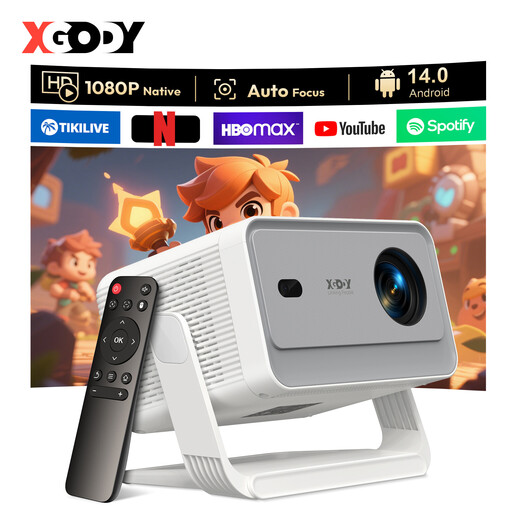
XGODY Gimbal A6 Pro, native 1080P, white and grey
The adjustable stand, autofocus and keystone correction may help with temporary set-ups; check that the available space allows for the projection you want.
The title lists native 1080P and 650 ANSI. Consider the ambient light and the image size you want when choosing.
The product description mentions HDMI, USB, Wi-Fi 6 and Bluetooth 5.4.
View at Joybuy
Frequently asked questions
Can I present from my laptop without Wi-Fi?
Yes, as long as your laptop’s video output is compatible with an input on the projector. BenQ says the MH560 has two HDMI inputs; check whether your laptop has HDMI or needs a suitable adapter. Epson lists an optional accessory for wireless use with the EB-W49.
How do I set up a projector in a shared living room?
First measure the clear distance to the wall or screen and check the throw ratio of the exact model. Set the image to the size you want and read a slide from the seat furthest away; ambient light and image size affect how much detail you can see.
Should I consider lamp replacement and the warranty?
Compare lamp life only with the mode the stated figure applies to: Epson lists up to 17.000 hours in eco mode for the EB-W49, while ViewSonic associates 20.000 hours with SuperEco+. In the Netherlands, the statutory guarantee is separate from any manufacturer’s warranty; ACM ConsuWijzer states that the seller is responsible for providing an appropriate solution if a product is faulty.
Can I use other people’s historical photos in my presentation?
Check the rights and get permission before sharing photos further or making the presentation public. The Dutch Government states that photos may be protected by copyright and that a private copy for personal use must not be distributed or made public; this general guidance does not provide a definitive ruling on every private screening in a student house.
Do I have a cooling-off period for an online purchase in the Netherlands?
For a standard online consumer purchase, ACM ConsuWijzer says you generally have a statutory cooling-off period of up to 14 days after delivery, with some exceptions. Before buying, check which terms apply to your order.


