First, choose an image size that’s easy to follow from the back row, then check that the projector can produce that size at the distance available. In a room with ambient light, the stated brightness is an important consideration. In a darkened room, image detail, sound and how you play the series may matter more. Manufacturer specifications from companies such as Epson Netherlands and BenQ Netherlands are a useful starting point, but they don’t guarantee how the picture will look in your room.
Who is this relevant to?
Viewers in a bright living room
If you’re watching with a group and can’t completely block out ambient light, consider brightness alongside the amount of light falling on the screen. Epson Netherlands stresses that the viewing environment should inform your choice of brightness.
Organisers with limited space for positioning
Want viewers at the back to be able to see the picture, but have little space between the projector and screen or need to keep a walkway clear? BenQ Netherlands describes projection distance as an important factor when deciding on image size and positioning.
Nature lovers in a darkened room
If you can control the light and mainly want a large picture with visible detail, check the projector’s resolution, the quality of the playback source and the sound setup too. Hisense lists the C2 Ultra as having 4K resolution.
What should you look for when choosing?
Standard projection
Suitable when: there’s enough distance between the projector and screen, and you’re watching with several people in a living room.
Bear in mind: a high stated brightness won’t automatically overcome light falling on the screen. Check the projection distance for the exact model too.
Short-throw or ultra-short-throw projection
Suitable when: you want a large picture but have little room for the projector, or need to keep a busy walkway clear.
Bear in mind: measure the available space and your desired image size beforehand. Samsung Netherlands recommends a suitable ultra-short-throw screen for The Premiere 7 to provide the best viewing experience.
4K projection with smart features
Suitable when: image detail and built-in playback features are important to you, and the room and playback source are suitable.
Bear in mind: 4K alone doesn’t determine how bright or detailed a series will look in your setup. Check the source quality and the amount of light in the room too.
| What to consider |
What should you check? |
Who is this important for? |
| Picture visibility in ambient light |
Assess the light around the screen and compare the stated brightness of the exact models; check which measurement standard was used. |
If I’m watching in a living room where I can’t completely block out the light, I want the picture to remain easy for the group to follow. Around 36% of consumers say ambient light is their top buying priority. |
| Image size and visibility for the group |
Measure the distance from the lens to the screen and the available image width; check what size the model can project from that distance. |
If I have limited space but want viewers at the back to be able to see too, the desired image size needs to work in the available setup. Around 29% of consumers give positioning and visibility for the group top priority. |
| Detail in nature footage |
Compare the stated resolution and check the picture quality provided by the episode and playback source. |
If I mainly want to see detail in landscapes and wildlife, I want the projector and source to be up to the task. Around 21% of consumers put image detail at the top of their list. |
| Playback and sound for a group |
Check the app and episode you want to watch, the available connections and whether you can connect external audio. |
If I’m watching with a group, I want to be able to play the series easily and tailor the sound to the room. Around 14% of consumers give playback and sound top priority. |
Pitfalls to avoid
-
Choosing based only on the highest lumen figure
The light falling on the screen and the viewing environment still affect how usable the picture is. Epson Netherlands points out that the brightness you need depends on the viewing environment.
First assess the light around the planned screen position, then compare the stated brightness of the exact models.
-
Assuming the maximum image size will suit your setup
The required projection distance varies from model to model. With an ultra-short-throw projector, your choice of screen may also matter.
Measure the distance from the lens to the screen and the available width before choosing between standard, short-throw and ultra-short-throw projection. BenQ Netherlands provides information about projection distance; Samsung Netherlands recommends a suitable ultra-short-throw screen for The Premiere 7 to provide the best viewing experience.
-
Assuming every app or phone connection will play the series
A built-in app and streaming from a phone are different playback options. BenQ notes that the TH575 can show a black screen when streaming certain services via a mobile cable or adapter.
Check the service and episode you want to watch on your exact projector, and test your planned playback method. If it doesn’t work, you may need a separate compatible playback source.
-
Assuming a group screening counts as a private viewing
According to Auteursrecht.nl, the exemption for screening without permission applies within a strictly domestic circle. A club night or company party doesn’t automatically fall into this category.
Establish who your audience will be and check the screening requirements and the terms of the streaming service you’re using before organising an event outside the domestic circle.
Brands to consider
Epson
The Epson EB-FH52 is an example of a conventional Full HD lamp projector.
- Epson Netherlands lists 4,000 lumens, a projection ratio of 1,32–2,14:1 and two HDMI inputs for the EB-FH52.
- Check the distance you’ll need, and bear the stated lamp life in mind with this lamp model. These features don’t automatically apply to other Epson models.
BenQ
The TH575i and TH671ST illustrate different projection distances and playback setups.
- BenQ Netherlands lists Full HD, 3,800 lumens and an included Google TV dongle for the TH575i. The TH671ST is a Full HD short-throw model.
- For the exact model, check the required distance and connections, and whether the series you want is available through your chosen playback method.
Hisense
The C2 Ultra is a 4K laser projector with listed streaming features.
- Hisense lists Netflix, two HDMI connections and an audio system for the C2 Ultra.
- The stated brightness doesn’t provide a sound basis for a practical comparison with the other models listed. Assess the projector in relation to your screen and lighting.
Samsung
The Premiere 7 is Samsung’s 4K projection option for very short distances.
- Samsung Netherlands describes positioning close to the wall and built-in sound.
- Samsung recommends a suitable ultra-short-throw screen for the best viewing experience, so consider the complete setup.
XGIMI
The HORIZON S Max is an example of a 4K model with an adjustable built-in stand.
- XGIMI lists 3,100 ISO lumens, a built-in stand and automatic image adjustment for this model.
- A lumen rating based on a different measurement method isn’t automatically a comparable measure of brightness in your room.
Projectors for group viewing
These Joybuy products offer Full HD viewing, flexible positioning or built-in playback features. Check whether the features of each model suit your space and the series you want to watch.
 No image available
Yaber L2 projector
Suitable if you’re looking for a Full HD projector with built-in Google TV. Check that the series you want is available through your playback setup.
Native 1080P FHD, two 5 W speakers and compatible with ceiling mounting.
View at Joybuy
 No image available
Blackview Smart Projector PV1000 Max Grey
Suitable if you’re looking for native 1080P and a rotatable design for flexible positioning. Check the image size you need for your viewing setup.
Native 1080P, 4K decoding and a stated image size of 40–150 inches. The product title also mentions Dolby Audio.
View at Joybuy
 No image available
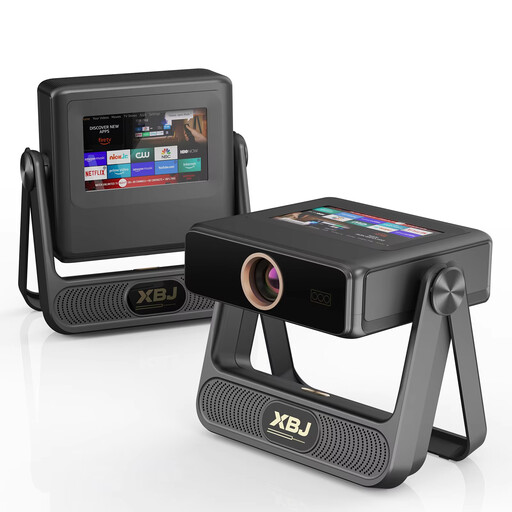
XBJ A5Pro, grey
Suitable if you’re looking for a portable projector with native 1080P. Check which image size will work at your planned projection distance before you buy.
The product title lists 900 ANSI lumens, an image size of up to 300 inches, autofocus and automatic keystone correction.
View at Joybuy
 No image available
XGIMI MoGo 4 Match Night EU Edition
Suitable if you’re looking for portable Full HD viewing and built-in Google TV. Check that the series you want is available through your chosen playback method.
Full HD 1080p, 450 ISO lumens, Harman Kardon audio and a stated battery life of 2,5 hours. The variant also lists an EA SPORTS FC 26 game code.
View at Joybuy
 No image available
Video projector with built-in apps, black
Suitable if built-in playback features and rotatable positioning matter to you. Check that the service and episode you want are available.
The title lists built-in apps, Play Store, 180° rotation and an image size of 50–200 inches.
View at Joybuy
Frequently asked questions
How can you check before buying whether the picture will work for the whole group?
Measure the available projection distance and decide where the screen and viewing positions will be. Then check what image size the exact model can produce at that distance; don’t rely solely on the largest advertised size.
Can you play a nature documentary directly from your phone?
Don’t assume you can without checking first. BenQ notes that the TH575 can show a black screen when streaming certain services via a mobile cable or adapter. Check the app you want to use and test a suitable playback method with your projector.
What maintenance and warranty questions should you ask?
For a lamp model, check the stated lamp life and the replacement instructions for that specific model. According to ACM ConsuWijzer, you’re entitled to a legal guarantee in the Netherlands if a product doesn’t meet what you could reasonably expect under normal use; there’s no fixed general time limit.
Can you show a streamed nature documentary to a large group?
The size of the group isn’t the only factor. According to Auteursrecht.nl, screenings within a strictly domestic circle are permitted without the rights holders’ permission; a club night or company party doesn’t automatically fall into this category. For an event outside the domestic circle, also check the terms of the streaming service you’re using.


