First, measure the available projection distance and image width, and check how much ambient light falls on the screen. A standard projector is a good fit if you have enough distance; an ultra-short-throw model can work well where space is limited, while a portable model offers greater flexibility. Bear in mind that manufacturers’ figures don’t guarantee the picture you’ll get in your room. Also check your programme source and audio connections.
Who is this relevant for?
Watching in daylight
You watch gardening programmes while daylight is still coming through the windows, and want the picture to remain clear at your chosen size. Don’t just consider resolution: think about the light falling on the projection surface and the stated light output too. BenQ Netherlands explains how ambient light affects viewing.
Picture detail and colour
You mainly watch in a darkened home cinema and want to make out the details of plants and flowers on a large screen. Compare the specifications for the exact model and bear in mind the quality of your programme source. BenQ Netherlands lists specifications for models including the TK710 and W2720i.
Limited space for projection
There’s little distance between your projector and the wall, and you want to know what image size will fit in your room. Standard-throw and ultra-short-throw projectors require different distances. For example, LG Netherlands lists model-specific distances for the CineBeam S PU615U.
What should you look for when choosing?
Standard-throw projector
A good fit if: you have a fixed spot with enough distance from the screen. BenQ lists a throw ratio of 1.15–1.5:1 and 3200 ANSI lumens for the TK710.
Trade-off: you’ll need space behind the screen, and you’ll also need to plan for power, your programme source and, if required, external audio.
Ultra-short-throw projector
A good fit if: the projector needs to sit close to the wall. LG Netherlands lists 40 inches from 8.1 cm and 100 inches from 39.3 cm for the CineBeam S PU615U.
Trade-off: check that the projection surface is flat and that your chosen image size will fit the available space. A short throw distance alone says nothing about visibility in daylight.
Portable projector
A good fit if: you watch in different places and easy alignment matters. Samsung lists automatic picture correction for The Freestyle+.
Trade-off: Samsung lists 430 ISO lumens. Don’t compare this figure directly with an ANSI-lumen rating, and check in advance that your chosen source will work.
| What to consider |
What should you check? |
Who should pay extra attention? |
| Visibility in ambient light |
Check the light on the wall at the time you normally watch, and bear your preferred image size in mind. |
If I watch while there’s still daylight coming in, I want to know whether the picture will remain visible at my chosen size. Around 31% of consumers say visibility in ambient light is their top priority. |
| Picture detail and colour |
Check the resolution of both the projector and programme source, and assess claims for the exact model. |
If I mainly watch in a darkened room, I want to see the details in leaves and flowers on a large screen. For around 25% of consumers, picture detail and colour come first. |
| Projection distance and placement |
Measure the distance from the lens to the screen and the available image width, then compare these with the model’s specifications. |
With limited space between the projector and wall, I want an image size that will genuinely fit in my room. Around 25% of consumers make suitable placement their top priority. |
| Programme source and audio |
Check your preferred app or source, the input you need and the connection for your audio equipment. |
If I want to use my existing streaming source and speakers, I need to know how to connect them to the projector. Around 19% of consumers put source and audio at the top of their list. |
Avoiding common buying mistakes
-
Comparing all lumen figures like for like
Manufacturers use different units of measurement, such as ANSI lumens and ISO lumens. Ambient light and image size also affect how clear the picture looks in your room.
Make a note of the unit used for each model and assess the picture in the lighting conditions you’ll be watching in. BenQ lists ANSI lumens for the TK710, while XGIMI gives an ISO-lumen rating for the HORIZON 20.
-
Choosing a large image before measuring your room
The available distance and your preferred image width need to match the projection specifications of the exact model.
First, measure the distance from where the lens will sit to the projection surface, along with the available width. Compare these measurements with the specifications for standard-throw or ultra-short-throw projection.
-
Assuming ‘smart’ or ‘4K’ will automatically play your programmes
A resolution rating and smart features don’t automatically tell you whether your chosen app, TV source or audio equipment will work.
Before buying, check the app or external source you want to use, as well as the connections on the exact model. For example, Epson says the EH-TW7000 needs a connected device for streaming.
Brands to compare
Epson
The EH-TW7000 is a 3LCD projector for a fixed home cinema set-up.
- Epson lists 3000 lumens of both white and colour light output, lens shift and two HDMI ports.
- The stated 5000-hour lamp life applies in Eco mode. Epson says you’ll need a connected device for streaming.
BenQ
The TK710 and W2720i are home cinema models with different projection specifications.
- BenQ lists 3200 ANSI lumens and a throw ratio of 1.15–1.5:1 for the TK710, compared with 2500 ANSI lumens and 1.0–1.3:1 for the W2720i.
- These model specifications aren’t an independent picture-quality test carried out under identical room conditions.
XGIMI
The HORIZON 20 is a smart home projector with laser technology and Google TV.
- XGIMI lists 3200 ISO lumens and optical zoom.
- An ISO rating isn’t directly comparable with an ANSI rating. Check the lighting conditions and whether your preferred apps are available.
Samsung
The Freestyle+ is a portable projector for anyone who needs the flexibility to move it around.
- Samsung lists automatic keystone correction to help align the picture.
- Samsung lists 430 ISO lumens. This doesn’t prove that the model will offer the same picture headroom in a bright room as a larger fixed projector.
LG
The CineBeam S PU615U is an ultra-short-throw model designed to sit close to the wall.
- LG lists 40 inches from 8.1 cm and 100 inches from 39.3 cm.
- According to LG, this model doesn’t have a built-in battery. Obstacles or uneven surfaces can interfere with certain screen adjustments.
Projectors for home cinema use
This selection features projectors for home cinema use. Compare each model’s projection distance, light output and connections with your room and programme source.
 No image available
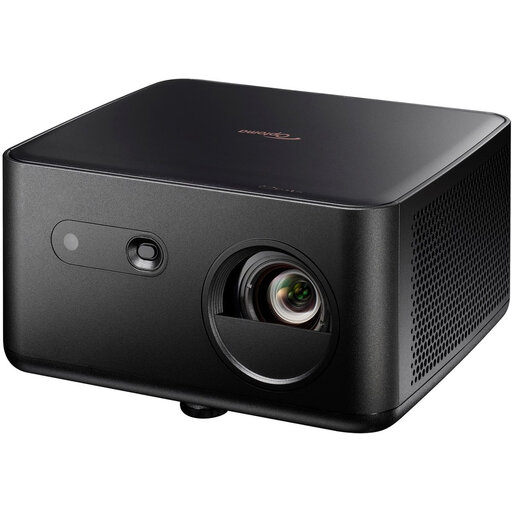
Optoma UZ38X 4K UHD Dual-Laser projector
A 4K UHD projector for a fixed home cinema set-up with a connected programme source.
The product description lists 3800 lumens, 1.3× zoom, a throw ratio of 1.21:1–1.59:1 and a projection distance of 1–8 m.
It has two HDMI inputs and a built-in 15 W speaker. A projection screen and source device aren’t included.
View at Joybuy
 No image available
Optoma Photon Life PK32 4K UHD DLP projector
A 4K UHD projector with several listed connections for a fixed viewing set-up.
The product description lists 1100 ISO lumens, HDR10 and HLG.
HDMI 2.0 and USB-C are listed connections. Automatic focus and keystone correction are also included.
View at Joybuy
 No image available
BenQ TK700 standard-throw projector
A 4K projector for anyone who can plan the distance to the screen in advance as part of a fixed set-up.
The product title lists 3200 ANSI lumens and 4K resolution (3840×2160).
The description lists 1.3× zoom, automatic vertical keystone correction and an HDMI connection.
View at Joybuy
 No image available
Dangbei DBOX02 4K laser projector
A home cinema projector with listed streaming and audio features.
The product description lists 2450 ISO lumens, Google TV and access to Netflix.
Two built-in 12 W speakers are listed. The ISO-lumen rating isn’t directly comparable with ANSI lumens.
View at Joybuy
 No image available
Yaber K2s projector with Google TV
A projector with built-in Google TV and listed connection options for a programme source.
The product title lists native 1080P and 4K support.
The product description lists dual 10 W JBL speakers, HDMI compatibility and automatic focus and keystone correction.
View at Joybuy
Frequently asked questions
How do you work out whether a projector will fit in your home cinema?
Measure the distance from where you plan to position the lens to the projection surface, as well as the available image width. Compare both measurements with the specifications for the exact model. An ultra-short-throw projector needs a different distance from a standard-throw projector.
Can you watch gardening programmes on a projector during the day?
It depends on the light falling on the projection surface, the image size and the projector. Darkening the room reduces ambient light on the screen, but a single stated lumen figure can’t predict on its own how the picture will look in your room.
How do you connect your programmes and audio?
First, check which TV or streaming source you use. Some models work with an external device connected via HDMI, while others list smart features. Also check that your preferred app is available and that the audio connection is compatible with your equipment.
What maintenance and running costs should you consider?
Compare the light source and the conditions under which the stated lifespan applies. Epson lists a lamp life of 5000 hours in Eco mode for the EH-TW7000. Also check whether your set-up requires a separate programme source, screen or audio equipment.
Which Dutch safety and buying rules are relevant?
The Netherlands Food and Consumer Product Safety Authority states that CE marking is compulsory for electrical products placed on the market in the Netherlands. The mark alone doesn’t prove that a specific item has been independently tested. ACM ConsuWijzer says that online purchases generally come with a statutory cooling-off period that ends 14 days after delivery. If a product doesn’t do what you could reasonably expect, the seller is responsible for providing a remedy under the legal guarantee.


