Start by measuring the available wall width and deciding where the projector can go. An ultra-short-throw model placed by the wall could work if there’s no room behind the seating, while a short-throw model is only suitable if the calculated distance is achievable. If you’ll be watching with ambient light, compare brightness specifications only when they use the same measurement basis. For music, also check the audio connections, fan noise and how the projector connects to your sound system. A portable model gives you more flexibility over where you set it up, but it won’t automatically reduce the projection distance.
Who is this choice for?
Viewers with limited space to position a projector
If there’s no room for a projector behind the seating, measure the available wall, the space on your furniture and the possible projection distance. BenQ Netherlands recommends taking the room dimensions and available distance into account when deciding on the image size.
Viewers in a room with ambient light
If you can’t keep the living room dark, consider the stated brightness alongside your preferred image size. BenQ Netherlands highlights ambient light and projection distance as factors to consider; specifications don’t show how the picture will look in your room.
Music listeners with their own audio equipment
If you want to listen to the recording through existing speakers or a soundbar, check the audio outputs and how they connect to your sound system. BenQ Netherlands explains that HDMI ARC requires compatible connections at both ends. Also allow for potentially audible fan noise.
What should you consider when choosing?
Ultra-short throw, positioned by the wall
A good fit when: there’s no suitable space behind the seating, but you have a piece of furniture by a flat projection surface. LG gives the CineBeam S PU615U as projecting a 40-inch image from 8.1 cm and a 100-inch image from 39.3 cm.
Keep in mind: the image size you want needs to fit the available wall. LG warns that obstacles and uneven surfaces can interfere with automatic screen adjustment. Epson specifies a maximum of 120 inches for the EH-LS670W, but that doesn’t mean the image will fit in your room.
Short throw from further into the room
A good fit when: there’s a clear spot further from the wall and the calculated distance works for your preferred image width. BenQ gives the TK700STi a throw ratio of 0.9–1.08:1.
Keep in mind: this positioning option needs more clear projection space than an ultra-short-throw model. BenQ lists different lamp life figures for different usage modes; these aren’t a guarantee of how long the lamp will last with your usage.
A portable model you can put away afterwards
A good fit when: flexible positioning matters more than a permanent installation. Samsung lists automatic screen adjustment and built-in 360-degree sound for The Freestyle 2nd Gen.
Keep in mind: check the distance needed for your preferred image size and how you’ll connect the recording and audio. Samsung says the Battery Base is sold separately, so portable doesn’t automatically mean wireless.
| Concern |
What to check |
Who does this matter to? |
| Will the image fit in the room? |
Measure the available wall, furniture space and possible projection distance, then check them against the specifications for the exact model. |
If I have limited space and can’t position the projector behind the seating, I want to know in advance whether the image will fit on the available wall. Around 36% of consumers put positioning first. |
| Picture quality with ambient light |
Decide whether you can darken the room, and check the model’s brightness specification and measurement basis. |
If I can’t keep the living room dark, I want to assess the image size and stated brightness together. For around 29% of consumers, watching with ambient light is their main concern. |
| Music and sound |
Check the audio output, the matching input on your sound system and the sound level specified for each usage mode. |
If I mainly want to listen to the recorded performance, I’ll check the connection for my speakers and whether the cooling fan might be audible. Around 21% of consumers prioritise the connection and listening set-up. |
| Playing the recording |
Note the output on your player and check for a matching projector input, an audio connection and any app or file requirements. |
If I want to watch an existing recording from my own player, I want to know how to connect its picture and sound to the projector. Around 14% of consumers say ease of playback is their main concern. |
Common mistakes
-
Choosing based only on the maximum screen size
A stated maximum doesn’t tell you whether that image size will fit on your available wall from the position you have in mind.
Measure the wall and possible projector position, then check those measurements against the specifications for the exact model.
You may need a different screen or another positioning solution to get the image size you want.
-
Assuming built-in speakers will deliver the right sound for music
A speaker specification doesn’t tell you how a recording will sound in your room. For external audio, the projector and sound system need compatible connections.
Check the full set-up, from the recording source through the projector to the speakers you want to use.
External audio may require compatible cables or extra equipment.
-
Assuming a portable projector is automatically wireless
Samsung says the Battery Base for The Freestyle 2nd Gen is sold separately.
Check how the exact version is powered and which accessories are included.
This version may need a separately sold power accessory.
Brands to compare
LG
LG presents the CineBeam S PU615U as a compact ultra-short-throw projector for placing on furniture by the projection wall.
- LG specifies a 40-inch image from 8.1 cm and a 100-inch image from 39.3 cm.
- LG says obstacles and uneven surfaces can interfere with automatic adjustment, so check the wall and furniture position.
Epson
Epson describes the EH-LS670W as an ultra-short-throw 3LCD laser projector with built-in sound.
- Epson lists 3,600 lumens, an image of up to 120 inches and 20 W 2.1-channel sound.
- These are manufacturer specifications, not an independent assessment of picture or music performance in your room.
BenQ
According to BenQ, the TK700STi offers a short-throw option if you can position it further from the wall.
- BenQ lists a throw ratio of 0.9–1.08:1, a built-in 5 W speaker and connections for external audio.
- Calculate the image width for the space you have; the stated lamp life varies by mode.
Samsung
Samsung describes The Freestyle 2nd Gen as a portable option for anyone who values flexible positioning.
- Samsung lists automatic screen adjustment and built-in 360-degree sound.
- Samsung says the Battery Base is sold separately. Also check the distance needed for your preferred image size and the connections for your recording and audio.
Projectors at Joybuy
These Joybuy products are suited to watching in a compact living room. For each model, check the projection distance for your preferred image size, as well as the connections for your recording and audio.
 No image available
Optoma H117ST Short Throw DLP Projector – WXGA, 3800 ANSI Lumens, 3D, White
A short-throw model to compare if you need to position the projector closer to the projection surface.
Throw ratio 0.52:1; projection distance 0.4–3.4 m; WXGA 1280 × 800; 3800 ANSI lumens; built-in 10 W speaker and HDMI input.
View at Joybuy
 No image available
BenQ MW809STH Short Throw Projector, XGA (1024 × 768), White
A short-throw model to consider if the calculated distance from the wall works for your set-up.
Throw ratio 0.49; XGA 1024 × 768; 3600 ANSI lumens and HDMI connection for an external source.
View at Joybuy
 No image available
BenQ MX825STH Short Throw Projector, XGA (1024 × 768), White
A short-throw model to compare if the available distance works for your chosen image size.
Throw ratio 0.61; XGA 1024 × 768; 3500 ANSI lumens and HDMI input for an external source.
View at Joybuy
 No image available
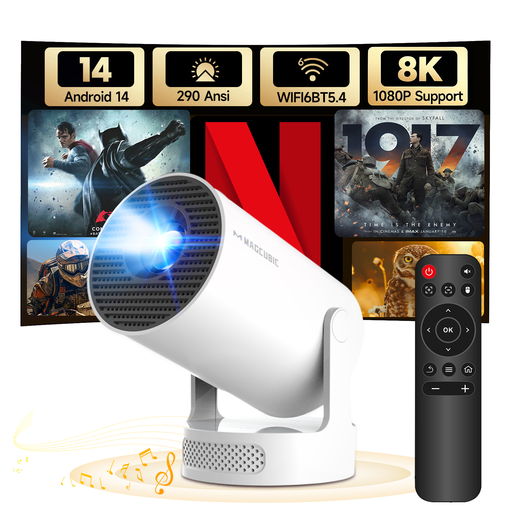
MAGCUBIC HY300Pro+ Mini Projector, Android 14
A portable model to consider if flexible positioning matters; check the distance needed for your preferred image size.
Throw ratio 0.8:1; projection distance 0.6–2.5 m; 290 ANSI lumens; built-in 5 W speaker; stand rotates through 180°.
View at Joybuy
 No image available
Yaber K2s Projector, Native 1080P
A model to compare if Google TV and built-in sound are important to you for playback; check the distance needed to position it for your wall.
Native 1080P; Google TV; two built-in 10 W JBL speakers.
View at Joybuy
Frequently asked questions
How can I tell if the image will fit on the wall?
Measure the available wall width and possible projector position. Then use the distance-to-image-size information for the exact model; the maximum stated screen size alone isn’t enough. BenQ Netherlands recommends taking the room dimensions and available projection distance into account.
Can I connect my soundbar?
That depends on the connections on both devices. As BenQ Netherlands explains, HDMI ARC requires compatible ARC connections and settings. If you’re using an external player, also check how its audio will be passed through.
What should I consider when using and maintaining a projector?
Allow for potentially audible fan noise and check the stated sound level for each mode. BenQ lists different lamp life figures for different modes on the TK700STi. Refer to the maintenance instructions for your chosen model.
What are my rights when buying a projector online from a business in the Netherlands?
According to the Government of the Netherlands, distance purchases often come with a 14-day cooling-off period. You’re also entitled to a product that works properly, and you can ask the seller to resolve any fault. The Netherlands doesn’t have one fixed statutory warranty period that applies to all products.
Can I show a recorded performance to other people?
Auteursrecht.nl describes an exception for screenings within a strictly domestic setting; a school or society event isn’t automatically covered. The Government of the Netherlands also states that a private copy for personal use must not be distributed or made available to the public. Check the source and usage rights for the specific recording separately.


