Who is this guide for?

Viewers at the back of the room

The distance from the back row to the screen and the available screen height can help you work out what image size you need. Epson Netherlands and BenQ Netherlands explain how viewing distance, screen size and projection distance each play a different role.

Film fans watching in a bright room

If you can’t darken the room completely, compare the stated brightness and consider the screen surface and ambient light. Epson Netherlands highlights how the viewing environment affects your choice of brightness.

Organisers of portable film nights

If you use your projector in different places, it’s worth considering connections, power and sound when making your choice. For example, Samsung Netherlands says that the Battery Base for the Freestyle 2nd Gen is sold separately.

What should you look for when choosing?

What to consider What should you check? Who is this important for?
Screen size and viewing distance Measure the distance to the back row and the usable screen height. For passive video content, Epson Netherlands gives a viewing distance of up to eight times the vertical screen height as a guideline, not a guarantee of viewing comfort for everyone. If I’m sharing the film with people sitting at the back, I want the image size to suit their viewing distance. Around 40% of consumers prioritise screen size and visibility at the back.
Ambient light Consider the light in the room and the screen surface. Only compare brightness figures when the units and measurement basis are clear; the stated figure alone won’t predict how the image will look in your room. If I can’t darken the room completely, I want to get an idea in advance of how the light and screen will affect the film. Around 30% of consumers say visibility in ambient light is their main consideration.
Projector placement Measure the distance from the projector lens to the screen separately from the viewing distance. Check the throw ratio, zoom and any image alignment options for the exact model. If the projector can only go in a limited number of places, the chosen image size needs to be achievable from one of them. Around 20% of consumers prioritise where the projector can be placed.
Connections, sound and power Check that your film source is compatible with an input on the projector, which audio connection you need and whether power is available. Don’t assume it has a built-in battery without checking. If I want to show films in different places, the complete setup needs to work with my source, sound and power supply. Around 10% of consumers prioritise a flexible playback setup.

Common pitfalls

  • Confusing viewing distance with projection distance

    The distance between the viewer and the screen doesn’t automatically determine how far the projector needs to be from the screen. For your chosen screen size, you’ll need to check the lens-to-screen distance and the model’s throw ratio separately.

    Measure both distances and check that the projector can produce your preferred image size from the intended position.

    If the distances don’t work, you may need a different projector position, screen or projector model.

  • Assuming the maximum image size guarantees a good picture

    A stated maximum diagonal size alone doesn’t tell you whether the image will be easy to see in your room. Ambient light and the screen surface still affect the picture, especially if you want to share a large image.

    Assess the light in the viewing room and compare brightness figures using a clear, like-for-like measurement basis. Don’t choose a screen based only on its maximum diagonal size.

    Depending on the room, you may need to darken it or include a suitable screen in your setup.

  • Assuming portable means a battery is included

    Samsung Netherlands says that the Battery Base for the Freestyle 2nd Gen is sold separately. So, portable doesn’t automatically mean you can watch without a power socket.

    Check what’s included with the exact model and arrange a suitable power supply if needed.

    You may need a separate battery or another power supply for your chosen viewing location.

Brands to consider

Epson

Epson offers home cinema projectors that let you factor in screen size and placement in advance; the EH-TW7000 is one specific model to consider.

  • For the EH-TW7000, Epson specifies lens shift, optical zoom, two HDMI ports and 3,000 lumens of both white and colour light output.
  • These specifications apply to this model and don’t automatically tell you how bright the picture will be in your room. Check the space available and the ambient light.

BenQ

The TH575i is a Full HD lamp-based model for a conventional living room setup.

  • For the TH575i, BenQ specifies 3,800 ANSI lumens and a throw ratio of 1.49–1.64.
  • The stated brightness isn’t a measurement taken in your living room. BenQ lists a lamp as the light source for this model; also check that the throw ratio suits your projector position.

Samsung

The Freestyle 2nd Gen is a compact option if you want to set up a screening in different places.

  • Samsung lists automatic screen adjustment and built-in sound for the Freestyle 2nd Gen.
  • Samsung says that the Battery Base is sold separately and that adjusting the screen position can result in a smaller image. Check your preferred image size and power supply in advance.

Projectors at Joybuy

These projectors at Joybuy are suited to a planned home cinema setup or a flexible film screening. Measure your space and check for each model that the image size, placement, connections and power supply suit the way you plan to use it.

Optoma UZ38X 4K UHD dual-laser projector

Optoma UZ38X 4K UHD Dual-Laser Projector

This projector could suit a planned film setup where you check the image size and lens-to-screen distance in advance.

The product name lists 3,800 lumens, 1.3× zoom and a 15 W speaker. According to the product information, a projection screen and source device are not included.

View at Joybuy

Optoma H117ST short-throw DLP projector

Optoma H117ST Short Throw DLP Projector

This short-throw model may be worth considering if the projector needs to be close to the screen; check that this placement works with your preferred image size.

The product name lists WXGA and 3,800 ANSI lumens. The product information states that Full HD content isn’t displayed at native Full HD resolution.

View at Joybuy

Blackview PV1000 Max Grey smart projector

Blackview PV1000 Max Grey Smart Projector

This model could suit you if you’re looking for a rotatable projector for a particular viewing direction; check the preferred image size at the intended location.

The product name lists 1,000 ANSI lumens, native 1080P, an image size of 40–150 inches, 360° rotation and TOF autofocus.

View at Joybuy
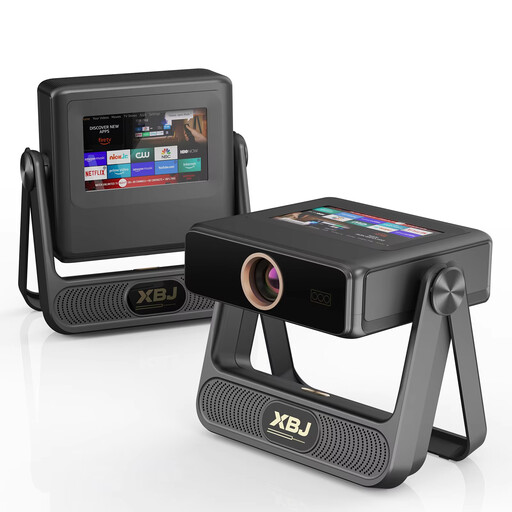
XBJ A5Pro Grey outdoor smart projector

XBJ A5Pro Grey Outdoor Smart Projector

This model could suit a flexible setup; assess the advertised image size in relation to the space available and the ambient light.

The product name lists an image size of up to 300 inches, native 1080P and 900 ANSI lumens.

View at Joybuy

Football World Cup HP CC360 FHD smart projector

Football World Cup HP CC360 FHD Smart Projector

This smart projector could suit you if you want to play a film from a compatible device; check in advance that your source works with your chosen connection.

The product name lists Wi-Fi, Bluetooth, wireless projection, autofocus and 4K support.

View at Joybuy

Frequently asked questions

Is the distance from the viewer at the back the same as the projection distance?

No. Viewing distance is measured from the viewer to the screen; projection distance is measured from the projector lens to the screen. First decide on your preferred image size, then check whether the model can produce it from the available position.

Do I need a short-throw projector straight away for viewers sitting far away?

Not necessarily. Short throw describes how close the projector can be to the screen, not how far away the viewers are. Your preferred screen size and the available lens position determine whether this type of model will suit your setup.

How do I connect my holiday film, and what else should I consider?

Check that your playback device is compatible with an input on the exact projector model; Epson lists two HDMI ports for the EH-TW7000. Also check that the lens and screen are within the supported range, and plan for sound and power separately.

Can I always watch without a power socket with a portable projector?

No, a portable design doesn’t automatically mean you can watch without mains power. Samsung Netherlands says that the Battery Base for the Freestyle 2nd Gen is sold separately. Check what’s included with each model and whether the power supply suits the place where you want to watch.

What should I look out for when buying a projector with CE marking?

CE marking is relevant when the projector is covered by harmonised EU rules that require it. According to Your Europe, the European Union’s website, the mark is only compulsory for products covered by such rules. So check the conformity of the specific model being offered rather than relying on the product name alone.
