
Viewers in a bright room
You want to watch the final with others without having to plunge the room into darkness. Consider the stated brightness alongside the amount of light in the room and your preferred image size.


For watching a football final at home, the best projector is one that suits the light in the room, the available distance from the screen and the viewing source you actually use. First decide on the image size and where to position the projector. Then compare how it handles fast-moving images and check that it works with your broadcast and sound setup.
You want to watch the final with others without having to plunge the room into darkness. Consider the stated brightness alongside the amount of light in the room and your preferred image size.
You want a large image, but need to work out where the lens, screen and seating will fit. A short-throw or ultra-short-throw projector needs a different setup from a conventional projector.
You want to know before kick-off whether your set-top box, streaming device or app will work with the projector. An HDMI connection does not automatically mean that every streaming service is supported.
Choose this option if: you can position the projector at the required distance and angle.
Bear in mind: measure the distance from the lens to the screen. Epson states that the EH-TW7000 has a lamp life of 5,000 hours in Eco mode.
Choose this option if: you want a large image but a conventional projector would need to be placed too far away. BenQ describes the TK710STi as a short-throw model.
Bear in mind: compare your preferred image size with the projection specifications for the exact model. An input lag figure is not a measure of how clearly it displays movement during a broadcast.
Choose this option if: you do not want a projector behind the seating and have space at the front of the screen.
Bear in mind: Samsung recommends a dedicated ultra-short-throw screen for the best viewing experience with The Premiere 7.
Choose this option if: you regularly change where you watch and want to be able to realign the projector. BenQ says the GP520 automatically adjusts to ambient light.
Bear in mind: the stated brightness alone does not tell you how the image will look with the light in your room and your screen size.
First consider the lighting and where the projector will go. Then check how it handles fast action and whether it works with your complete viewing setup.
| Buying concern | What to look for when buying | Who is this important to? |
|---|---|---|
| A clear picture in ambient light | Think about when you will be watching, whether you can darken the room and how large the image will be. Compare the stated brightness, paying attention to the unit of measurement. | If I want to watch with the lights on, I make sure the image size suits those conditions. Around 31% of consumers rank visibility in ambient light as their main buying concern. |
| The right distance and setup | Measure your preferred screen width and the distance from the lens to the screen. Check the projection specifications for the exact model, and allow for a dedicated screen if you are considering ultra-short-throw projection. | If I want a large image but have limited space, the projector needs to produce the desired image size from the position I have in mind. Around 25% of consumers make finding the right fit for their space a priority. |
| Fast-paced football action | Check which motion features the exact model offers and, if possible, try them with sports footage. Do not treat a gaming input lag figure as a measure of how well it displays football. | If I want to follow fast action on the pitch clearly, I look at image processing, not just resolution. Around 25% of consumers make the display of fast-moving images their main priority. |
| Connecting your broadcast and sound | Check support for your chosen service, the HDMI connection you need and your preferred audio connection. Test the complete combination of source, app and projector before the match. | If I want to use my chosen broadcast and sound setup, I check that the service works on the exact model or can be played through an external device. Around 19% of consumers rank a working viewing source and audio setup as their main buying concern. |
Your preferred image size needs to suit both the available distance and the lighting conditions. A larger projection spreads the available light over a bigger area.
First measure the screen width and the distance from the lens to the screen. Then consider the light in the room and the projection specifications for the exact model together.
BenQ gives input lag figures for the TK710STi under specific video signal conditions. These figures do not measure how football footage looks during fast camera movements.
Consider motion features and input lag separately. If possible, assess sports footage using the source you plan to watch.
Samsung describes projection onto a flat wall, but recommends a dedicated ultra-short-throw screen for the best viewing experience with The Premiere 7.
Compare a wall setup and a suitable screen setup as two different installation options.
A separate screen suitable for ultra-short-throw projection may mean an additional purchase.
A projector can accept a 4K input signal without displaying images at native 4K resolution.
Check the native resolution separately from the resolutions the device can process.
These examples relate to specific product ranges and models; their features are not a general recommendation for the entire brand.
The EH-TW7000 is a lamp-based 3LCD model for a fixed home cinema setup with an external viewing source.
The GP520 and TK710STi suit different setups: one is portable, while the other is a short-throw model.
The Premiere 7, model SP-LPU7DSAXXXE, is Samsung’s ultra-short-throw option, with integrated sound.
The HORIZON S Max is a product range to consider if you want a built-in adjustable stand and the ability to realign the projector.
These Joybuy products are worth considering for watching football at home, with placement, brightness and connection to a viewing source in mind. Choose one to suit your room, preferred image size and exact broadcast.
 Image unavailable
The short-throw ratio may be useful if the projector needs to be positioned close to the screen.
Native WXGA resolution of 1280 × 800; 3,800 ANSI lumens; throw ratio of 0.52:1.
The description lists HDMI 1.4a, a built-in 10 W speaker and a sports mode. Full HD input is not displayed at native Full HD resolution.
 Image unavailable
The listed streaming option and flexible positioning may suit you if you want to avoid an external viewing source and adjust your setup.
Native 1080p; 520 ISO lumens; Google TV and HDMI connectivity.
The description lists two 5 W speakers and a throw ratio of 1.17:1.
 Image unavailable
The stated throw ratio can help you decide whether this projector will suit a room with a shorter viewing distance.
Native 1080p; 1,000 ANSI lumens; throw ratio of 1.1:1.
The description lists HDMI, Whale OS, autofocus and keystone correction. A 60-inch image is stated to be possible from 1.33 m.
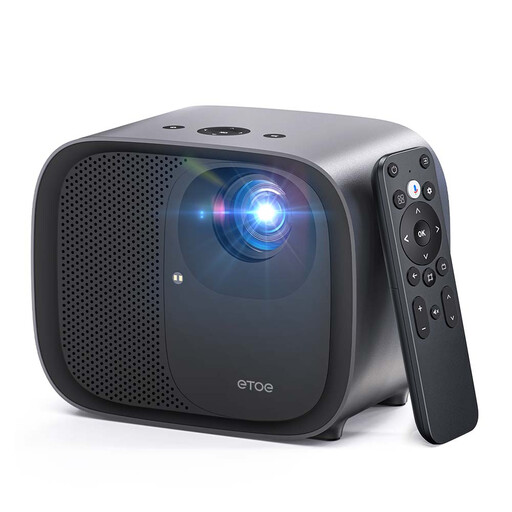 Image unavailable
Google TV and HDMI connectivity may suit a setup with built-in streaming or an external source.
Native 1080p; 600 ANSI lumens; Google TV.
The description lists dual-band Wi-Fi, automatic focus and keystone correction, and a 20 W audio system.
 Image unavailable
The listed HDMI connection and streaming apps may be useful if you want to connect the source directly to the projector.
Native 1080p; the description lists 500 LED lumens and 220 ANSI lumens. These are different units of measurement.
HDMI, built-in stereo speakers, autofocus and keystone correction are listed.
Measure your preferred screen width and the distance from the lens to the screen, then compare the combination with the projection specifications for the exact model. A general image size figure alone will not tell you where to position the projector.
No. Check whether the chosen streaming service works with the exact projector model, or use a suitable external device connected to the right port. The Netflix Help Centre says the Netflix app only works on compatible projector models; this does not tell you whether a particular final is available or has the relevant broadcast rights.
Follow the instructions for the exact model to position or mount it securely, and make sure you can reach the connections you need. Stated lamp life can depend on the mode: Epson lists 5,000 hours in Eco mode for the EH-TW7000.
According to ACM ConsuWijzer, when you buy a product online you generally have a statutory cooling-off period of up to 14 days after delivery, with some exceptions. Your statutory guarantee is separate from any manufacturer’s guarantee. If a product is faulty, the seller must offer a solution under the applicable conditions.
The Dutch government says that individuals can hand in electrical appliances in several ways, including when buying a new, similar appliance, at a collection point or at their local council recycling centre. The take-back scheme also applies when buying a similar appliance online.