What should you look for?
First, assess the ambient light and the space available. Then check that your live source and audio set-up will work with the projector.
| What to consider |
What should you check? |
Who should consider this? |
| Picture in ambient light |
Check the stated light output and how it’s measured. Also consider whether you can darken the room. |
If your household can’t make the room dark, you’ll want to know how the projector will perform in the available light. Around 36% of consumers are mainly concerned about picture quality in ambient light when buying. |
| Distance and picture width |
Measure the distance from the lens to the wall or screen, as well as the available picture width. Compare these with the throw ratio of the exact model. |
If the furniture leaves you with only one viable position, you’ll want to be able to get a suitable picture from there. For around 29% of consumers, the available space for positioning is the main consideration. |
| Live source and audio for the group |
Check that your source device is compatible, then test the picture and sound in advance. Check which audio connections the exact model has. |
If you’re watching with others, you’ll want to know before the match that your broadcast will play and everyone will be able to hear it. Around 21% of consumers prioritise connections for their source and audio. |
| Set-up and pack-away |
Check the power supply and any focus or picture-correction features. For a battery-powered model, check whether the stated battery life is long enough for your viewing time. |
If you need to clear the living room after the final, consider how easy the projector is to move and store. For around 14% of consumers, being able to pack away quickly is their main buying concern. |
Projectors at Joybuy
These product picks are worth considering for a temporary projector set-up to watch football together. Compare the specifications with the light, space, live source and audio in your living room.
 No image available
XGODY N7 Cine Smart Projector
Could be a good fit if you’re looking for a projector with built-in speakers and connections for a source device.
The product description lists native 1080P, 1000 ANSI lumens, HDMI, USB and 2 × 8 W stereo speakers.
The stated throw ratio is 1.1:1; the description says 60 inches from 1,33 m and 90° rotation.
View at Joybuy
 No image available
BenQ TK700
Could be a good fit if you’re looking for a 4K projector and its positioning and connections suit your room and audio set-up.
The product title lists 3200 ANSI lumens and UHD 4K (3840 × 2160); the description mentions 1,3× zoom and automatic vertical keystone correction.
BenQ lists two HDMI inputs and eARC for the TK700. Measure the distance and picture width before deciding where to position it.
View at Joybuy
 No image available
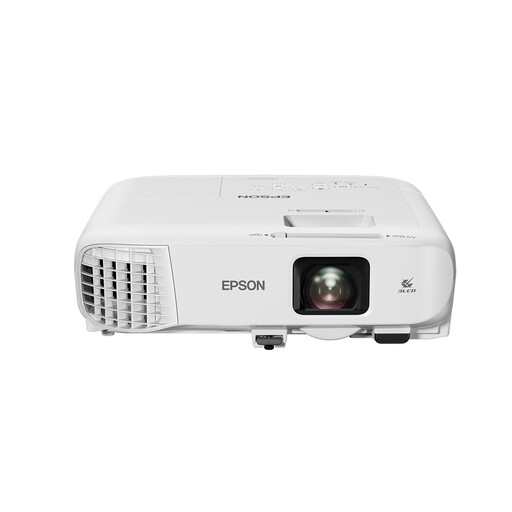
Epson EB-982W
Could be a good fit if its connections and built-in speaker suit your match-day set-up.
The product title lists 4200 ANSI lumens, 3LCD and WXGA (1280 × 800); the description mentions 1,6× optical zoom and keystone correction.
The description also lists a 16 W built-in speaker and HDMI. Check that the picture resolution and distance suit your room.
View at Joybuy
 No image available
Epson EF-22N
Could be a good fit if native 1080p and built-in speakers meet your viewing needs.
The product description lists 3LCD, native 1080p (1920 × 1080), 1000 ANSI lumens and built-in speakers.
The stated picture size is 30–150 inches and the throw ratio is 1.00–1.82:1. The picture size you can achieve depends on your set-up.
View at Joybuy
 No image available
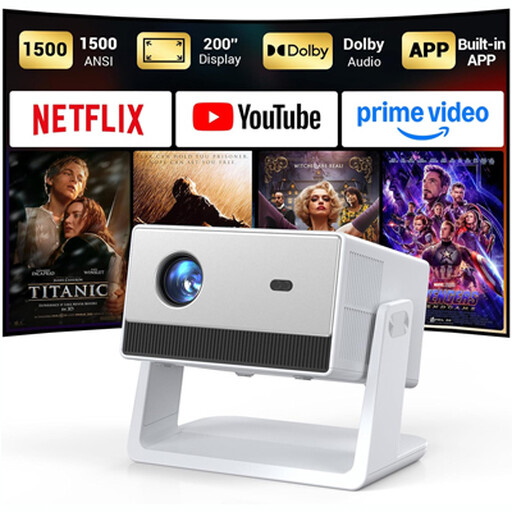
Funfilx Smart Projector, Native 1080P
Could be a good fit if you want HDMI and built-in speakers as part of a temporary set-up.
The product title lists native 1080P; the product description mentions 1500 ANSI lumens, HDMI, USB and two 5 W speakers.
The description mentions an adjustable stand, automatic keystone correction and manual focus. Test your chosen source and audio beforehand.
View at Joybuy
Frequently asked questions
How can I tell if the projector will produce a suitable picture in our living room?
Measure the distance from the possible lens position to the wall and the picture width you want. Divide the distance by the picture width to work out the throw ratio you need. Compare it with the range for the exact model and, if possible, test the final set-up.
Can I rely on automatic keystone correction if the projector is at an angle?
Keystone correction can make the picture rectangular, but BenQ warns that digital correction can affect sharpness and picture size, among other things. Where possible, start by positioning the projector as straight as you can, then check the picture.
Will I need anything besides the projector to watch the live broadcast?
That depends on your provider and source device. Check in advance that the specific broadcast is available to you, that your device works with the projector and that the sound is loud enough for everyone watching. Built-in streaming apps don’t confirm this.
What are my rights if the projector I bought online isn’t suitable for my home?
According to ACM ConsuWijzer, with a standard online consumer purchase you generally have a statutory cooling-off period of up to 14 days after delivery, subject to exceptions. You’re also entitled to a product that is of satisfactory quality and does what you could reasonably expect under normal use. The length of this legal guarantee isn’t a fixed number of years for every projector.


