First, measure the available distance to the wall and the usable wall width. Then choose a projector that can play photos from your phone, laptop or USB storage. A short-throw model may suit a limited distance; a battery-powered model is handy if you want to move the projector, while a mains-powered model is an option if there’s a socket available and brightness is important. Check the connections, image size and required projection distance for the specific model.
Who is this guide for?
Families short on space
You want to look at photos together, so the distance between the projector and the wall, as well as the available wall width, needs to work in your room. BenQ Netherlands explains why projection distance determines the image size you can achieve.
Families who want to connect quickly
You want to show photos from a phone or laptop you already own, without having to work out the connections while you have guests over. Check in advance which connection and playback method your device can use with the model you’ve chosen.
Families who move their viewing set-up
You want to be able to move the projector or set it up temporarily. In that case, it’s important to weigh up the power supply, any battery life and the brightness of the specific model.
What should you consider when choosing?
Start with the room and how you’ll connect your photo device. Then check whether the projector will have sufficient power and suitable lighting conditions where you plan to use it.
| What to consider |
What to look for |
Who should prioritise this? |
| Image on the wall |
Measure the projection distance and available wall width, then compare them with the specifications for the exact model. |
If there’s very little space between the projector and the wall, you’ll want to know whether the image will fit within the available width. Around 42% of consumers prioritise how well a projector fits their room. |
| Connecting your photos |
Check HDMI, USB and screen mirroring, and whether the method you choose works with your phone or laptop. |
If you want to show photos from a device you already own, you can check in advance which connection will work. Around 33% of consumers put connectivity first. |
| Visibility in bright conditions |
Consider whether you can darken the room. When comparing brightness figures, check the stated unit and how the measurement was taken. |
If it’s difficult to darken the room, factor in the stated light output, but consider it alongside the image size and the room. Around 17% of consumers make visibility in bright conditions their main priority. |
| Moving the projector and power |
Check whether the model has a battery, the stated running time for the relevant mode, and whether mains power is available. |
If you want to change where you watch or there’s no socket near the projector, the power source is an important factor. Around 8% of consumers prioritise portability. |
Common things to watch out for
-
Focusing only on the maximum image size
A stated maximum doesn’t tell you whether the projector will produce an image that fits your wall from the available distance.
Measure the distance and usable wall width, then compare both with the projection specifications for the exact model.
-
Assuming ‘wireless’ means no socket is needed
Screen mirroring and power are two different features. A wireless connection doesn’t, by itself, mean that a projector has a built-in battery.
Check separately how you’ll play your photos and how the projector will be powered during the slideshow.
Without a battery, you may still need a socket or a suitable power supply for a temporary set-up.
-
Comparing brightness figures without checking how they were measured
A figure on its own won’t tell you how the photos will look in your room. The stated unit of measurement, image size and ability to darken the room also matter.
Check the unit, and compare white and colour light output only if both figures are provided for the model. BenQ points out that specifications alone don’t give you the full picture of brightness.
Brands to consider
Philips
The NeoPix 110 is an example of a model for a compact set-up, with several listed ways to play photos.
- Philips lists HDMI, USB, screen mirroring and a built-in media player for the NeoPix 110.
- Philips specifies 720p and an image size of up to 65 inches for this model. Check that the image size and projection distance will work with your wall.
BenQ
The TH671ST is an example of a short-throw model for situations where space between the projector and wall is limited.
- BenQ lists 1080p for the TH671ST and a 100-inch image from a projection distance of around 4.9 feet.
- That example image size doesn’t guarantee that your wall is wide enough. Measure your room and check the specifications for the exact model.
Epson
The CO-FH01 is an example of a model for anyone looking for a mains-powered set-up with a stated light output.
- Epson lists Full HD, HDMI and 3,000 lumens of both white and colour light output for this model.
- These are manufacturer specifications, not measurements taken in your rented home. Check the projection distance and lighting conditions too.
soundcore Nebula
The Capsule 3 Laser illustrates the choice between a built-in battery and the stated brightness of a compact model.
- According to Anker’s own product information, the Capsule 3 Laser offers 1080p, 300 ANSI lumens and 2.5 hours of battery life in eco mode.
- The stated battery life applies in eco mode. Don’t confuse this model with the Capsule 3 without ‘Laser’, which has different specifications.
Projectors for a compact set-up
These Joybuy product picks are aimed at a compact, temporary set-up. Their product names indicate that they’re suitable for short-throw projection or offer connections for a photo device. Before you buy, check that the connections and image size will work for your situation.
 No image available
Optoma H117ST DLP projector, WXGA, 3800 ANSI lumens
A short-throw model to compare if space between the projector and wall is limited. Also check that your desired image will fit on the available wall.
The product name lists WXGA, 3800 ANSI lumens and 3D.
Joybuy
 No image available
Yaber L2 projector, native 1080P, 520 ISO lumens
An option to consider if you want to connect your photos by cable. Check that the connections are compatible with your phone or laptop.
The product name lists native 1080P, 520 ISO lumens and HDMI/USB.
Joybuy
 No image available
XGODY Gimbal N6 Pro projector, native 1080P, 700 ANSI lumens
A model to compare if you want to show photos from a phone or another connected device. Check in advance which connection will work with your device.
The product name lists native 1080P, 700 ANSI lumens and connections for HDMI, USB and a phone.
Joybuy
 No image available
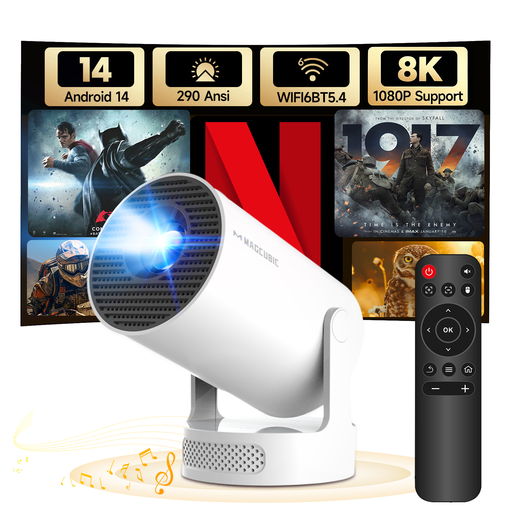
MAGCUBIC HY300Pro+ mini projector, 290 ANSI lumens
A compact model to compare for a temporary set-up. Check that the connection for your photo device and the projection distance will work for you.
The product name lists 290 ANSI lumens and HDMI/USB.
Joybuy
Frequently asked questions
Do I need to attach anything to the wall for a slideshow?
Not necessarily. Start with a stable temporary set-up and measure the distance to a suitable wall. Whether you’re allowed to attach anything depends on your tenancy agreement and the work you plan to do.
Can I show photos directly from my phone?
That depends on both your phone and the projector. Philips lists screen mirroring and HDMI for the NeoPix 110. Check which connection your phone supports and whether the playback method you choose works with your photo files.
How can I make a temporary set-up practical?
Place the projector on a stable surface and work out the distance and image size in advance. If you choose a battery-powered model, take its stated operating mode into account and check that it will last for your slideshow.
What are my rights when buying online in the Netherlands?
When you buy at a distance, the seller must provide information about the product and the cooling-off period, which is usually 14 days. The Dutch government also explains that, under the statutory guarantee, you’re entitled to a product that works properly. This is separate from any manufacturer’s guarantee.
What should I check about statutory product safety?
Applicable EU rules require CE marking for electrical and electronic equipment. The European Union’s Your Europe website explains the rules for product groups covered by CE legislation; check the information for the specific model being offered. A model name on its own doesn’t prove that a product complies.


