What should you look for when choosing?
First decide on the screen size and check the view from the back row. Then make sure the projector position, ambient light, source and audio requirements work with your choice.
Epson Nederland and BenQ Nederland recommend considering viewing distance, screen size and projection distance. Measure the distance from the back row to the screen separately from the distance between the projector lens and the screen.
| What to consider |
What should you check? |
Who is this important for? |
| Image size and view from the back |
Measure the desired screen width and the available wall space. Measure the viewing distance and the lens-to-screen distance separately. |
If I want to follow the picture and subtitles from the back row, I start with the screen size. Around 33% of consumers put visibility from the back first. |
| Visibility in ambient light |
Note whether daylight or lights will be present, which screen surface you will use and what unit is given for the stated light output. |
If the room cannot be darkened during the film, I want to choose the picture set-up to suit the light and screen. Around 27% of consumers take lighting during the screening into account. |
| Details and subtitles |
Check the stated projection resolution, the source resolution and whether subtitles are readable at your intended image size. |
If fine details and subtitles matter for my documentary, I want to assess the source and projector together. Around 20% of consumers put details and subtitles first. |
| Source, set-up and sound |
Check how you will play the documentary, which inputs you need and whether an audio output or separate sound system would be useful. |
When I set up the equipment from scratch each time, I want to be able to play the source and make speech easy to follow from the back row. Around 20% of consumers put set-up and speech clarity first. |
Projectors at Joybuy
These projectors suit different needs around large images, placement space and built-in features. Check each model’s specifications against your own set-up.
 No image available
Optoma UZ38X 4K UHD Dual-Laser Projector
The stated zoom and throw ratio give you flexibility with placement. Check that they suit your chosen image width and distance.
Native 4K UHD; projection up to 300 inches; throw ratio 1.21:1–1.59:1; 1.3× manual zoom; 3,800 lumens; two HDMI inputs; built-in 15 W speaker.
Projection screen and playback device not included.
View at Joybuy
 No image available
Yaber L2 Projector
Built-in Google TV and a rotating gimbal are listed for a set-up you move regularly. Check that you can play the documentary from your preferred source.
Native 1080p; throw ratio 1.17:1; screen size range 40–150 inches; 520 ISO lumens; 360° gimbal; dual 5 W speakers.
View at Joybuy
 No image available
BenQ TK700 Standard Throw Projector
The zoom gives you some adjustment from the projector position. Compare the stated ratio with the distance and image width available in your room.
Native 4K UHD (3840 × 2160); projection up to 300 inches; 3,200 ANSI lumens; 1.3× zoom; two HDMI inputs.
View at Joybuy
 No image available
Dangbei Atom Portable Laser Projector
Google TV and built-in speakers may reduce the need for separate equipment. Test your preferred documentary source and check the sound from the back row.
Native 1080p; 4K HDR input support; projection up to 180 inches; throw ratio 1.2:1; 1,200 ISO lumens; two built-in 5 W speakers.
View at Joybuy
 No image available
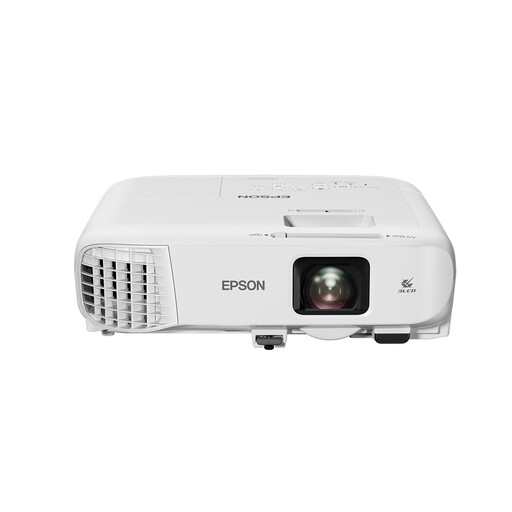
Epson EB-982W Standard Throw Projector
Optical zoom gives you room to adjust when the projector is positioned away from the screen. Check that the ratio and image size suit your room.
Native WXGA resolution (1280 × 800); projection up to 280 inches; throw ratio 1.38–2.24:1; 1.6× optical zoom; 4,200 ANSI lumens; built-in 16 W speaker.
WXGA resolution is a limitation if fine image detail matters.
View at Joybuy
Frequently asked questions
Is a long viewing distance the same as a long projection distance?
No. Measure the distance from the furthest viewer to the screen to assess visibility, and separately measure the distance from the projector lens to the screen to plan placement. BenQ Nederland recommends considering the room and desired screen size when choosing a projector.
How can you check whether the projector will produce your desired image size from its planned position?
Compare the image width with the throw ratio of the exact model: projection distance is the image width multiplied by that ratio. Also check the stated limits for image size and lens placement. The distance between your guests and the screen is not part of this calculation.
What should you check in advance about the documentary source and sound?
Test the documentary on the intended player or service, including subtitles and sound. Check which HDMI connection you need and listen from the back row. A built-in speaker or streaming feature does not guarantee that the set-up will be adequate for your room.
Do you need permission for an organised documentary night in the Netherlands?
That depends on how you show the film. The Dutch government warns that copyright-protected films cannot be shown publicly without permission. FilmService provides information about film licences for screenings outside the home. Check which rights apply to the specific documentary.
How can you check whether subtitles are readable from the back row?
First choose your intended screen size, then check visibility from the furthest seat using the documentary source you plan to use. Take the stated projection resolution and the distance between viewer and screen into account. A resolution label alone cannot guarantee readability in your set-up.


