First, measure the distance between the lens and the projection surface, and decide what image width will feel comfortable from your seat. Then choose between standard, short-throw and ultra-short-throw projection. If you’ll be watching in daylight, brightness and managing ambient light are important considerations. For maps and small subtitles, the actual image resolution, picture size and viewing distance matter too. Also check that the streaming service and sound set-up you want are compatible, and review the CE marking and product information for the exact model.
Who is this buying guide for?
Viewer with limited space for positioning
Wants a usable picture without placing the projector a long way from the wall. BenQ Netherlands and Epson Netherlands highlight the importance of the available distance, the room and the desired picture size.
Viewer in a room with daylight
Wants to watch even when it’s difficult to block out the light. Epson Netherlands and MediaMarkt Netherlands identify lighting conditions and the projection surface as factors to consider.
Detail-focused documentary viewer
Wants to follow maps, small subtitles and subtle details in the picture. Check the actual image resolution, picture format, viewing distance and quality of the video source.
What should you look for when buying?
Measure the distance from the lens to the wall, the available wall width and your viewing distance before comparing models. BenQ Netherlands and Epson Netherlands identify room dimensions and projection distance as important factors in determining the final picture size.
Standard throw
Suitable when: there’s enough room to place the projector further from the wall.
Consider: check the distance needed for your desired picture size; positioning and image correction vary by model.
Short throw
Suitable when: a standard projector won’t produce a wide enough picture from the available distance.
Consider: the throw ratio helps you calculate picture width, but you’ll still need to check how it works in your actual set-up.
Ultra-short throw
Suitable when: the projector needs to sit on a suitable piece of furniture close to the wall.
Consider: allow for the projector’s position relative to the wall, a flat projection surface and your choice of screen, if any.
Compact and portable
Suitable when: easy portability and built-in streaming are important.
Consider: check the stated brightness and measurement unit; a model designed for a dark room won’t necessarily be suitable for daylight viewing.
| Buying concern |
What should you check? |
Who is this important for? |
| Projection distance |
Measure the distance from the lens to the wall and the available wall width; check the throw ratio or distance table for the exact model. |
If my living room has limited space, I want to know in advance whether the lens position will give me the picture width I want. Around 33% of consumers put suitable positioning ahead of other buying concerns. |
| Ambient light |
Work out whether you’ll mainly watch during the day, with the lights on or in the dark; compare brightness claims, paying attention to the unit of measurement used. |
If I can’t always block out the light, I want to know how the projector and projection surface will perform in the available light. Around 27% of consumers prioritise watching in ambient light. |
| Fine details |
Check the actual image resolution, not just the supported input signals; choose a picture size that suits your viewing distance. |
If I want to follow maps, small subtitles and nature footage, I’ll look for details that remain visible from my seat. Around 20% of consumers prioritise detail. |
| Streaming and sound |
Check that the exact model supports the service you want and that its connections are compatible with your source and audio equipment. |
For a simple set-up, I want to be able to play my documentaries and hear spoken commentary clearly. Around 20% of consumers prioritise streaming and sound. |
Pitfalls to avoid
-
Focusing only on the maximum screen size
The picture size you can achieve also depends on the projection distance and available wall space. A large maximum size in the specifications doesn’t tell you what picture your set-up will produce.
Measure where you could position the lens and how much clear wall space you have, then check the distance table for the exact model.
Your chosen set-up may require a different screen, piece of furniture or projector position.
-
Assuming 4K input means native 4K resolution
A projector that accepts a 4K signal doesn’t automatically project at native 4K resolution. For example, Optoma lists Full HD for the GT2100HDR, alongside support for 4K input.
Look up both the actual image resolution and the list of accepted input signals.
-
Assuming built-in apps or speakers are all you need
A listed app doesn’t prove that your preferred documentary service is available; connections and built-in sound vary by model.
For the exact model, check the service, any subscription requirements and the connections for your existing equipment.
Depending on your set-up, you may need a subscription, external media player or separate audio equipment.
Brands to consider
BenQ
BenQ Netherlands lists a throw ratio of 0.8, 4K display, 3,000 ANSI lumens and Google TV for the TK705STi. These are specifications for this model, not measurements that apply to every projector from the brand.
- The listed short-throw distance may be useful if you have limited space.
- Calculate the picture width for your distance and check the details for the exact version.
Epson
Epson offers models including the ultra-short-throw EH-LS670B and the EH-TW7100, which has lens shift and optical zoom.
- Epson lists a laser light source and a five-year manufacturer’s warranty for the EH-LS670B, and lens shift and optical zoom for the EH-TW7100.
- The EH-TW7100 uses a lamp and needs to be positioned differently. These model differences aren’t a general comparison of the product ranges.
Dangbei
Dangbei describes the N2 mini as a compact model with native 1080p resolution and built-in access to Netflix.
- Dangbei lists 200 ISO lumens for the N2 mini and positions it as a model for dark rooms.
- Don’t compare ISO lumens directly with brightness figures based on a different measurement standard; also check the requirements for the streaming service you want.
XGIMI
XGIMI’s European range includes compact and home cinema projectors, including the Elfin Flip 4K and portable MoGo models.
- The range includes models for different rooms and uses.
- Portability and built-in features vary by model; check the specifications and intended conditions of use for the exact version.
Projectors at Joybuy
These projectors are suited to home use and watching documentaries. For each model, compare the resolution, positioning options, streaming and connections with your room and equipment.
 No image available
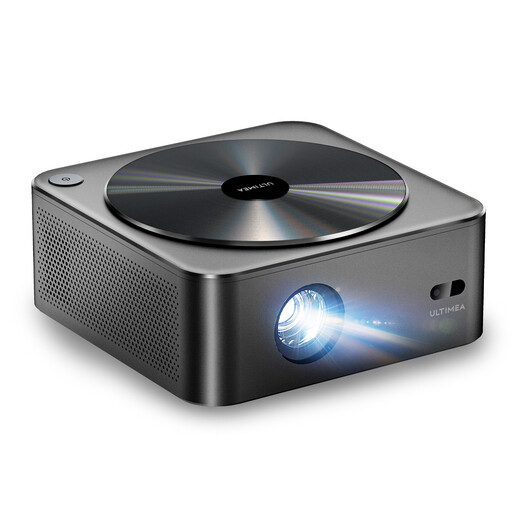
Ultimea Apollo P40, native 1080p
For anyone looking for the stated native 1080p resolution when watching documentaries.
Native resolution: 1920 × 1080. The product information lists 700 ANSI lumens, a throw ratio of 1,4:1, automatic focus and automatic keystone correction.
View at Joybuy
 No image available
XGODY Gimbal A8, native 1080p
An option to compare if you’re looking for native 1080p and an adjustable set-up.
The product information lists native 1080p, 1.200 ANSI lumens, a throw ratio of 1,08:1 and a 0–90° rotating gimbal stand.
View at Joybuy
 No image available
Yoton Y6, native 1080p
Suitable for anyone comparing a native 1080p projector with connections for existing equipment.
The product information lists LCD technology, native 1080p, Bluetooth 5.2 and HDMI, USB and AV connections.
View at Joybuy
 No image available
Yaber K2s, native 1080p
An option to compare if you want streaming and built-in sound as part of your set-up.
Native resolution: 1080p. Google TV is listed; the product information also mentions dual 10W JBL speakers and support for 4K input.
View at Joybuy
 No image available
Magcubic HY350Max, native 1080p
A model to include in your comparison if portability and the throw ratio are relevant to where you’ll position it.
The product information lists native 1080p, 900 ANSI lumens, a throw ratio of 1:1 and 180° rotation.
View at Joybuy
Frequently asked questions
How do I work out the right picture size before buying?
Measure where you could position the lens and the available wall width separately from the distance between your sofa and the picture. Then use the distance table or throw ratio for the exact model; the stated maximum screen size alone isn’t enough.
Can I project onto an ordinary wall?
A flat wall can serve as a projection surface, but imperfections or glare may affect the picture. Check the surface and ambient light before deciding whether a screen would suit your set-up.
What should I check when installing and maintaining a projector?
Check the positioning, cables, connections and manual for the exact model. A lamp model such as the Epson EH-TW7100 and a laser model such as the EH-LS670B use different light sources. Factor in possible maintenance and replacement costs, and don’t treat a stated lifespan as a guarantee.
What are my rights when buying online in the Netherlands?
According to the Dutch government, when you buy online from a business you’re often entitled to a 14-day cooling-off period. The Netherlands also has a statutory guarantee, with no fixed, general guarantee period; if a product is faulty, the seller is your point of contact. The cooling-off period has exceptions and is separate from your rights if a product is faulty.
Which product safety requirement should I check?
According to the Dutch government, electrical appliances placed on the EU market must carry a CE marking. Check the marking and product information for the exact model, and ask the seller for more information if anything is unclear.


