Start by measuring the distance between your seat and the screen, then choose a screen size that fits the available wall width. Next, measure the distance from the projector lens to the screen separately, and compare it with the model’s throw ratio and optical zoom. Ambient light, the level of detail you want in your films and the set-up you need will help you narrow down the options.
Who is this relevant to?
Film fans seated far from the screen
If you want a picture that looks large enough from a fixed seat, it’s worth first working out your viewing distance and the available screen width. THX recommends a 36-degree viewing angle from the furthest seat in a cinema; this isn’t a fixed standard for every living room.
Viewers with limited space for set-up
If there’s little room at the back of your room, check whether the projector can be ceiling-mounted, placed at the back of the room or positioned close to the projection wall. BenQ Netherlands recommends considering the room and the distance to the screen when deciding on a suitable set-up.
Film fans in a bright living room
If you can’t always darken the room, weigh the stated light output against the screen size and viewing conditions. Manufacturers use different specifications and units of measurement, so don’t assume they’re directly comparable.
What should you look for?
Assess the distance from your sofa to the screen to determine the picture size, and the distance from the lens to the screen to work out where to place the projector. These are two separate measurements.
| What to consider |
What to look for |
Who should give this more weight? |
| Screen size from your seat |
Measure the viewing distance and the available screen width. THX recommends a 36-degree viewing angle from the furthest cinema seat; judge for yourself how a particular size will work in your living room. |
If I watch films from the furthest sofa, I want the picture to look large enough without the screen being too wide for the wall. Around 36% of this group are consumers who are most concerned with how visible the picture is from their seat. |
| Distance between the projector and screen |
Measure from the intended lens position and compare the distance with the throw ratio and optical zoom of the exact model. BenQ gives the W2720i a ratio of 1.0–1.3; Samsung recommends a suitable ultra-short-throw screen for the Premiere 9. |
If the projector can only go in a particular place, the lens-to-screen distance must work with your desired picture size. Around 29% of this group are consumers who want to work out the positioning first. |
| Picture quality in ambient light |
Consider whether you’ll usually watch in a darkened room. BenQ lists ANSI lumens for the W2720i, while XGIMI gives peak brightness in ISO lumens for the HORIZON 20 Max; don’t treat these units of measurement as directly comparable. |
If I want to watch with the lights on, I’ll weigh the stated light output against the screen size and how much I can darken the room. Around 21% of this group are consumers who prioritise visibility in ambient light. |
| Streaming, installation and use |
Check the connections, streaming options and audio connections on the exact model. Also consider whether you’ll need a screen, mounting or maintenance. |
If I want to put together a complete film set-up, I want to know in advance what equipment and installation it will involve. Around 14% of this group are consumers who focus mainly on what they’ll need and how the projector works. |
Common buying mistakes
-
Assuming a distant seat means you need a projector at the back of the room
The distance from the sofa to the screen isn’t the same as the distance from the projector lens to the screen. A standard-throw projector and an ultra-short-throw model need to be positioned differently.
Mark the sofa, screen and intended lens position separately on a floor plan. Then check that the throw ratio of your chosen model suits the layout.
-
Looking only at the largest advertised picture size
A picture size that’s possible on paper doesn’t automatically tell you how large it will look from your seat or whether it will fit on the available wall.
First decide on the screen width and viewing distance you want. Then compare the picture sizes the model can project from your lens position.
-
Assuming a manufacturer’s warranty is the same as all your legal rights
According to the Dutch government, there’s no fixed statutory warranty period in the Netherlands. If a product is faulty, the retailer is your point of contact.
Keep your proof of purchase and contact the retailer about any fault. Also check separately what any additional warranty covers.
Brands to consider
BenQ
The W2720i is a home cinema model for which BenQ specifies the throw ratio, optical zoom and light source.
- BenQ lists a throw ratio of 1.0–1.3, 1.3× optical zoom and 2,500 ANSI lumens for the W2720i.
- The stated vertical lens shift is ±5%. Check that this range will work if the projector can’t be positioned directly in front of the screen; these figures alone don’t predict picture quality in your room.
Epson
Epson offers the lamp-based EH-TW7100, which has lens shift, as well as the EH-LS670W, an ultra-short-throw model.
- Epson lists lens shift, optical zoom and 3,000 lumens for the EH-TW7100. The brand describes the EH-LS670W as ultra-short-throw, with picture sizes of up to 120 inches.
- These features relate to different models. Don’t assume that one model’s brightness or positioning options apply to the other.
XGIMI
The HORIZON 20 Max is a home cinema model for which XGIMI lists optical zoom, lens shift and built-in Google TV.
- XGIMI gives the HORIZON 20 Max a peak brightness of 5,700 ISO lumens.
- This is the manufacturer’s stated figure, and it isn’t directly comparable with values in ANSI lumens. Also check that the dimensions and set-up will work in your room.
Samsung
The Premiere 9 is an example of an ultra-short-throw projector, designed to be placed close to the projection wall.
- An ultra-short-throw set-up could be useful if there’s little space at the back of the room.
- Samsung recommends a suitable ultra-short-throw screen for the Premiere 9. So consider the wall, the screen and the space available for the projector too.
Projectors at Joybuy
These projectors are suited to a range of film-viewing and home set-ups. Compare the required lens distance and picture specifications with the measurements of your own room.
 Image unavailable
Optoma UZ38X 4K UHD Dual-Laser Projector
Suitable for a set-up where the lens distance falls within the stated throw ratio and 4K UHD is what you’re looking for.
4K UHD resolution; 3,800 lumens; 1.3× manual optical zoom; throw ratio 1.21:1–1.59:1; 15 W speaker.
Projection screen and source device not included.
View at Joybuy
 Image unavailable
Optoma H117ST Short Throw DLP Projector
The short throw ratio may suit you if the projector needs to be positioned relatively close to the screen.
WXGA resolution (1280 × 800); 3,800 ANSI lumens; throw ratio 0.52:1; stated projection distance 0.4–3.4 m; integrated 10 W speaker.
Check that the intended lens position falls within the stated distance range.
View at Joybuy
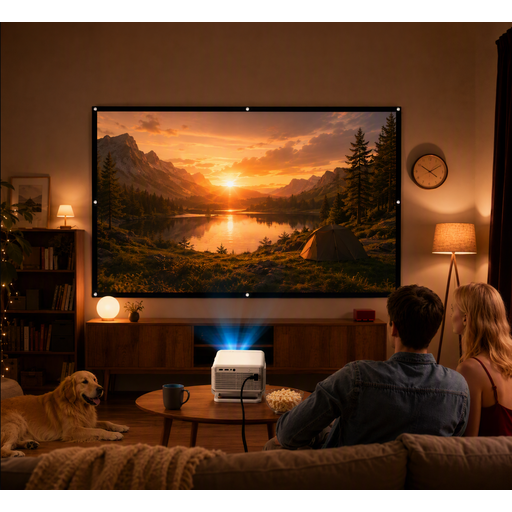 Image unavailable
XGODY Gimbal N6 Pro with 120-inch projection screen
This portable projector bundle may be worth considering if you’re looking for a projection screen in the stated size.
The product name specifies a 120-inch projection screen. Listed connections include HDMI, USB, AV and VGA.
View at Joybuy
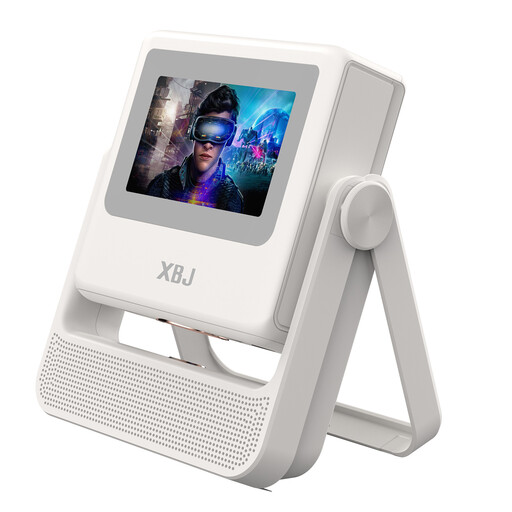 Image unavailable
XBJ A5Pro Outdoor Smart Projector, white
The stated native 1080P resolution may be relevant if you’re looking for this resolution for films; also check that your preferred picture size suits your set-up.
Native 1080P; 900 ANSI lumens; stated picture size up to 300 inches; autofocus and automatic keystone correction; Wi-Fi 6 and Android OS.
View at Joybuy
 Image unavailable
2026 Video Projector with Built-in Apps, Black
Could suit a set-up where built-in apps and a rotating projector are useful; check that it’s fully compatible with the devices you want to use.
Stated picture size 50–200 inches; 50–100% digital zoom; Wi-Fi 6; 180° rotation; built-in apps and Play Store.
View at Joybuy
Frequently asked questions
Is viewing distance the same as projection distance?
No. Viewing distance is measured from your seat to the screen; projection distance is measured from the projector lens to the screen. Measure both before choosing a screen size and projector.
How do you set up a projector without distorting the picture?
First measure your desired screen width and the distance from the lens to the screen. Then check the throw ratio and optical adjustment range of the exact model. An installation calculator can help, but measure the room yourself to confirm.
Do you need anything else for streaming and sound?
It depends on the model. Epson lists an HDMI connection for a streaming device on the EH-TW7100; XGIMI lists built-in Google TV on the HORIZON 20 Max. Check the exact model for the services, connections and sound set-up you want.
What cooling-off period and warranty apply to online purchases in the Netherlands?
According to the Dutch government, online purchases from a business generally come with a 14-day cooling-off period. The Netherlands has no fixed statutory warranty period; if a product is faulty, the retailer is your point of contact. Check the specific purchase and returns terms.
What should you look for when it comes to product safety in the Netherlands?
The Netherlands Food and Consumer Product Safety Authority (NVWA) explains the CE marking requirements for electrical appliances covered by the applicable rules. Check the marking and instructions for your chosen device; a mention on a webpage alone doesn’t prove that a specific item meets all the requirements.


