What should you look for?
First, test the smallest text in your portfolio at your intended image size. Then assess the room’s lighting, the available projection distance and how the projector will connect to your laptop.
| What to consider |
What should you check? |
Who is this important for? |
| Readable details |
Test a page with your smallest text at the desired image width and from the furthest seat. Full HD alone doesn’t guarantee readability. |
If you want to discuss typography or fine lines, you’ll want to check whether they’re clear from the seats. Around 31% of consumers put readable details first. |
| Image in ambient light |
Assess the image with the lighting you’ll actually use during presentations. Bear in mind that lumen ratings don’t all use the same unit of measurement. |
If you can’t darken the living room each time, you’ll want to show your portfolio in the room’s usual lighting. Around 25% of consumers give this top priority. |
| Projection distance and setup |
Measure the distance from the lens to the wall and the available image width. BenQ lists a fixed throw ratio of 1.2 for the GV32; also check there’s space for the device and its power supply. |
If a shared table, walkway or the need to put it away limits your space, you’ll want to know in advance whether the projector can be set up there. Around 25% of consumers put placement first. |
| Connections and use |
Check that your laptop’s video output is compatible with the projector’s input and whether you’ll need an adaptor. Also check the power and maintenance information for the exact model. |
If you present from your laptop, you’ll want to know which connection and any adaptor you’ll need. Around 19% of consumers consider connections and running costs their main concern. |
New electronic projectors placed on the market in the Netherlands must carry the applicable CE marking. The Dutch government advises checking this; make sure you check the marking and product identity of the item you buy.
Projectors at Joybuy
These Joybuy product picks are projectors to compare for showing a portfolio in a shared student house.
 No image available
Yoton Y6 projector, Native 1080P
For portfolios with fine details: the product name states Native 1080P, but this isn’t a test of how readable your own files will be.
The product description mentions HDMI, USB and Bluetooth 5.2. Check which connection is compatible with your laptop.
View at Joybuy
 No image available
Dangbei N2 Mini projector, 1080P
The product name and description state 1080P; still, test small portfolio text at your intended image size.
The product description mentions autofocus, automatic keystone correction and obstacle avoidance. Check which connections your laptop needs.
View at Joybuy
 No image available
Magcubic HY350Max projector, Native 1080P
For changing the projection direction, the product description mentions a 180° rotatable base and automatic keystone correction. Also check that the projector’s position and power supply will work in your room.
The product name states Native 1080P and 900 ANSI lumens. These are specifications, not a measure of readability in your room’s lighting. HDMI is mentioned in the description.
View at Joybuy
 No image available
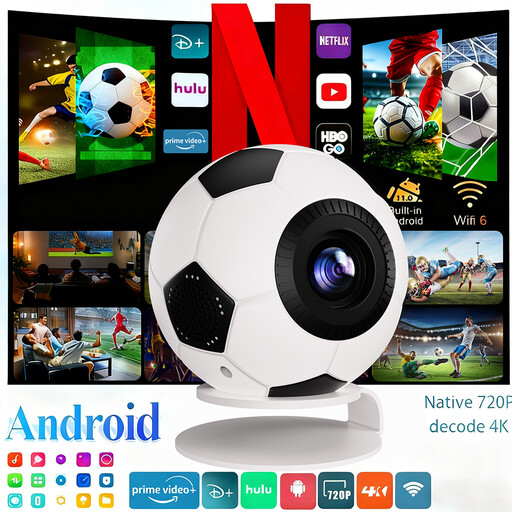
XBJ football-shaped mini projector
The product name states 1080P Full HD and 4K decoding, while the description gives a native resolution of 720P. Base your expectations for fine portfolio details on the native resolution and test your own files.
The product name states 800 ANSI lumens; the description mentions automatic keystone correction. Check the image in the lighting you’ll use during presentations.
View at Joybuy
 No image available
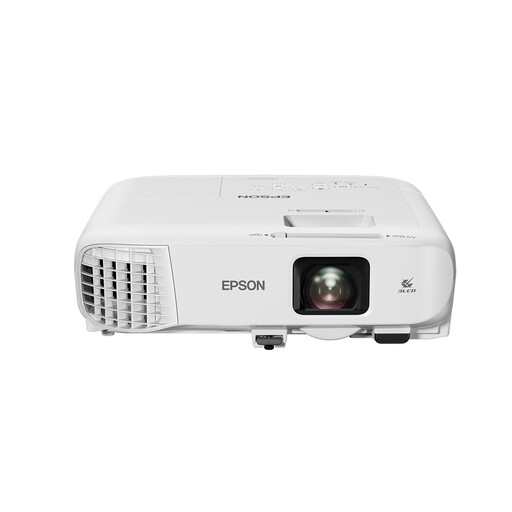
Epson EB-982W WXGA projector
The stated 4200 ANSI lumens may be useful for presenting in ambient light; this is a product specification, not an independent measurement of how the image will look in your room.
This model has WXGA resolution (1280x800), not Full HD. The description mentions 1.6× optical zoom and keystone correction; check whether the resolution will suit the detail in your portfolio.
View at Joybuy
Frequently asked questions
Can I rely on Full HD to show small portfolio text?
No, not on that specification alone. Test your smallest text at the planned image width and from the seating area; focus and room lighting also make a difference.
How can I check whether a projector will fit in the room?
Measure the available wall width and the distance from the lens to the wall. For the BenQ GV32, BenQ gives a fixed throw ratio of 1.2: based on this, a 2-metre-wide image needs a lens distance of around 2.4 metres. Also check there’s enough clearance around the device and access to a power supply.
Is the BenQ GV31 the same as the GV32?
No, they’re different models. BenQ has announced a recall of all GV31 projectors because the battery may overheat and cause a fire. BenQ asks users to stop using them immediately and follow the recall instructions.
Which safety marking should I check when buying in the Netherlands?
Electronic devices placed on the market in the EU must carry the applicable CE marking. The Dutch government advises checking the marking and product identity of the item; a brand or shop page alone doesn’t prove that the product you receive complies.
What if a projector I bought online isn’t suitable or breaks?
In the Netherlands, online purchases from a business generally come with a 14-day cooling-off period, with some exceptions; purchases from private sellers aren’t covered by the same rules. If a product is faulty, you have statutory rights and should contact the seller. The Dutch government states that the Netherlands doesn’t have a fixed statutory warranty period of two years.


